> ## Documentation Index
> Fetch the complete documentation index at: https://cloudinary.com/documentation/llms.txt
> Use this file to discover all available pages before exploring further.
# Cloudinary Image & Video Release Notes: May 28, 2026
## Cloudinary Image
### Enhanced background removal model: 3.5x faster and higher quality
The Cloudinary background removal model got a significant upgrade. It's now 3.5x faster and delivers noticeably cleaner results, especially on product imagery like photoshoots, cropped items, and close-up shots. The new model handles a wider range of edge cases with better consistency.
No migration or code changes required on your side. This new and improved model is now automatically applied to every new background removal transformation you generate.

```nodejs
cloudinary.image("docs/wicker-chair", {effect: "background_removal"})
```
```react
import { backgroundRemoval } from "@cloudinary/url-gen/actions/effect";
new CloudinaryImage("docs/wicker-chair").effect(backgroundRemoval());
```
```vue
import { backgroundRemoval } from "@cloudinary/url-gen/actions/effect";
new CloudinaryImage("docs/wicker-chair").effect(backgroundRemoval());
```
```angular
import { backgroundRemoval } from "@cloudinary/url-gen/actions/effect";
new CloudinaryImage("docs/wicker-chair").effect(backgroundRemoval());
```
```js
import { backgroundRemoval } from "@cloudinary/url-gen/actions/effect";
new CloudinaryImage("docs/wicker-chair").effect(backgroundRemoval());
```
```python
CloudinaryImage("docs/wicker-chair").image(effect="background_removal")
```
```php
use Cloudinary\Transformation\Effect;
(new ImageTag('docs/wicker-chair'))
->effect(Effect::backgroundRemoval());
```
```java
cloudinary.url().transformation(new Transformation().effect("background_removal")).imageTag("docs/wicker-chair");
```
```ruby
cl_image_tag("docs/wicker-chair", effect: "background_removal")
```
```csharp
cloudinary.Api.UrlImgUp.Transform(new Transformation().Effect("background_removal")).BuildImageTag("docs/wicker-chair")
```
```dart
cloudinary.image('docs/wicker-chair').transformation(Transformation()
.effect(Effect.backgroundRemoval()));
```
```swift
imageView.cldSetImage(cloudinary.createUrl().setTransformation(CLDTransformation().setEffect("background_removal")).generate("docs/wicker-chair")!, cloudinary: cloudinary)
```
```android
MediaManager.get().url().transformation(new Transformation().effect("background_removal")).generate("docs/wicker-chair");
```
```flutter
cloudinary.image('docs/wicker-chair').transformation(Transformation()
.effect(Effect.backgroundRemoval()));
```
```kotlin
cloudinary.image {
publicId("docs/wicker-chair")
effect(Effect.backgroundRemoval())
}.generate()
```
```jquery
$.cloudinary.image("docs/wicker-chair", {effect: "background_removal"})
```
```react_native
import { backgroundRemoval } from "@cloudinary/url-gen/actions/effect";
new CloudinaryImage("docs/wicker-chair").effect(backgroundRemoval());
```
[Learn more](background_removal)
### Use any Google Font in your text overlays
You can now reference any font from the [Google Fonts](https://fonts.google.com/) library in your text overlay URLs, including those that until now weren't inherently supported, without the need to first upload them as custom font files to Cloudinary. Just append `@google` to the font name and you're done.
**Example: Overlay text using the Gravitas One Google Font**
`co_white,l_text:Gravitas%20One@google_80:Enjoy%20luxury`

```nodejs
cloudinary.image("docs/fine_hotel_room", {transformation: [
{color: "white", overlay: {font_family: "google", font_size: 80, text: "Enjoy%20luxury"}},
{flags: "layer_apply", x: -40, y: -90}
]})
```
```react
import { source } from "@cloudinary/url-gen/actions/overlay";
import { text } from "@cloudinary/url-gen/qualifiers/source";
import { Position } from "@cloudinary/url-gen/qualifiers/position";
import { TextStyle } from "@cloudinary/url-gen/qualifiers/textStyle";
new CloudinaryImage("docs/fine_hotel_room").overlay(
source(
text("Enjoy luxury", new TextStyle("Gravitas One@google", 80)).textColor(
"white"
)
).position(new Position().offsetX(-40).offsetY(-90))
);
```
```vue
import { source } from "@cloudinary/url-gen/actions/overlay";
import { text } from "@cloudinary/url-gen/qualifiers/source";
import { Position } from "@cloudinary/url-gen/qualifiers/position";
import { TextStyle } from "@cloudinary/url-gen/qualifiers/textStyle";
new CloudinaryImage("docs/fine_hotel_room").overlay(
source(
text("Enjoy luxury", new TextStyle("Gravitas One@google", 80)).textColor(
"white"
)
).position(new Position().offsetX(-40).offsetY(-90))
);
```
```angular
import { source } from "@cloudinary/url-gen/actions/overlay";
import { text } from "@cloudinary/url-gen/qualifiers/source";
import { Position } from "@cloudinary/url-gen/qualifiers/position";
import { TextStyle } from "@cloudinary/url-gen/qualifiers/textStyle";
new CloudinaryImage("docs/fine_hotel_room").overlay(
source(
text("Enjoy luxury", new TextStyle("Gravitas One@google", 80)).textColor(
"white"
)
).position(new Position().offsetX(-40).offsetY(-90))
);
```
```js
import { source } from "@cloudinary/url-gen/actions/overlay";
import { text } from "@cloudinary/url-gen/qualifiers/source";
import { Position } from "@cloudinary/url-gen/qualifiers/position";
import { TextStyle } from "@cloudinary/url-gen/qualifiers/textStyle";
new CloudinaryImage("docs/fine_hotel_room").overlay(
source(
text("Enjoy luxury", new TextStyle("Gravitas One@google", 80)).textColor(
"white"
)
).position(new Position().offsetX(-40).offsetY(-90))
);
```
```python
CloudinaryImage("docs/fine_hotel_room").image(transformation=[
{'color': "white", 'overlay': {'font_family': "google", 'font_size': 80, 'text': "Enjoy%20luxury"}},
{'flags': "layer_apply", 'x': -40, 'y': -90}
])
```
```php
use Cloudinary\Transformation\Overlay;
use Cloudinary\Transformation\Source;
use Cloudinary\Transformation\Position;
use Cloudinary\Transformation\TextStyle;
(new ImageTag('docs/fine_hotel_room'))
->overlay(Overlay::source(
Source::text("Enjoy luxury",(new TextStyle("Gravitas One@google",80)))
->textColor(Color::WHITE)
)
->position((new Position())->offsetX(-40)
->offsetY(-90))
);
```
```java
cloudinary.url().transformation(new Transformation()
.color("white").overlay(new TextLayer().fontFamily("google").fontSize(80).text("Enjoy%20luxury")).chain()
.flags("layer_apply").x(-40).y(-90)).imageTag("docs/fine_hotel_room");
```
```ruby
cl_image_tag("docs/fine_hotel_room", transformation: [
{color: "white", overlay: {font_family: "google", font_size: 80, text: "Enjoy%20luxury"}},
{flags: "layer_apply", x: -40, y: -90}
])
```
```csharp
cloudinary.Api.UrlImgUp.Transform(new Transformation()
.Color("white").Overlay(new TextLayer().FontFamily("google").FontSize(80).Text("Enjoy%20luxury")).Chain()
.Flags("layer_apply").X(-40).Y(-90)).BuildImageTag("docs/fine_hotel_room")
```
```dart
cloudinary.image('docs/fine_hotel_room').transformation(Transformation()
.addTransformation("co_white,l_text:Gravitas One@google_80:Enjoy luxury/fl_layer_apply,x_-40,y_-90"));
```
```swift
imageView.cldSetImage(cloudinary.createUrl().setTransformation(CLDTransformation()
.setColor("white").setOverlay("text:Gravitas%20One%40google_80:Enjoy%20luxury").chain()
.setFlags("layer_apply").setX(-40).setY(-90)).generate("docs/fine_hotel_room")!, cloudinary: cloudinary)
```
```android
MediaManager.get().url().transformation(new Transformation()
.color("white").overlay(new TextLayer().fontFamily("google").fontSize(80).text("Enjoy%20luxury")).chain()
.flags("layer_apply").x(-40).y(-90)).generate("docs/fine_hotel_room");
```
```flutter
cloudinary.image('docs/fine_hotel_room').transformation(Transformation()
.addTransformation("co_white,l_text:Gravitas One@google_80:Enjoy luxury/fl_layer_apply,x_-40,y_-90"));
```
```kotlin
cloudinary.image {
publicId("docs/fine_hotel_room")
overlay(Overlay.source(
Source.text("Enjoy luxury",TextStyle("Gravitas One@google",80)) {
textColor(Color.WHITE)
}) {
position(Position() { offsetX(-40)
offsetY(-90) })
})
}.generate()
```
```jquery
$.cloudinary.image("docs/fine_hotel_room", {transformation: [
{color: "white", overlay: new cloudinary.TextLayer().fontFamily("google").fontSize(80).text("Enjoy%20luxury")},
{flags: "layer_apply", x: -40, y: -90}
]})
```
```react_native
import { source } from "@cloudinary/url-gen/actions/overlay";
import { text } from "@cloudinary/url-gen/qualifiers/source";
import { Position } from "@cloudinary/url-gen/qualifiers/position";
import { TextStyle } from "@cloudinary/url-gen/qualifiers/textStyle";
new CloudinaryImage("docs/fine_hotel_room").overlay(
source(
text("Enjoy luxury", new TextStyle("Gravitas One@google", 80)).textColor(
"white"
)
).position(new Position().offsetX(-40).offsetY(-90))
);
```
[Learn more](layers#google_fonts)
### Embed clipping paths in image metadata
You can now embed a clipping path into the metadata of a delivered image using the new `e_embed_clipping_path` transformation effect. Supply a mask image as a [user-defined reference variable](user_defined_variables#image_buffer_references). Cloudinary converts it to a clipping path and writes it into the output file. The path is preserved in all formats that support clipping-path metadata (primarily JPEG and TIFF), so it's ready for downstream use in Photoshop and similar tools without extra processing steps.
**Example: Embed a clipping path derived from `butterflywomanmask` into a JPEG**
`$mask_ref:!butterflywomanmask!/e_embed_clipping_path:mask_$mask/q_90/butterfly.jpg`

```nodejs
cloudinary.image("butterfly.jpg", {transformation: [
{variables: [["$mask", "ref:!butterflywomanmask!"]]},
{effect: "embed_clipping_path:mask_$mask"},
{quality: 90}
]})
```
```react
new CloudinaryImage("butterfly.jpg").addTransformation(
"$mask_ref:!butterflywomanmask!/e_embed_clipping_path:mask_$mask/q_90"
);
```
```vue
new CloudinaryImage("butterfly.jpg").addTransformation(
"$mask_ref:!butterflywomanmask!/e_embed_clipping_path:mask_$mask/q_90"
);
```
```angular
new CloudinaryImage("butterfly.jpg").addTransformation(
"$mask_ref:!butterflywomanmask!/e_embed_clipping_path:mask_$mask/q_90"
);
```
```js
new CloudinaryImage("butterfly.jpg").addTransformation(
"$mask_ref:!butterflywomanmask!/e_embed_clipping_path:mask_$mask/q_90"
);
```
```python
CloudinaryImage("butterfly.jpg").image(transformation=[
{'variables': [["$mask", "ref:!butterflywomanmask!"]]},
{'effect': "embed_clipping_path:mask_$mask"},
{'quality': 90}
])
```
```php
(new ImageTag('butterfly.jpg'))
->addTransformation("$mask_ref:!butterflywomanmask!/e_embed_clipping_path:mask_$mask/q_90");
```
```java
cloudinary.url().transformation(new Transformation()
.variables(variable("$mask","ref:!butterflywomanmask!")).chain()
.effect("embed_clipping_path:mask_$mask").chain()
.quality(90)).imageTag("butterfly.jpg");
```
```ruby
cl_image_tag("butterfly.jpg", transformation: [
{variables: [["$mask", "ref:!butterflywomanmask!"]]},
{effect: "embed_clipping_path:mask_$mask"},
{quality: 90}
])
```
```csharp
cloudinary.Api.UrlImgUp.Transform(new Transformation()
.Variables("$mask", ref:!butterflywomanmask!).Chain()
.Effect("embed_clipping_path:mask_$mask").Chain()
.Quality(90)).BuildImageTag("butterfly.jpg")
```
```dart
cloudinary.image('butterfly.jpg').transformation(Transformation()
.addTransformation("$mask_ref:!butterflywomanmask!/e_embed_clipping_path:mask_$mask/q_90"));
```
```swift
imageView.cldSetImage(cloudinary.createUrl().setTransformation(CLDTransformation()
.chain()
.setEffect("embed_clipping_path:mask_$mask").chain()
.setQuality(90)).generate("butterfly.jpg")!, cloudinary: cloudinary)
```
```android
MediaManager.get().url().transformation(new Transformation()
.variables(variable("$mask","ref:!butterflywomanmask!")).chain()
.effect("embed_clipping_path:mask_$mask").chain()
.quality(90)).generate("butterfly.jpg");
```
```flutter
cloudinary.image('butterfly.jpg').transformation(Transformation()
.addTransformation("$mask_ref:!butterflywomanmask!/e_embed_clipping_path:mask_$mask/q_90"));
```
```kotlin
cloudinary.image {
publicId("butterfly.jpg")
addTransformation("\$mask_ref:!butterflywomanmask!/e_embed_clipping_path:mask_\$mask/q_90")
}.generate()
```
```jquery
$.cloudinary.image("butterfly.jpg", {transformation: [
{variables: [["$mask", "ref:!butterflywomanmask!"]]},
{effect: "embed_clipping_path:mask_$mask"},
{quality: 90}
]})
```
```react_native
new CloudinaryImage("butterfly.jpg").addTransformation(
"$mask_ref:!butterflywomanmask!/e_embed_clipping_path:mask_$mask/q_90"
);
```
[Learn more](transformation_reference#e_embed_clipping_path)
## Cloudinary Video
### Video Player v4: with lightweight, lazy-loading player
The recently released version 4.x of the [Cloudinary Video Player](https://github.com/Cloudinary/cloudinary-video-player) ships with a fundamentally different loading model. The default bundle is a ~4 KB (gzipped) shell that defers the full player core until it's actually needed. This meaningfully reduces the JavaScript initially loaded on page load.
The default CDN files are now `player.min.js` and `player.min.css`. The previous `cld-video-player.min.{js,css}` names are aliased to the full bundle, so existing integrations continue working unchanged. `cloudinary.videoPlayer()` returns a deferred proxy that buffers calls until the player loads.
For new integrations, `cloudinary.player()` replaces `cloudinary.videoPlayer()` and supports a `lazy` option that initially renders just a poster and play button, loading the full player on click or scroll. Pair it with `breakpoints`, `loading="lazy"`, and `preload="none"` for the most performant setup. If you need a synchronous `VideoPlayer` instance up front, opt into the full bundle via `cloudinary-video-player/full` on NPM or `dist/player-full.min.js` on the CDN.
**Example: Recommended performant setup**
```html
```
[Learn more](cloudinary_video_player#installation)
### Save and reuse video transformation templates
The Transformation Builder now supports transformation templates (named transformations) for video assets. Build a transformation you want to keep, save it as a template, and load it again on any other video. Useful for maintaining consistent output specs across projects or onboarding teammates to a standard set of transformations.

[Learn more](dam_editing_and_transformations#working_with_video_transformation_templates)
### Bring your own subtitles: import .vtt and .srt files
You can now import existing `.vtt` (WebVTT) and `.srt` (SubRip) subtitle files directly from the Transcript and Localization editor in the [Video Player Studio](video_player_studio). This is the practical path for subtitle files from external captioning services, professional translators, or your existing video editing workflow. Cloudinary automatically converts imported files to `.transcript` format and saves them as video elements.

> **NOTE**:
>
> The **Add translation** button was renamed to **Add transcript** to reflect both generating and importing subtitle files.
[Learn more](video_transcription#importing_subtitles)
## Asset management and upload
### New Webhook triggers and trigger options
Webhook triggers now support several new options that you can pass when you create or update them via the Admin API:
* **`additive`**: Set to `true` to allow both the globally configured webhook notification and any `notification_url` specified in an upload preset or direct Upload API call to fire. Previously, specifying a `notification_url` in an upload preset or direct API call suppressed the global webhook notification, which remains the default behavior.
* **`filter`**: Accepts a **[JSONLogic](https://jsonlogic.com/)** expression so notifications are only delivered when the payload matches your rule.
* **`payload_template`**: Defines a Mustache-templated JSON body for the trigger's notification payload.
* **`auth_scheme`**: Selects how Cloudinary signs the request: `default`, `legacy_hmac`, or `eddsa_v2`. Existing triggers use `default`, which sends both legacy HMAC-SHA1 and EdDSA v2 signatures for backward compatibility.
Use the new `POST /triggers/:id/test` ([Test a trigger's filter](admin_api#test_a_trigger_filter)) trigger to evaluate sample payload data against an existing trigger's filter, or to validate and render a payload template against sample data, which is handy for getting the filter right before going live.
**Example: Create a trigger with additive behavior, a filter, a custom payload, and EdDSA v2 signing**
```curl
curl 'https://:@api.cloudinary.com/v1_1//triggers' \
-X POST \
--header 'Content-Type: application/json' \
--data '{
"uri": "https://mysite.example.com/my_notification_endpoint",
"event_type": "upload",
"additive": true,
"filter": {"==": [{"var": "resource_type"}, "image"]},
"auth_scheme": "eddsa_v2",
"payload_template": {
"event": "{{event.type}}",
"asset_id": "{{asset.id}}",
"public_id": "{{asset.public_id}}",
"received_at": "{{event.timestamp}}"
}
}
```
[Learn more](admin_api#triggers)
### Python and JavaScript SDKs for Permissions and Provisioning
**Python** and **JavaScript** SDKs are now available for both the [Permissions API](permissions_api) and [Provisioning API](provisioning_api). Each language now uses a single SDK package for both APIs, so you don't need to install or manage separate packages.
See each API reference page for installation instructions and SDK links.
> **NOTE**: [Permissions API](permissions_api) methods in these SDKs target the new Roles and Permissions system and apply only after your account has been migrated. For rollout timing, see [Roles and Permissions](#roles_and_permissions) below, or check the [Migrating to Roles and Permissions](permissions_migration) page.
### Use your private Azure container as an upload and/or backup source
You can now pull assets into Cloudinary directly from a private [Azure Blob Storage](https://learn.microsoft.com/en-us/azure/storage/blobs/storage-blobs-introduction) container or use your container as your backup storage location. Amazon S3 and Google Cloud Storage were already supported, and Azure Blob Storage is now supported as well.
After configuring your private Azure Blob Storage container for Cloudinary access, pass the Azure Blob Storage URL in your upload call or enter your Azure URI in the **Backup** page of the Console Settings.
**Upload example:**
```multi
|ruby
Cloudinary::Uploader.upload("azure://your-tenant-id:mystorageaccount@mycontainer/sample.jpg")
|php_2
$cloudinary->uploadApi()->upload("azure://your-tenant-id:mystorageaccount@mycontainer/sample.jpg");
|python
cloudinary.uploader.upload("azure://your-tenant-id:mystorageaccount@mycontainer/sample.jpg")
|nodejs
cloudinary.v2.uploader
.upload("azure://your-tenant-id:mystorageaccount@mycontainer/sample.jpg")
.then(result=>console.log(result));
|java
cloudinary.uploader().upload("azure://your-tenant-id:mystorageaccount@mycontainer/sample.jpg",
ObjectUtils.emptyMap());
|csharp
var uploadParams = new ImageUploadParams(){
File = new FileDescription(@"azure://your-tenant-id:mystorageaccount@mycontainer/sample.jpg")};
var uploadResult = cloudinary.Upload(uploadParams);
|go
resp, err := cld.Upload.Upload(ctx, "azure://your-tenant-id:mystorageaccount@mycontainer/sample.jpg", uploader.UploadParams{})
|curl
curl https://api.cloudinary.com/v1_1//image/upload -X POST --data 'file=azure://your-tenant-id:mystorageaccount@mycontainer/sample.jpg×tamp=173719931&api_key=&signature='
|cli
cld uploader upload "azure://your-tenant-id:mystorageaccount@mycontainer/sample.jpg"
```
Learn more: [Upload from Azure container](upload_parameters#upload_from_a_private_azure_blob_storage_container) | [Backup to Azure container](backups_and_version_management#backing_up_to_azure_blob_storage)
### `clear_invalid` now works on `explicit` and Admin API resource updates
`clear_invalid` is now supported when updating structured metadata via the Upload API `explicit` method or the Admin API (by public ID or asset ID). Set it to `true` and Cloudinary removes only the invalid field values instead of failing the entire update. This option was already available on `upload` and `update_metadata`.
This is particularly useful when conditional metadata rules or dependent fields would otherwise block changes to unrelated fields.
**Example: `explicit` with `clear_invalid`**
```multi
|ruby
Cloudinary::Uploader.explicit(
"my_public_id",
type: "upload",
metadata: "color_id=blue",
clear_invalid: true)
|php_2
$result = $cloudinary->uploadApi()->explicit("my_public_id", [
"type" => "upload",
"metadata" => "color_id=blue",
"clear_invalid" => true,
]);
|python
cloudinary.uploader.explicit(
"my_public_id",
type="upload",
metadata="color_id=blue",
clear_invalid=True,
)
|nodejs
cloudinary.v2.uploader
.explicit("my_public_id", {
type: "upload",
metadata: "color_id=blue",
clear_invalid: true,
})
.then((result) => console.log(result));
|java
result = cloudinary.uploader().explicit("my_public_id",
ObjectUtils.asMap(
"type", "upload",
"metadata", "color_id=blue",
"clear_invalid", true));
|csharp
var explicitParams = new ExplicitParams("my_public_id")
{
Type = "upload",
Metadata = "color_id=blue",
ClearInvalid = true
};
var explicitResult = cloudinary.Explicit(explicitParams);
|go
resp, err := cld.Upload.Explicit(ctx, uploader.ExplicitParams{
PublicID: "my_public_id",
Type: "upload",
Metadata: map[string]string{"color_id": "blue"},
ClearInvalid: api.Bool(true),
})
|curl
curl https://api.cloudinary.com/v1_1//image/explicit -X POST --data 'type=upload&public_id=my_public_id&metadata=color_id%3Dblue&clear_invalid=true×tamp=&api_key=&signature='
|cli
cld uploader explicit "my_public_id" type="upload" metadata="color_id=blue" clear_invalid="true"
```
[Learn more](image_upload_api_reference#explicit_optional_parameters)
### Auto-upload now forwards your custom `X-*` headers to remote sources
Auto-upload now forwards HTTP headers from your Cloudinary delivery requests to the mapped remote URL. This makes it easier to work with remote storage or APIs that require authentication tokens or other custom `X-*` headers. Any supported headers included in the request to the Cloudinary URL are forwarded to your origin.
> **NOTE**: `X-Cld-*` names are reserved for Cloudinary and aren't available for your use.
[Learn more](migration#lazy_migration_with_auto_upload)
### Long file names now wrap in Upload Widget grid views
File names in the Upload Widget's upload source grid views now wrap across multiple lines, so long names are fully readable without truncation. Applies to all file types. Folder names aren't affected.

[Learn more](upload_widget_changelog)
### Smoother infinite scroll and smoother asset selection in the Media Library
Scrolling through the Media Library grid is noticeably more fluid, and checkbox interactions when selecting assets are more responsive. Customers with large asset libraries will feel the difference most.
## Account management
### Apple Pay and Google Pay now accepted for plan upgrades
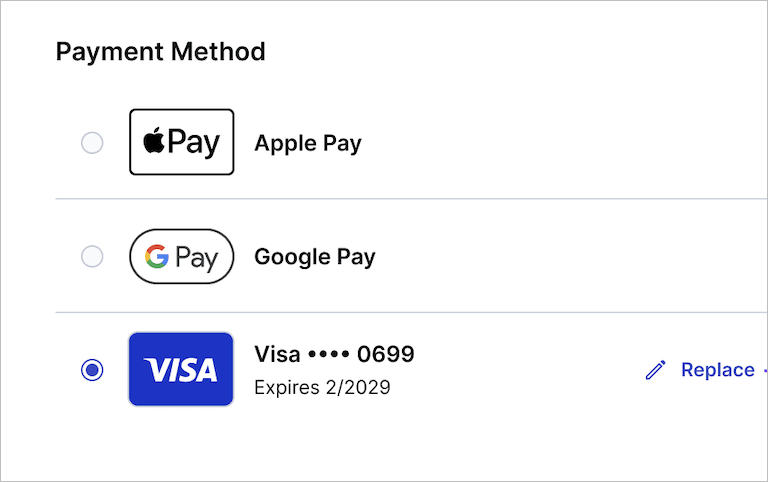
You can now use Apple Pay or Google Pay when upgrading your Cloudinary plan. Both are available in the **Payment Method** section of the self-service upgrade flow alongside existing credit card options.
### API Keys section renamed to Account Management Keys
The **Account API Keys** Console Settings page located under the **Account settings** section is now called **Account Management Keys**, a more accurate name for credentials used to manage your Cloudinary account programmatically via the Provisioning API.
(The **API Keys** page under the **Product Envioronment settings** section remains unchanged.)

[Learn more](account_settings#account_management_keys)
### Restore your own canceled or disabled accounts within 30 days
If your account has been canceled, or was disabled due to outstanding payments or other reasons, you can now restore it yourself within the new 30-day recovery window before it’s permanently deleted. (Requires that you have an admin role for the account.)
During this period, all product environments, assets, metadata, and settings remain recoverable. After 30 days, the account and all associated data are permanently removed.
To restore your account, sign in using the login associated with the canceled or disabled account and follow the prompts to reactivate it, including upgrading your plan if required.
> **NOTE**: In some cases, you can still access your account, but uploading, storing, managing, and delivering assets is disabled. In those cases, go to [Console Settings > Billing > Plans Details](https://console.cloudinary.com/app/settings/billing/plans) and to upgrade to a plan that supports your usage.
[Learn more](billing_and_plans#re_enabling_a_cancelled_or_disabled_account)
## Docs and demo apps
### Get the Agent Skills install command from any doc page
The **Agent Skills** button in the toolbar on every doc page, just below the page title, gives you the `npx` install command for the Cloudinary Skills pack, the fastest way to wire up an AI agent to follow Cloudinary best practices, suggest the right features for a use case, and reduce implementation errors. Worth grabbing it right now if you haven't tried the Cloudinary Skills yet.

### New billing and plans documentation
New documentation covers everything you need to understand and manage account billing: plan types, how self-serve credits and Enterprise units are measured and calculated, add-ons, payment methods, usage monitoring, and managing your plan, including upgrading, downgrading, and cancellation. See [Billing and plans](billing_and_plans).
## Coming soon
### Roles and Permissions
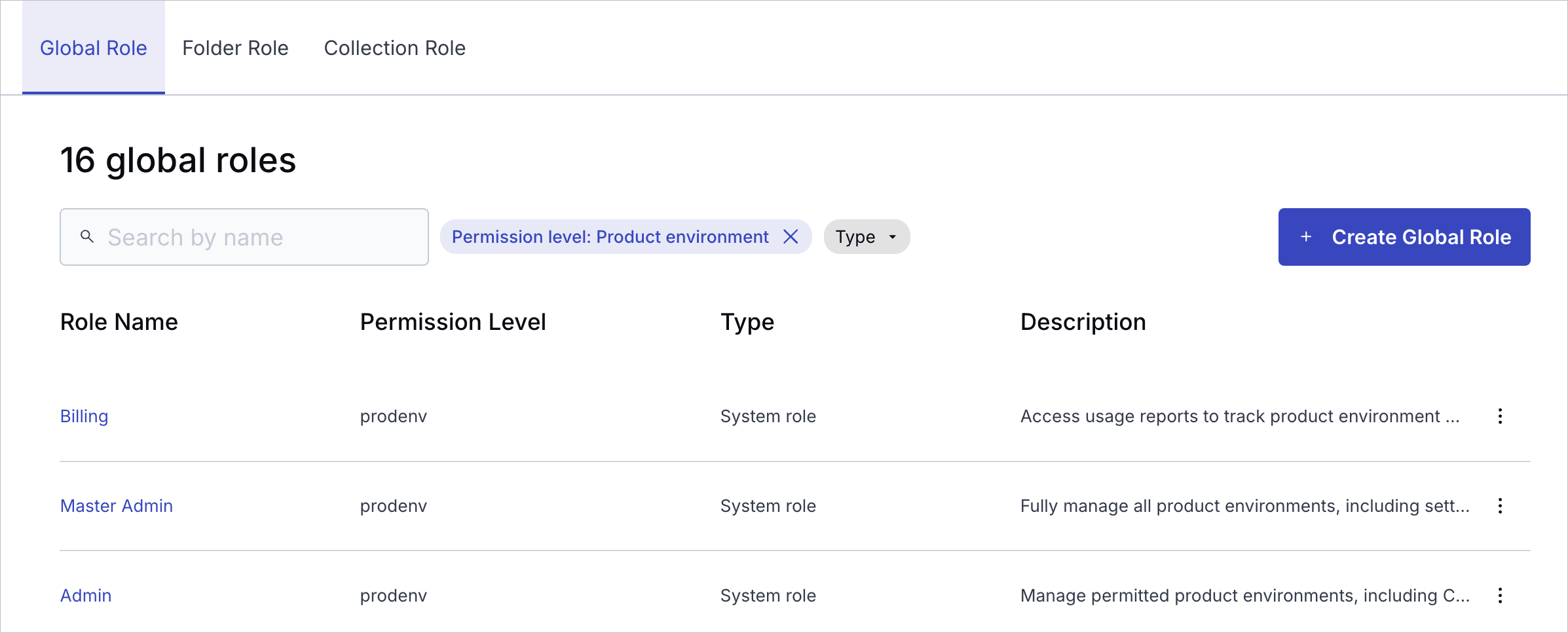
Cloudinary is rolling out a modern, unified Roles and Permissions system, a foundational upgrade to how access is managed across your account. The new model brings structured, granular access control to both the Console and APIs, with a consistent role-based approach designed to scale for teams, automation, and enterprise governance. Enterprise customers can manage roles and permissions via the [Permissions API](permissions_api) after migration.
**What you gain**
* **Structured access at scale**: Assign **global**, **folder**, and **collection** roles where teams actually work, with granular control across all system user types.
* **Granular and flexible permissions**: Combine predefined system roles with custom roles (Enterprise plans only) to match your organization's exact workflows and access needs.
* **Safer service automation**: Provision API keys tied to specific roles so services, CI jobs, and integrations only receive the permissions they need.
* **Clearer visibility**: Understand who has access to what, and manage it consistently in one place.
**Rollout status**
* Since February 2026, the new system has been rolling out to new free Cloudinary accounts. [Check if your account has been migrated](permissions_migration).
* Starting **May 4, 2026**, all new free Cloudinary accounts use the new Roles and Permissions system.
* Migration for existing free and paid accounts starts May 12, 2026.
* Broad Enterprise migration hasn't started yet. If your team hasn't already been moved with Cloudinary's help, you're still on the legacy system.
[Learn more](permissions_migration)
{partialdoc}partial_twentytwenty_comparison_slider{partialdoc}