
Research shows that clickable hotspots and personalized overlays can improve conversion rates by 30% or more, but businesses hesitate to implement them due to perceived complexity and development overhead.
As someone who has done many video optimization experiments, I’ve seen how interactive elements can turn viewers into customers. The challenge is how to develop it without spending months on writing code.
That’s where Cloudinary’s Video Player shines. Instead of building an interactive video infrastructure from scratch, you can leverage its native interactionAreas API to create hotspots, overlays, and tracking in hours, not months.
This guide will show you how to build an interactive video that features clickable hotspots, real-time analytics, and conversion tracking. We’ll even complete an A/B test to compare standard video to interactive video, so we can prove it’s worth building. The demo demonstrates a 56% increase in conversions from using interactive elements.
A traditional video is like window shopping, while an interactive video is like having a sales assistant. When someone hovers over that jacket in your fashion video, why not let them click to see details or add it to their cart instantly?
Here’s what makes interactive video particularly valuable:
- Hotspots guide viewers toward specific actions.
- Interactive elements with related content appear contextually.
- Every click and hover feeds directly into your analytics pipeline.
- Users who engage with interactive elements exhibit three times higher purchase intent.
In the following section, you’ll learn how Cloudinary simplifies interactive video development.
Traditional interactive video development requires complex coordinate mapping, event handling, and cross-browser compatibility testing.
Cloudinary’s Video Player eliminates this complexity with built-in interactive features:
- Native interaction areas API. Define clickable hotspots with simple percentages (left: 15%, top: 25%, width: 30%, height: 25%). The player automatically handles click detection, mobile touch events, and responsive scaling.
- Declarative configuration. Interactive elements are defined in player configuration, not scattered across JavaScript event handlers. This keeps your code clean and makes experiments easy to modify.
- Built-in analytics hooks. Every interaction triggers trackable events that feed directly into your conversion funnel.
- Performance optimization. Cloudinary handles video delivery, caching, and adaptive bitrate streaming while your interactive elements remain responsive across all devices.
Let’s see this in action by building a real conversion test.
You’ll create a comprehensive testing environment that compares a standard video with interactive video featuring clickable product hotspots. This setup mimics real-world e-commerce scenarios, where interactive elements can significantly influence purchase decisions.
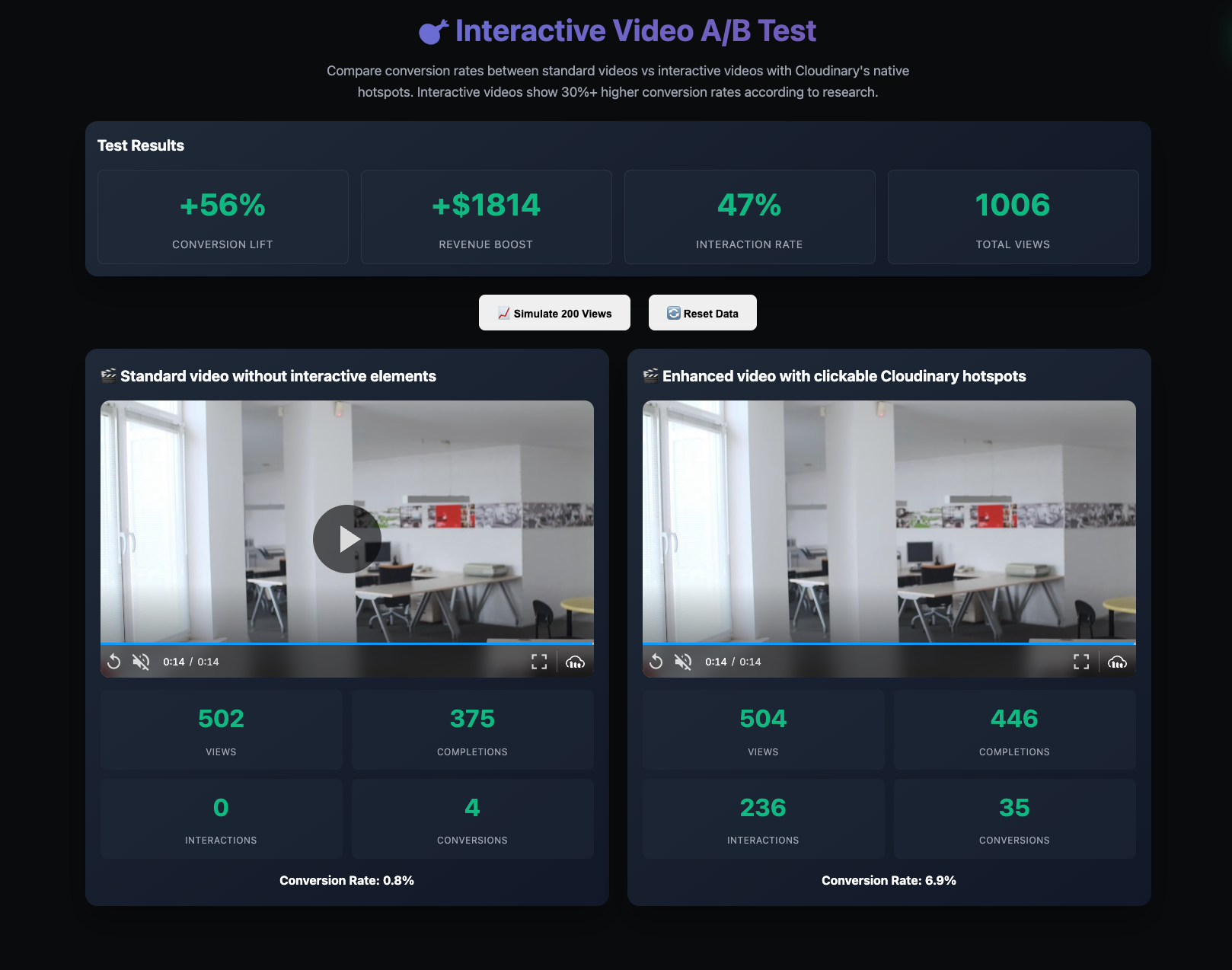
You should have:
- Basic knowledge of HTML, CSS, and JavaScript.
- A free Cloudinary account for video optimization.
- A local development server (Python, Node.js, or VS Code Live Server).
You can also view the complete source code on GitHub to see the result.
You’ll use a prebuilt UI to expedite development. To get started, let’s clone the project by navigating to a desired directory and running the command below:
git clone -b starter https://github.com/Olanetsoft/interactive-video-conversion-test.git

cd interactive-video-conversion-testCode language: PHP (php)
Your project contains these files:
interactive-video-conversion-test/

├── index.html          # Complete UI layout

├── styles.css          # Styling (ready to use)

├── app.js              # Empty - you'll build this.

└── README.md           # Project documentationCode language: PHP (php)
The HTML structure includes everything needed for A/B testing: global metrics cards, control/interactive video sections, and tracking elements.
Open index.html to see the complete test interface. The layout includes:
- Global metrics section. Displays conversion lift, revenue impact, and interaction rates.
- Control video. Standard Cloudinary Video Player without interactive features.
- Interactive video. Enhanced player with clickable hotspots over products.
- Real-time analytics. Individual metrics for each video variant.
This setup enables you to directly compare the impact of interactive elements on key business metrics, such as conversion rates and revenue per visitor.
We’ll start simple with basic video playback, then add hotspots, and finally wire up the conversion tracking. Each step builds on the previous one, so you’ll see exactly how the pieces fit together.
Start by building a class to manage your two video players. This structure will track metrics for both variants, allowing you to compare control and interactive video performance.
Navigate to the app.js file and create the main class that’ll handle everything with the following code snippet:
// app.js

class CloudinaryNativeTest {

  constructor() {

    // Metrics tracking for both video variants

    this.metrics = {

      control: {

        views: 0,

        completions: 0,

        interactions: 0,

        conversions: 0,

      },

      interactive: {

        views: 0,

        completions: 0,

        interactions: 0,

        conversions: 0,

      },

    };

    // Track interactions per session for accurate conversion calculation

    this.sessionHasInteractions = false;

    this.init();

  }

  init() {

    // Initialize Cloudinary with your cloud name

    this.cld = cloudinary.Cloudinary.new({

      cloud_name: "demo", // Replace with your cloud name

      secure: true,

    });

    this.setupControlPlayer();

    this.setupInteractivePlayer();

    this.loadData();

  }

}Code language: JavaScript (javascript)
The code snippet above handles metric tracking for both video variants and initializes the Cloudinary service. Notice how we track session-level interactions. This prevents inflated conversion rates when users interact with the site multiple times.
Now you will set up the baseline, a standard video player that tracks basic metrics without any interactive features, with the following code snippet:
// app.js

class CloudinaryNativeTest {

  constructor() {

    // Metrics tracking for both video variants

    this.metrics = {

      control: {

        views: 0,

        completions: 0,

        interactions: 0,

        conversions: 0,

      },

      interactive: {

        views: 0,

        completions: 0,

        interactions: 0,

        conversions: 0,

      },

    };

    // Track interactions per session for accurate conversion calculation

    this.sessionHasInteractions = false;

    this.init();

  }

  init() {

    // Initialize Cloudinary with your cloud name

    this.cld = cloudinary.Cloudinary.new({

      cloud_name: "demo", // Replace with your cloud name

      secure: true,

    });

    this.setupControlPlayer();

    this.setupInteractivePlayer();

    this.loadData();

  }

}Code language: JavaScript (javascript)
In the code above, you:
- Created a standard Cloudinary Video Player, which serves as your baseline control group without any interactive features
- Set up event listeners for “play” and “ended” events. When these fire, they automatically increment the appropriate view counters and refresh the dashboard display
- Established your approximately 1.8% conversion rate as the performance benchmark, which the interactive version will improve upon.
Add clickable product areas that transform viewers into shoppers. You’ll configure three hotspots with custom UI settings and interaction hints.
Here’s where Cloudinary’s interactionAreas API lets you define clickable hotspots using simple coordinate templates:
// app.js

//...

setupInteractivePlayer() {

    // Interactive video player with Cloudinary's native interaction areas

    this.interactivePlayer = this.cld.videoPlayer("interactive-video", {

      controls: true,

      muted: true,

      fluid: true,

      interactionDisplay: {

        layout: {

          enable: false, // Disable the default zoom UI overlay

          showAgain: false,

        },

        theme: {

          template: "pulsing", // Keep the pulsing hotspot indicators

        },

      },

    });

    // Configure video source with interaction areas using Cloudinary's native API

    this.interactivePlayer.source("docs/walking_talking", {

      interactionAreas: {

        enable: true,

        template: [

          {

            left: 15, // 15% from left

            top: 25, // 25% from top

            width: 30, // 30% width

            height: 25, // 25% height

            id: "sunglasses",

          },

          {

            left: 55, // 55% from left

            top: 35, // 35% from top

            width: 30, // 30% width

            height: 25, // 25% height

            id: "watch",

          },

          {

            left: 35, // 35% from left

            top: 65, // 65% from top

            width: 30, // 30% width

            height: 30, // 30% height

            id: "collection",

          },

        ],

        onClick: (event) => {

          this.onInteractionClick(event);

        },

      },

    });

    // Interactive player events

    this.interactivePlayer.on("play", () => {

      this.onPlay("interactive");

      this.showInteractionHint();

    });

    this.interactivePlayer.on("ended", () => this.onVideoEnd("interactive"));

}Code language: JavaScript (javascript)
Next, provide users with an interaction hint to help them understand how to interact with your video.
// app.js

class CloudinaryNativeTest {

//...

showInteractionHint() {

    // Show a subtle hint about clickable products

    const videoContainer =

      document.querySelector("#interactive-video").parentElement;

    const hint = document.createElement("div");

    hint.className = "interaction-hint";

    hint.innerHTML = "💡 Click on products to shop";

    hint.style.cssText = `

      position: absolute;

      top: 10px;

      right: 10px;

      background: rgba(0,0,0,0.8);

      color: white;

      padding: 8px 12px;

      border-radius: 20px;

      font-size: 14px;

      z-index: 10;

      opacity: 0;

      transition: opacity 0.3s ease;

    `;

    videoContainer.style.position = "relative";

    videoContainer.appendChild(hint);

    // Fade in

    setTimeout(() => (hint.style.opacity = "1"), 100);

    // Fade out after 3 seconds

    setTimeout(() => {

      hint.style.opacity = "0";

      setTimeout(() => {

        if (hint.parentElement) {

          hint.parentElement.removeChild(hint);

        }

      }, 300);

    }, 3000);

  }

  onPlay(type) {

    this.metrics[type].views++;

    this.updateDisplay(type);

    this.updateGlobalMetrics();

  }

}Code language: JavaScript (javascript)
This custom hint addresses a common UX issue: Users often don’t realize that videos are interactive. The hint appears when the video starts playing, shows clear instructions (“Click products to shop”), and fades away without disrupting the experience.
The styling utilizes absolute positioning in the corner, featuring smooth opacity transitions and a subtle, dark background that complements any video content.
Now you’ll connect clicks to actions, showing product overlays and tracking interactions that lead to conversions.
When users click hotspots, you want to show relevant product information and track the interaction:
// app.js

class CloudinaryNativeTest {

//...

onInteractionClick(event) {

    const interactionId = event.item.id;

    this.metrics.interactive.interactions++;

    // Mark this session as having interactions for proper conversion tracking

    this.sessionHasInteractions = true;

    // Show product info based on interaction area

    let productInfo = "";

    switch (interactionId) {

      case "sunglasses":

        productInfo = "🕶️ Premium Sunglasses - $89";

        break;

      case "watch":

        productInfo = "⌚ Luxury Watch - $299";

        break;

      case "collection":

        productInfo = "🛍️ Shop Full Collection";

        break;

    }

    // Pause video for interaction

    this.interactivePlayer.pause();

    // Show product alert

    this.showProductAlert(productInfo);

    // Note: Conversion happens on video completion, not here

    // This prevents double-counting conversions

    this.updateDisplay("interactive");

    this.updateGlobalMetrics();

    // Resume video after 2.5 seconds

    setTimeout(() => {

      this.interactivePlayer.play();

    }, 2500);

  }

}Code language: JavaScript (javascript)
In the code above, notice how we pause the video during interactions. This prevents users from missing the next part of the video while they’re still considering that jacket.
Next, enhance the shopping experience by adding overlays that allow users to add products to the cart without leaving the video. Product overlays with images, descriptions, pricing, and “Add to Cart” functionality drive conversions.
Create an overlay with the following code snippet that appears directly on the video:
// app.js

class CloudinaryNativeTest {

  //...

 showProductAlert(productInfo) {

    const videoContainer = document.getElementById("interactive-container");

    if (!videoContainer) return;

    // Parse product info (emoji label - price or generic)

    const parts = productInfo.split("-");

    const title = parts[0]?.trim() || "Product";

    const price = parts[1]?.trim() || "Limited Offer";

    // Remove any existing overlay first (single instance)

    const existing = videoContainer.querySelector(".product-alert-overlay");

    if (existing) existing.remove();

    const wrapper = document.createElement("div");

    wrapper.className = "product-alert-overlay";

    wrapper.innerHTML = `

      <div class="product-overlay-card" role="dialog" aria-label="Product interaction">

        <h3>${title}</h3>

        <div class="price">${price}</div>

        <div class="actions">

          <button class="primary" data-action="add" type="button">Add to Cart</button>

          <button class="secondary" data-action="close" type="button">Close</button>

        </div>

        <div class="mini-note">Interactive Hotspot</div>

      </div>`;

    videoContainer.appendChild(wrapper);

    const card = wrapper.querySelector(".product-overlay-card");

    const addBtn = card.querySelector('[data-action="add"]');

    const closeBtn = card.querySelector('[data-action="close"]');

    const cleanup = (delay = 0) => setTimeout(() => wrapper.remove(), delay);

    addBtn.addEventListener("click", () => {

      addBtn.textContent = "✓ Added";

      addBtn.disabled = true;

      addBtn.style.filter = "grayscale(.2) brightness(.9)";

      // Track conversion from interactive element

      this.metrics.interactive.conversions++;

      this.updateDisplay("interactive");

      this.updateGlobalMetrics();

      cleanup(900);

    });

    closeBtn.addEventListener("click", () => cleanup(0));

    cleanup(5000);

  }

}Code language: JavaScript (javascript)
This overlay system creates a seamless shopping experience. Users can add products to the cart without leaving the video, and every action is tracked directly in your conversion metrics.
Simulate realistic conversions based on video completion and user interactions, e.g., 1.8% control, 8% with interaction, and 2.8% without interaction.
Add the following code snippet to implement the events during interaction:
// app.js

class CloudinaryNativeTest {

  //...

 showProductAlert(productInfo) {

    const videoContainer = document.getElementById("interactive-container");

    if (!videoContainer) return;

    // Parse product info (emoji label - price or generic)

    const parts = productInfo.split("-");

    const title = parts[0]?.trim() || "Product";

    const price = parts[1]?.trim() || "Limited Offer";

    // Remove any existing overlay first (single instance)

    const existing = videoContainer.querySelector(".product-alert-overlay");

    if (existing) existing.remove();

    const wrapper = document.createElement("div");

    wrapper.className = "product-alert-overlay";

    wrapper.innerHTML = `

      <div class="product-overlay-card" role="dialog" aria-label="Product interaction">

        <h3>${title}</h3>

        <div class="price">${price}</div>

        <div class="actions">

          <button class="primary" data-action="add" type="button">Add to Cart</button>

          <button class="secondary" data-action="close" type="button">Close</button>

        </div>

        <div class="mini-note">Interactive Hotspot</div>

      </div>`;

    videoContainer.appendChild(wrapper);

    const card = wrapper.querySelector(".product-overlay-card");

    const addBtn = card.querySelector('[data-action="add"]');

    const closeBtn = card.querySelector('[data-action="close"]');

    const cleanup = (delay = 0) => setTimeout(() => wrapper.remove(), delay);

    addBtn.addEventListener("click", () => {

      addBtn.textContent = "✓ Added";

      addBtn.disabled = true;

      addBtn.style.filter = "grayscale(.2) brightness(.9)";

      // Track conversion from interactive element

      this.metrics.interactive.conversions++;

      this.updateDisplay("interactive");

      this.updateGlobalMetrics();

      cleanup(900);

    });

    closeBtn.addEventListener("click", () => cleanup(0));

    cleanup(5000);

  }

}Code language: JavaScript (javascript)
The conversion logic reflects research showing that interactive videos with user engagement convert at 8%, while non-interactive completions still outperform standard videos (2.8% vs. 1.8%).
Now, let’s calculate the conversion lift and revenue impact that proves ROI and display them on your dashboard using this code. The revenue boost calculation is handy because it shows the dollar impact per 1,000 views, allowing you to quickly estimate what an interactive video would mean for your traffic volumes.
Time to make the data visible in real-time dashboard updates and bulk test controls. Users need to see real-time results and simulate larger test volumes:
// app.js

class CloudinaryNativeTest {

  //...

 showProductAlert(productInfo) {

    const videoContainer = document.getElementById("interactive-container");

    if (!videoContainer) return;

    // Parse product info (emoji label - price or generic)

    const parts = productInfo.split("-");

    const title = parts[0]?.trim() || "Product";

    const price = parts[1]?.trim() || "Limited Offer";

    // Remove any existing overlay first (single instance)

    const existing = videoContainer.querySelector(".product-alert-overlay");

    if (existing) existing.remove();

    const wrapper = document.createElement("div");

    wrapper.className = "product-alert-overlay";

    wrapper.innerHTML = `

      <div class="product-overlay-card" role="dialog" aria-label="Product interaction">

        <h3>${title}</h3>

        <div class="price">${price}</div>

        <div class="actions">

          <button class="primary" data-action="add" type="button">Add to Cart</button>

          <button class="secondary" data-action="close" type="button">Close</button>

        </div>

        <div class="mini-note">Interactive Hotspot</div>

      </div>`;

    videoContainer.appendChild(wrapper);

    const card = wrapper.querySelector(".product-overlay-card");

    const addBtn = card.querySelector('[data-action="add"]');

    const closeBtn = card.querySelector('[data-action="close"]');

    const cleanup = (delay = 0) => setTimeout(() => wrapper.remove(), delay);

    addBtn.addEventListener("click", () => {

      addBtn.textContent = "✓ Added";

      addBtn.disabled = true;

      addBtn.style.filter = "grayscale(.2) brightness(.9)";

      // Track conversion from interactive element

      this.metrics.interactive.conversions++;

      this.updateDisplay("interactive");

      this.updateGlobalMetrics();

      cleanup(900);

    });

    closeBtn.addEventListener("click", () => cleanup(0));

    cleanup(5000);

  }

}Code language: JavaScript (javascript)
Next, add the function to simulate bulk views and data reset.
// app.js

class CloudinaryNativeTest {

  //...

  simulateBulkViews() {

      // Simulate 100 control views

      for (let i = 0; i < 100; i++) {

        this.metrics.control.views++;

        if (Math.random() < 0.78) this.metrics.control.completions++; // 78% completion

        if (Math.random() < 0.018) this.metrics.control.conversions++; // 1.8% conversion

      }

      // Simulate 100 interactive views with native Cloudinary interactions

      for (let i = 0; i < 100; i++) {

        this.metrics.interactive.views++;

        if (Math.random() < 0.89) this.metrics.interactive.completions++; // 89% completion

        // 45% of users click on native interaction areas

        const interacted = Math.random() < 0.45;

        if (interacted) {

          this.metrics.interactive.interactions++;

          // Very high conversion with native interactions

          if (Math.random() < 0.08) this.metrics.interactive.conversions++; // 8%

        } else {

          // Still better than control without interaction

          if (Math.random() < 0.028) this.metrics.interactive.conversions++; // 2.8%

        }

      }

      this.updateDisplay("control");

      this.updateDisplay("interactive");

      this.updateGlobalMetrics();

      this.showConversionAlert();

    }

    reset() {

      this.metrics = {

        control: {

          views: 0,

          completions: 0,

          interactions: 0,

          conversions: 0,

        },

        interactive: {

          views: 0,

          completions: 0,

          interactions: 0,

          conversions: 0,

        },

      };

      this.sessionHasInteractions = false;

      this.updateDisplay("control");

      this.updateDisplay("interactive");

      this.updateGlobalMetrics();

    }

  }

}Code language: JavaScript (javascript)The final step is to connect everything with data persistence and launch an A/B test with the following code snippet:
// Data persistence for longer experiments

saveData() {

  localStorage.setItem("cloudinary-native-test", JSON.stringify(this.metrics));

}

loadData() {

  const saved = localStorage.getItem("cloudinary-native-test");

  if (saved) {

    this.metrics = JSON.parse(saved);

    this.updateDisplay("control");

    this.updateDisplay("interactive");

    this.updateGlobalMetrics();

  }

}

// Initialize when page loads

let nativeTest;

if (document.readyState === "loading") {

  document.addEventListener("DOMContentLoaded", () => {

    nativeTest = new CloudinaryNativeTest();

  });

} else {

  nativeTest = new CloudinaryNativeTest();

}

// Global functions for UI controls

function resetTest() {

  if (nativeTest) nativeTest.reset();

}

function simulateViews() {

  if (nativeTest) nativeTest.simulateBulkViews();

}

// Auto-save experiment data every 20 seconds

setInterval(() => {

  if (nativeTest) nativeTest.saveData();

}, 20000);

}Code language: JavaScript (javascript)Now let’s see the results. Open index.html in your browser and run through this testing workflow:
- After playing both videos, notice how the interactive version includes subtle hotspot areas.
- Product overlays should appear with “Add to Cart” functionality.
- Watch real-time updates to conversion rates and revenue impact.
- Click Simulate 200 Views to see statistical significance.
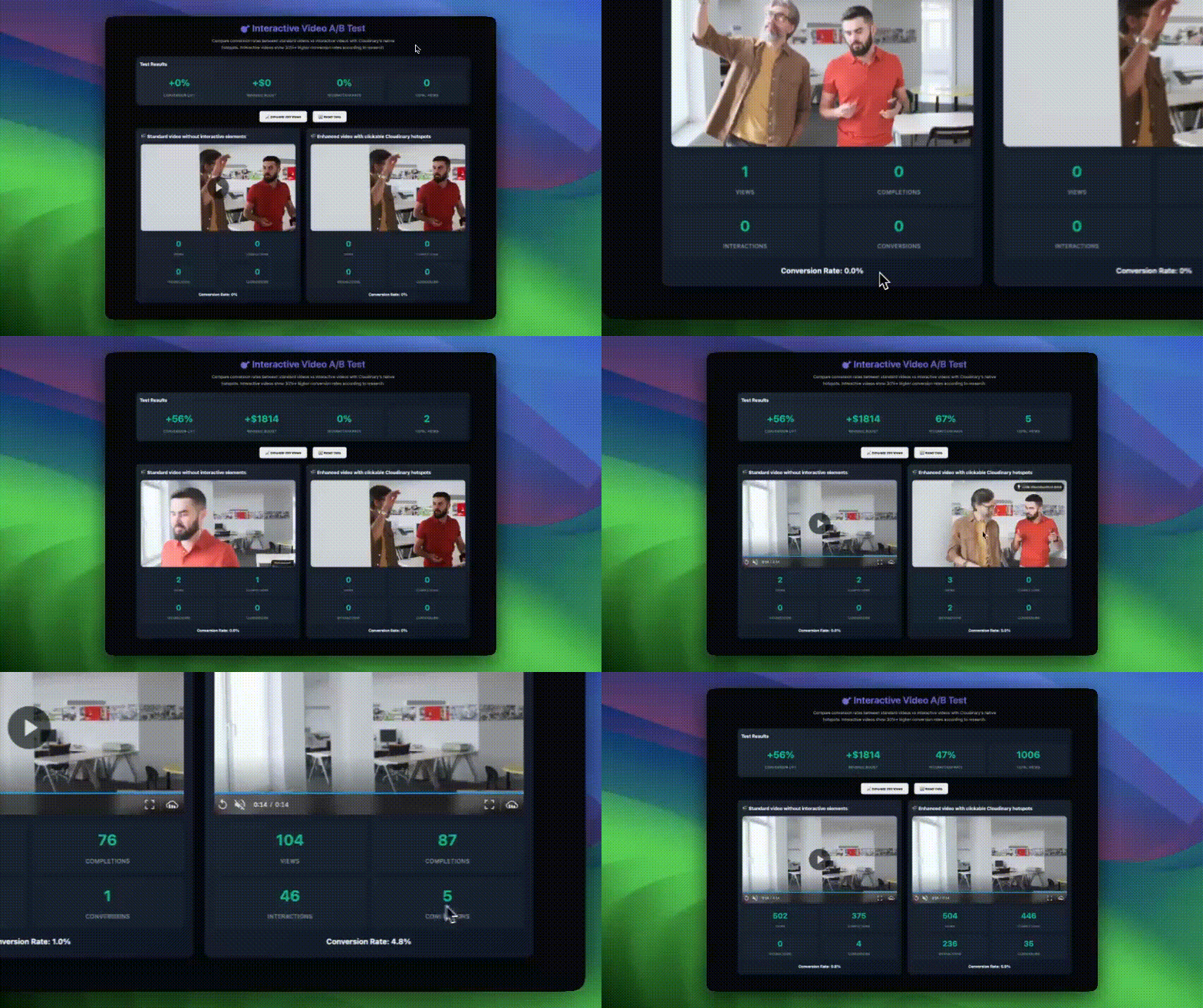
With the simulation, you should see:
| Control Conversion Rate | Interactive Conversion Rate | Conversion Lift | Revenue | Interaction Rate |
| ~1.8% | ~5.2% (mix of 8% with interaction, 2.8% without) | ~56% | ~$180 per 1,000 views | ~45% |
After running these tests and implementing interactive videos across multiple projects, I’ve identified the scenarios where they deliver the strongest results:
- Product demonstrations. Fashion and retail videos work exceptionally well with shoppable hotspots. Viewers can click a featured product as it’s showcased, so they don’t have to hunt for it on another page later.
- Tutorial and onboarding videos. Interactive elements enable viewers to have more control over their own learning path. For example, a software tutorial can offer “Skip to advanced features” or “Learn more about this tool” options within the video.
- Real estate tours. Virtual tour videos with clickable room highlights and information overlays keep viewers engaged.
- Event highlights. Conference or webinar recordings with chapter navigation and resource links enable viewers to find relevant content quickly.
Start with your highest-converting video content. If you have product demos, tutorials, or marketing content that already drives signups or sales, those are perfect candidates for interactive features.
Most importantly, you’ve learned to build this yourself. No more waiting for dev teams to have capacity or countless more discussions about technical feasibility. Interactive video is now in your toolkit. If you’re ready to get started, sign up for a free Cloudinary account today.


