
As part of exploring how Cloudinary can streamline creative workflows, I built a proof-of-concept DAM app to automate animation and spritesheet generation. The app allows you to take assets from your Media Library, apply transformations, set frame timings, reorder frames, and generate either GIF animations or spritesheets instantly. All without leaving Cloudinary.
The process of creating animations and spritesheets involves juggling multiple tools, exporting frames from a design app, stitching them together in a separate program, and then uploading the results back to your DAM. I wanted to collapse that entire workflow into one seamless experience inside Cloudinary’s DAM.
I developed the application as a custom DAM app. After installing it from the Custom Actions menu, the Animations Maker option will be added to the DAM.
This action needs to be enabled by the Cloudinary Support team.
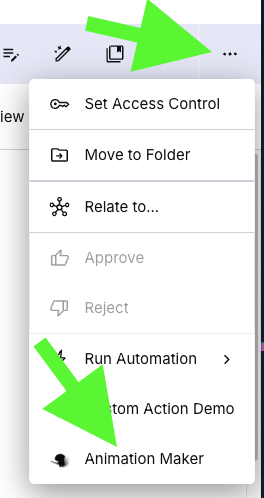
The Animations Maker app streamlines a multi-step creative process — selecting, transforming, timing, and exporting images — into a single Cloudinary workflow. That saves time, reduces context switching, and keeps users working inside the DAM rather than exporting assets to third-party tools.
The app enables designers, animators, and small studios to work directly within a familiar DAM environment, turning asset management into a lightweight animation and compositing workspace. This helps teams move from assets to finished visuals faster, reduce tool switching, and collaborate more efficiently — supporting quicker creative turnaround and a more streamlined media workflow.
The app receives a series of images as input from the Cloudinary DAM and allows the user to:
- Visualize one or more animations, and every single frame as a thumbnail.
- Establish the number of frames per animation.
- Set the exact time each frame is displayed within the animation.
- Apply Cloudinary transformations on a per-frame basis that the user can preview within the thumbnail.
- Drag frames to reorder them.
Output:
- The user can generate a GIF animation and spritesheet.
- For each animation and spreadsheet:
- A preview is displayed.
- A Cloudinary URL is provided.
- The user can upload them back to the DAM.
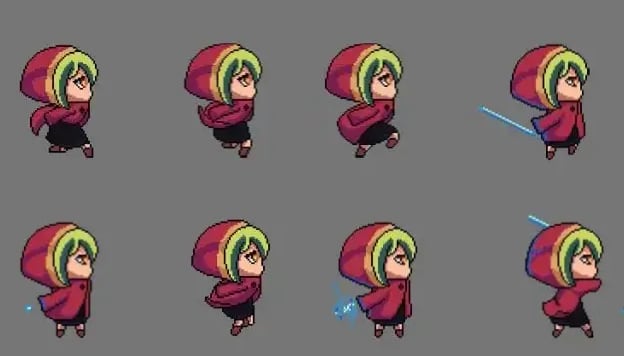
A spritesheet is a single image file that contains multiple smaller graphics, or sprites, arranged in a grid or sequence. Each sprite represents a frame of an animation or a visual state of a 2D object. For example, different poses of a character or stages of an explosion.
In 2D game development, spritesheets are used to optimize performance. Instead of loading dozens of separate image files, the game engine loads one spritesheet and then draws only the relevant portions of it at runtime.
Below is an example of a spritesheet:
The Cloudinary Animation Maker app is a standalone, embedded static web app. It runs entirely in the browser with vanilla JavaScript and HTML, leveraging the Cloudinary SDK for asset management and transformation generation. Cloudinary’s transformation API powers each frame’s preview and export, while Cloudinary’s video overlay and canvas composition capabilities powers the creation of animations and spritesheets.
The app reads user selections directly from the DAM context, applies per-frame transformations client-side, and then uploads generated GIFs or spritesheets back to Cloudinary through the Upload API. This lightweight setup requires no external backend, relying fully on Cloudinary’s APIs and the browser runtime for performance and simplicity.
This Animation Maker app helps customers quickly create and experiment with animations. As teams begin using it in their day-to-day digital media workflows, we’d love to get your feedback and ideas for improvement. Your insights and real-world use cases will make the product evolve to better support your creative needs.
Below are some potential enhancements:
- Limit canvas size when creating spritesheets. Add validation to prevent generating too-large canvases that could exceed browser memory limits or cause crashes, ensuring smoother performance and stability.
- Extend to authenticated and private resources from Cloudinary. Support assets that require signed URLs or token-based authentication so users can animate protected media without exposing credentials.
- Add export presets. Offer ready-made templates for common use cases (e.g., 4×4 game grid, 60 FPS loop) to speed up repetitive workflows.
- Improve error handling and feedback. Show clear, user-friendly messages for upload or rendering failures, helping users diagnose transformation or permission issues quickly.
The DAM Animations Maker app offers an easy and user-friendly way to create animations and spritesheets directly inside Cloudinary DAM.
Here are some ideas on what to do to get started:
- Download some free sprite images. There are plenty of free resources websites.
- Create your own retro sprites. Libresprite or even an online editor are some examples. Upload them to Cloudinary and create your spritesheets and animations.
- Combine the animations with Cloudinary’s AI and image editing tools. When used together, you can create clean, spectacular effects.
To stay updated with the latest product features, follow Cloudinary on Twitter and explore other sample apps.
Building an app with Cloudinary and need inspiration? Visit your App Gallery, or sign up for a free account to get started building today.
What is the Cloudinary DAM Animation Maker?
The Cloudinary DAM Animation Maker is a custom digital asset management (DAM) application that allows users to create GIF animations and spritesheets directly from assets stored in the Cloudinary Media Library. It streamlines animation workflows by combining asset selection, transformations, timing controls, and exports into a single experience inside Cloudinary.How does the app work with Cloudinary DAM?
The app integrates directly with Cloudinary DAM as a custom action. Users can select assets from the Cloudinary Media Library, open them in the Animation Maker, apply transformations, reorder frames, adjust timing, and export the final animation or spritesheet without leaving the DAM environment.Which Cloudinary APIs power the Animation Maker?
The app uses several Cloudinary technologies, including: – Cloudinary SDK for asset management and integration. – Cloudinary Transformation API for applying per-frame image transformations. – Cloudinary Upload API for uploading generated GIFs and spritesheets back into Cloudinary. – Cloudinary’s media processing and overlay capabilities for rendering animations and spritesheets.Can I apply Cloudinary transformations to individual frames?
Yes. Each animation frame can have its own Cloudinary transformations applied independently. Users can preview transformations directly in the interface before generating the final output.Does the app require a backend server?
No. The application runs entirely in the browser as a lightweight static web app built with vanilla JavaScript and HTML. It relies on Cloudinary APIs for media processing and asset management, eliminating the need for a separate backend service.Can the Animation Maker support private or authenticated assets?
Authenticated and private asset support is planned as a future enhancement. This would allow users to work with protected Cloudinary resources using signed URLs or token-based authentication.Is the Animation Maker production-ready?
The current version is an MVP (Minimum Viable Product) designed to validate workflows and gather feedback. Future improvements may include export presets, enhanced error handling, authenticated asset support, and canvas size validation for large spritesheets.Can developers build similar custom workflows in Cloudinary?
Yes. Cloudinary supports extensible DAM workflows through custom applications, APIs, and integrations. Developers can use the Cloudinary’s SDKs, Transformation API, and Upload API to build tailored media automation experiences directly within Cloudinary.

