Key takeaways:
- Enterprise image hosting combines storage, CDN delivery, real-time transformation, and compliance in a single platform.
- DIY setups built on S3 + CloudFront + Lambda carry hidden engineering costs that scale with growth.
- Security, compliance certification and SLAs are not optional when it comes to enterprise procurement.
- Cloudinary’s API-first architecture and global CDN make it a strong fit for organizations with complex media workflows.
Managing a handful of product images isn’t too hard. Managing billions of them across global teams and multiple applications on every device size imaginable feels impossible.
Enterprise image hosting is the infrastructure that makes that scale possible; it combines storage, optimization, transformation, delivery and governance all in a single platform. Organizations can’t afford downtime or data breaches, not to mention slow loading pages.
This guide will help us evaluate architecture options, CDN strategies, and how enterprise image infrastructure actually delivers.
In this article:
- What is Enterprise Image Hosting?
- The Core Features of Enterprise Image Hosting
- Enterprise Image Hosting Architecture
- How to Choose an Enterprise Image Hosting Provider
- Questions to Ask Vendors
- Red Flags to Keep A Look Out For
- Planning a Migration to Enterprise Image Hosting
- Enterprise Image Hosting Use Cases
What is Enterprise Image Hosting?
Enterprise image hosting is a managed platform that combines several technologies for us. It takes cloud storage, image optimization in real-time, global content delivery and access governance principles and rolls it into a single system.
It’s different from consumer-grade photo hosting platforms that are built for personal use, and it isn’t just another Amazon S3-wrapped service that acts like cloud file storage.
Who needs enterprise image hosting? Organizations managing 10K+ image assets, especially:
- E-commerce brands with massive product catalogs
- Media and publishing companies
- SaaS platforms handling user-generated content
- Healthcare providers
- Financial services firms
So whether you’re a CTO evaluating architecture scalability, a DevOps engineer comparing CDN performance, or a marketer responsible for brand asset governance, you’ll find enterprise image hosting a real benefit to your operations.
The “enterprise” part matters because of how operations need to scale, and smaller solutions aren’t equipped to deal with. We’re talking about libraries with billions of assets, SLAs that guarantee over 99% uptime, compliance with GDPR, HIPAA, and SOC 2 Type II.
Pro Tip!
Ensure compliance and security standards
Meet strict security and compliance needs without slowing down development. Built-in protections keep your media safe.
The Core Features of Enterprise Image Hosting
There is a lot more to hosting images in enterprise hosting than meets the eye. Below are some of the most foundational features that we need to serve up digital assets to teams around the world.
Global CDN Delivery
Enterprise image hosts serve digital assets from edge locations that are distributed all over the world, putting files close to whoever needs them. Instead of every image request going to a single origin server, a CDN directs each request to the closest point of presence (PoP).
For organizations with international customers, this cuts latency dramatically, giving them a smooth experience that feels more responsive. Enterprise platforms usually aim for sub-50ms delivery times across regions.
Multi-CDN strategies take this a step further by routing traffic across multiple CDN providers, which give the system more redundancy and allows the system to intelligently failover if there are network issues in a region.
The data path automatically reroutes to the next best location automatically without users noticing any downtime or disruptions. Again, these enterprise features are not affordable for DIY systems that must be maintained manually.
Automatic Format Optimization
Modern image formats like AVIF, WebP and JPEG XL offer better compression than older formats with the same visual quality. The problem is that browser support varies for different image formats.
While Chrome supports AVIF effectively, older browsers generally necessitate a JPEG fallback. It’s not feasible to manage image format variations by hand when dealing with large asset libraries.
Enterprise hosting handles all of that automatically for us.
Format selection happens at the URL level, and not in build pipelines. When a browser requests an image, the platform reads the Accept header, identifies the best supported format, and serves it; all without any configuration on the application end.
We end up with smaller files, faster load times, and no build-time image generation that needs to be maintained.
Real-time Transformation via URL and API
Pre-generating every variant of every image for every context wastes storage space and engineering time. Enterprise image hosting discards that approach and replaces it with on-the-fly transformations that are triggered by URL parameters or API calls.
A single source image can be resized, cropped, watermarked, color-adjusted, have its background removed, or format converted just by modifying the delivery URL of the image.
Cloudinary’s transformation reference covers hundreds of parameters that apply at delivery time, and the results get cached at the edge of the CDN after the first request. There’s no separate processing pipeline to contend with, which means no building and no additional maintenance for teams.
Responsive Image Delivery
Responsive images need to serve different resolution images for different devices. A 1200px wide desktop image sent to a 375px phone display is a waste of bandwidth that hurts a website’s Core Web Vital scores, especially on the Largest Contentful Paint (LCP) metric.
Enterprise platforms automate this through something called srcset generation, client hints, and device-aware sizing. Instead of hardcoding a set of prepoints and pre-generating files for each one, the platform generates the right size for each request based on the device context.
Organizations that have optimized responsive delivery usually see improvements in LCP and page load scores across mobile traffic, which has a huge impact on SEO and conversion rates.
Security and Access Control
Enterprise image infrastructure needs more than just public URL access. Signed URLs restrict access to specific time windows or authenticated sessions, which prevents hot linking and unauthorized distribution of assets.
Using token-based authentication is another security measure that links image access to application users. IP whitelisting is another method that blocks all traffic except for specific IP addresses, which limits access to only those that need it.
Role-based permissions grant access control to the asset management layer, which controls who can upload, modify, publish or delete assets. These permissions can be fine-tuned by department, division, and even at a user level.
Group access control is usually easier to manage, though. Encryption is another valuable security measure that protects data when it is being transmitted and stored. These features are not added extras; they are the base requirements that enterprise procurement teams need to check before any vendor evaluation talks begin.
Compliance and Data Residency
Regulatory compliance requirements vary by industry and region, but they are normally very strict, and non-negotiable. For example, frameworks like GDPR require that EU customer data stays within certain geographic locational boundaries, and that requests for data deletion have to be honored.
HIPAA mandates that specific controls have to be in place for access, encryption, and audit logging for health-related information. SOC 2 Type II and ISO 127001 certifications show that an organization’s security controls have been independently audited and verified.
Enterprise image platforms offer data center options across the EU, US, and APAC regions to support data residency requirements, and they have full audit logging that records who accessed which asset and when.
These are the types of certifications and controls that legal departments, compliance officers, and security teams check during the procurement stages of a partnership agreement. Missing any single one of a required set of regulations by a provider could stop evaluation discussions immediately.
DAM Integration
Enterprise image hosting connects digital asset management workflows together, handling metadata, tagging, version control, and approval flows. Digital assets aren’t static files that live in the cloud; they carry structured information embedded within them.
This information highlights their context, status, intended use, and relationships to other content. Multiple teams that need to work with assets can, because the same asset library has different levels of access and tools.
As long as the underlying enterprise platform can connect storage, metadata and permissions in a single system, then teams can work together securely and with auditable activity records.
AI-Powered Capabilities
AI features have moved away from being a fun new toy into legitimate business tools that many can’t live without. AI text generation alone can save hundreds of man hours and improve accessibility compliance across a catalog.
These capabilities are not replacing creative teams, but are instead allowing programmatic automations to do the dreary work of labelling metadata fields and sorting digital collection naming schemes.
This frees up teams to continue with their publishing pipelines without being slowed down by mundane administrative tasks.
Enterprise Image Hosting Architecture
Understanding how the components of enterprise hosting architecture fit together helps us evaluate each platform against the existing infrastructure that we use, as well as possible integrations.
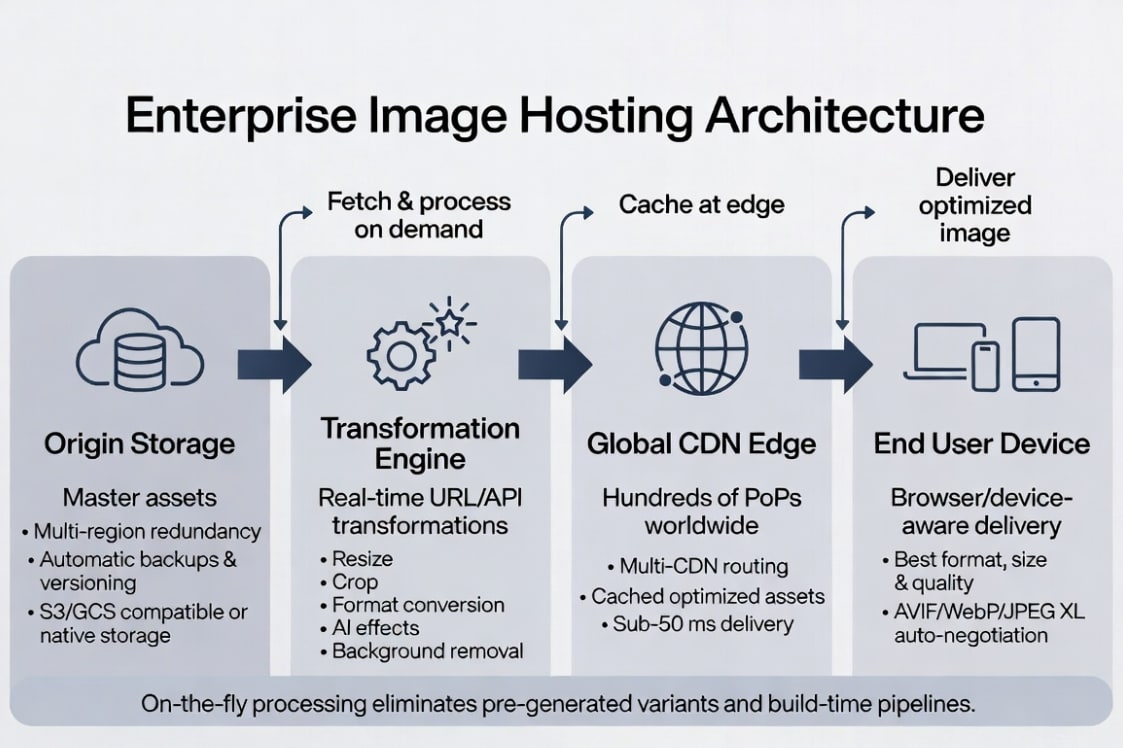
The average enterprise image hosting architectural layout follows a four-layer model:
- Origin Storage: Holds the original copies of every asset and has multi-region redundancy with automatic backups.
- Transformation Engine: Processes incoming requests and applies format conversions, resizing, cropping, overlays, and quality optimization on demand.
- CDN Edge Nodes: Cache the output of each transformation closest to the requesting user. Subsequent requests are cached in that region allowing assets to load faster.
- End-user Device: Receive the best file for their device context. The format and resolution, along with the quality, all match up to each specific request.
Upload and Ingestion
Enterprise platforms support multiple ingestion paths to accommodate different requirements within the organization. Direct API uploads work for new content, whereas bulk migration tools handle large existing media libraries.
SDKs are available in most major frameworks like Node.js Python, PHP, Java, Ruby, .NET, Go, React, Vue, and Next.js. For organizations that have assets already hosted in S3 or Google Cloud Storage, fetch-from-URL allows remote asset proxying with no need for a full upfront migration.
Storage Layer
The storage layer in an enterprise platform is more than just a container. It needs to have multi-region redundancy so that assets are available during regional outages, and also handle automatic version control.
Folder-level governance is another feature that allows access policies to be applied by a collection of assets instead of as individual items.
If we compare that to a DIY S3 management solution where replication, versioning lifecycle policies, and access control all need custom configurations, the technical overhead of a DIY solution is clear. Each of these capabilities requires engineering time and ongoing efforts to maintain the solution.
Transformation Engine
Processing on the fly is a must-have feature that really separates enterprise solutions from raw storage services. Instead of needing to pre-generate content during the build step or batch processing, the transformation engine applies all requested changes when an image is first requested.
This eliminates the need for image processing pipelines as a separate engineering step as it is all handled as part of normal operations. It also means that there’s no batch job to schedule, no variant library to manage, and no build-time dependencies on image processing tools.
Delivery Layer
The delivery layer handles how processed images reach users.
Global CDN distribution and cache invalidation controls, along with custom CNAME domains for custom domains are all enterprise requirements. And by using Brotli compression, we reduce transfer sizes for clients that support the protocol, making image delivery snappy and responsive.
Cloudinary’s network spans across multiple CDN providers and hundreds of Points of Presence (PoPs) around the world, with automatic routing and the fastest available edge for each request.
Integration Points
Enterprise image platforms need to connect to existing systems; workflows should not be rebuilt to accommodate a new solution. CMS integrations cover WordPress, Contentful, and Sanity. Ecommerce integrations include Shopify and Magento, as well as WooCommerce. There’s also support for frameworks like Next.js, Nuxt, and Astro. DAM system integrations allow Cloudinary to serve as the media layer within an enterprise’s content ecosystem.
Enterprise Image Hosting vs. DIY Solutions
The table below compares the main approaches that organizations should consider when evaluating image infrastructure. The goal isn’t to find a winner, but visualize the tradeoffs that each solution would fare in an evaluation.
| Feature | Cloudinary | DIY (S3 + CloudFront + Lambda) | Basic CDN (Cloudflare Images) | DAM-Only (Bynder/Canto) |
|---|---|---|---|---|
| Real-time transforms | ✓ URL-based | ⚠ Custom build | ⚠ Limited | ✗ None |
| Auto format optimization | ✓ AVIF/WebP/auto | ⚠ Manual config | ✓ Basic | ✗ None |
| Global CDN | ✓ Multi-CDN | ⚠ CloudFront only | ✓ Yes | ⚠ Varies |
| API / SDK coverage | ✓ 10+ languages | ⚠ AWS SDK only | ⚠ Limited | ⚠ Varies |
| DAM features | ✓ Full | ✗ None native | ✗ None | ✓ Core focus |
| Compliance certs | ✓ SOC 2 / ISO 27001 | ✓ SOC 2 / ISO 27001 | ✓ SOC 2 | ⚠ Varies |
| Pricing model | Usage-based | Pay-per-service | Usage-based | Per-seat |
| Dev effort | Low | High (ongoing) | Medium | Low (limited scope) |
Total Cost of Ownership
The sticker price of an enterprise image platform looks higher than a DIY setup until the full engineering cost of the DIY work is taken into account.
Building a transformation pipeline on Lambda, configuring CloudFront distributions, and then writing the format negotiation logic and other technical tasks add up fast. Maintaining this kind of solution also requires full-time engineering and technical teams, which further drives up the cost.
Forrester Consulting found a 203% ROI for Cloudinary customers over three years, driven primarily by reduced engineering overhead and improved delivery performance. The engineering hours freed by eliminating a custom image pipeline are typically significant enough to shift the TCO calculation meaningfully in favor of a managed platform.
When DIY Makes Sense
There are genuine cases where a managed platform isn’t the right fit. Environments that need to stay offline.
With an air-gapped environment, or highly specialized imaging pipelines with unusual formatting requests, businesses might find better ROI on developing a system in-house if they already have the engineering capacity.
Cloudinary’s API-first architecture handles most requirements that teams initially assume will require a custom solution. Cloudinary also supports private CDN configurations, custom transformation chains, and bring-your-own-storage integrations.
On premise hybrid deployments are also supported. It’s worth looking at the requirements for the chosen platform before you start building your own.
Streamline your media workflow and save time with Cloudinary’s automated cloud services. Sign up for free today!
How to Choose an Enterprise Image Hosting Provider
Enterprise platform evaluations involve multiple stakeholders with different priorities. Below is a checklist that covers the key criteria items that usually matter for engineering, security, and business teams.
- Scalability: Can the platform handle the current asset volume and projected growth without needing to be rebuilt?
- CDN performance: How many PoPs does the network cover? What are the SLA guarantees for uptime and delivery latency?
- Transformation capabilities: Are transformations applied in real time via URL parameters, or do variants need to be pre-generated?
- Format support: Does the platform auto-negotiate AVIF, WebP, and JPEG XL based on browser capabilities?
- Security and access control: Are signed URLs, token authentication, IP whitelisting, and role-based permissions available?
- Compliance certifications: Does the platform hold SOC 2 Type II, ISO 27001, and any industry-specific certifications your organization requires?
- API quality and SDK coverage: Is there full API coverage across your team’s languages and frameworks?
- DAM integration: Does the platform support metadata, tagging, versioning, and approval workflows, or does it require a separate DAM tool?
- Pricing transparency: Is pricing documented and predictable at scale, or does it require a custom quote?
- Support and SLAs: What support tiers are available, and what response times are guaranteed for production incidents?
Questions to Ask Vendors
A few specific questions need to be asked to get through the marketing language while evaluating a vendor. You should ask whether transformations are applied via URL parameters, or if you need a pre-generation step.
It’s also worth asking where data centers are located and what types of data residency are catered for if you have users from locations with strict compliance regulations, such as GDPR for European citizens.
Find out how pricing scales with bandwidth and transformation workload volumes. Are there cost surprises that you should anticipate as user counts grow? Uptime SLA agreements are very important to understand ahead of time, especially if image generation is operationally crucial for organizations.
Red Flags to Keep A Look Out For
Gaps between vendors can be expected; after all, not all providers cater to the same enterprise clients. Some are more niche and low-volume platforms that focus on smaller organizations. However, there are some features that shouldn’t be compromised.
If there are no sandbox environments or free trials available to test and validate, then it becomes very difficult to consider a vendor for widescale adoption.
Format support ranks high in requirements, especially fundamental features such as AVIF and WebP support. Without these necessary features, you could be leaving performance on the table.
Single-region CDNs are another red flag that needs to be carefully considered. Are there compliance certifications, and guarantees about regulations and international clients? Any of these could be enough to look into other service providers.
Planning a Migration to Enterprise Image Hosting
Migration Strategies
Lazy migration (fetch-from-URL): The platform proxies requests to the existing origin on first access and caches the result. No upfront bulk transfer is required.
This approach is low-risk and works well for large libraries where not every asset is actively accessed. The tradeoff is that the first request for each asset still hits the old origin, so transformation and CDN benefits apply immediately, but origin traffic doesn’t drop until the cache warms.
Bulk migration (API/CLI upload): All assets are transferred to the new platform before cutover. This requires planning time and bandwidth, but results in a clean break after migration.
The old origin can be decommissioned, and all requests will hit the new CDN immediately. Works best for organizations with well-documented asset libraries and defined migration windows.
Hybrid approach: New assets go to the new platform immediately while legacy assets migrate gradually via lazy fetch or scheduled batch uploads.
This is the most common approach for large organizations that can’t do a clean cutover and need to balance migration progress with ongoing publishing operations.
A Step-by-Step Migration Guide
Note: No two businesses are alike, so your migration may have more or less steps.
- Audit existing assets: Inventory the current library, including the total asset count, file formats, directory structure, and access patterns. Find which assets are actively used and which can be archived.
- Choose a migration method: Evaluate lazy migration, bulk upload, and hybrid against your library size, migration timeline, and risk tolerance.
- Set up URL mapping: Map old asset paths to new delivery URLs. This might involve updating application code, CMS configurations, or CDN rules to redirect requests to the new origin.
- Implement SDK or URL rewriting: Integrate the new platform’s SDK or update URL generation logic in the application. Cloudinary’s SDKs handle URL construction (including transformation parameters).
- Validate delivery: Confirm that assets are serving correctly across device types, formats, and geographies before cutting over production traffic.
- Decommission old infrastructure: Once the new platform is confirmed stable in production and the migration is complete, retire the old storage and CDN configuration.
Zero-Downtime Migration
The main risk in any image infrastructure migration is broken image references during cutover.
CNAME mapping allows the new platform to serve assets under the existing branded domain (e.g., images.yourcompany.com) before traffic is redirected, so the URL structure in production stays consistent.
Origin fallback configuration where the new platform falls back to the old origin for assets not yet migrated ensures no 404s during the transition period. Cloudinary’s Upload API reference and migration documentation cover the technical implementation in detail.
Enterprise Image Hosting Use Cases
Enterprise image hosting applies differently across industries. The underlying infrastructure is the same, but the workflows and compliance requirements aren’t.
- E-commerce: Product image optimization at catalog scale, zoom viewer delivery, A/B testing hero images, dynamic watermarking for partner channels, and on-the-fly variant generation for every breakpoint and device type. Teams managing hundreds of thousands of SKUs can’t pre-generate every variant; real-time transformations are the only approach that scales.
- Media and publishing: Editorial image pipelines where the same photograph needs to be cropped for a homepage hero, a social card, an email thumbnail, and a print-ready export, all from one source file. Original image generation for social sharing and paywall-safe watermarking for premium content protection are common use cases.
- SaaS platforms: User-generated content moderation, avatar processing, screenshot handling for product onboarding flows, and white-label delivery under customer-branded domains. The API-first architecture is really important here. SaaS platforms need to integrate image handling into their application logic programmatically.
- Healthcare: HIPAA-compliant storage and delivery for clinical-adjacent image content, including secure sharing with time-limited signed URLs, role-based access for different staff categories, and audit logging that records every access event. Remember that enterprise image platforms are not DICOM/PACS replacements; they handle web delivery of clinical-adjacent content, not diagnostic imaging workflows.
- Financial services: Document image processing, check imaging workflows, compliant archival with defined retention policies, and secure delivery with full audit trails. Compliance requirements in financial services often overlap with those in healthcare: SOC 2, ISO 27001, and data residency controls are typically baseline requirements.
Ready to Future-Proof Your Image Infrastructure?
Enterprise image hosting is no longer a nice-to-have; it’s the infrastructure that decides whether your digital experiences scale securely, perform globally, and deliver measurable business value.
When we combine storage, real-time optimization, global delivery, and enterprise-grade governance in a single platform,organizations eliminate hidden engineering costs, speed up your time-to-market, and protect brand assets across every channel and region.
Cloudinary was purpose-built for exactly these challenges. With multi-CDN performance, industry-leading compliance, and AI-powered automation, it lets your teams focus on strategy instead of infrastructure.
Sign up for a free Cloudinary account and see how quickly we can move from managing billions of assets to unlocking their full potential
Frequently Asked Questions
What is enterprise image hosting?
Enterprise image hosting is a managed platform that combines cloud storage, real-time image optimization and transformation, global CDN delivery, access controls, and compliance features in a single system.
It’s built for organizations that need to manage large asset libraries, typically 10,000 or more images across multiple teams and channels, with the security, uptime guarantees, and regulatory compliance that enterprise procurement requires.
Can I use my existing S3 storage with an enterprise image hosting platform?
Yes, remote fetch and proxy delivery allow an enterprise image platform to sit in front of existing S3 storage as an origin. Incoming image requests are intercepted by the platform, which fetches the original from S3.
It then applies any requested transformations, caches the result at the CDN edge, and serves it to the end user. This approach adds transformation and delivery capabilities to an existing storage investment without requiring an upfront migration.
What compliance certifications should enterprise image hosting have?
SOC 2 Type II and ISO 27001 are the baseline certifications to verify for any enterprise platform. They demonstrate that security controls have been independently audited.
Organizations handling EU personal data need to confirm GDPR-compliant data processing agreements and data residency options. Healthcare organizations should verify HIPAA compliance and Business Associate Agreement availability. Financial services organizations may also require PCI-DSS compliance depending on whether payment-related content is handled.


