 Ask AI
Assets release notes: January 28, 2026
Last updated: Jan-28-2026
This page lists features and updates shipped in the weeks before the date shown above. The information is accurate as of that date only and intentionally isn't updated when those features change later.
Don't rely on this page to understand how a feature works today. Apart from historical release notes pages, every page in this docs site is kept current, so wherever this page and the current documentation disagree, the current documentation is correct. You can follow the relevant Learn more link from this page to get the latest information on that feature.
New features
Assets Reports
Assets Reports provide comprehensive analytics and insights into how your team uses the Media Library. These reports help you track user engagement, understand search behavior, identify your most-downloaded assets, and monitor how teams collaborate through collections.

Key capabilities include:
- Engagement analytics: Track active users, most engaged users, and session trends over time
- Search insights: Analyze top searched filters, search expressions, and Visual Search usage patterns
- Download metrics: View most-downloaded assets and download trends across your Media Library
- Collection analytics: Monitor public collection views and downloads, plus collection creation trends
Data updates monthly, with detailed metrics and 12-month trend graphs to help you optimize asset organization, measure platform adoption, and improve content strategies.
Learn more about Assets Reports
Enhancements
Access Control visibility improvements
When using Access Control as the primary attribute for assets, visibility labels now provide clearer information about time-restricted access:
- Public now: Assets that were time-restricted but are now public display "Public now" instead of remaining labeled "Restricted," helping you distinguish between permanently public assets and those that became public due to an expired time limitation.
- Time-based restriction indicators: Assets that are currently restricted with a time limitation now show a clear indicator that the restriction is time-based.
- Detailed time windows: Hovering over the "Restricted" tag displays the specific time window during which the asset is accessible.
These improvements make it easier to track asset visibility and understand the current status of time-restricted assets at a glance.

Learn more about the primary attribute
Share multiple folders
You can now share multiple folders at once, streamlining collaboration workflows and saving time when you need to grant access to several folders for the same users or groups.

Learn more about folder sharing
Thumbnail previews in Global Search
Global Search results now display small thumbnail previews next to image and video assets, making it faster and easier to identify the right asset at a glance. No more guessing from icons alone—you can now visually recognize assets instantly, reducing clicks and improving accuracy in your selection workflow.

Regular expression validation UI for structured metadata text fields
Text-type structured metadata fields now include an enhanced user interface for defining regular expression (regex) validation patterns, making it easier to ensure data consistency for fields that require specific formats like email addresses, UUIDs, SKU codes, URLs, and more.

Users receive real-time validation feedback with helpful error messages as they type, making it particularly valuable for organizations that integrate their DAM with external systems or need to maintain strict data quality standards.
Learn more about structured metadata fields
Folder navigation improvements
The folder navigation experience has been upgraded to make it easier to understand where folders sit within your structure, especially in large, complex folder trees.
Key improvements:
- Search with context: When you search for folders, you can now navigate between results and immediately see each folder in context—including its parents, siblings, and surrounding structure. This makes it much easier to understand folder relationships at a glance.
- Tree open by default: The folder tree now opens by default based on user preference data, making folder navigation more accessible.
- Navigate between search results (accessibility improvement): If multiple folders match your search, use the up and down arrows to move between results.
- Collapse all folders: Quickly collapse all top-level folders using the double arrows for a cleaner view.
- Persistent folder selection: When you close the tree panel and reopen it, your selected folder remains in view.
Learn more about folder navigation
Add detected celebrities as tags
When using the Amazon Rekognition Celebrity Detection add-on, you can now instantly add detected celebrity names as tags to your assets directly from the Analysis tab. An Add tag/Remove tag button appears next to each detected celebrity, allowing you to apply and remove celebrity names as tags with a single click.

This enhancement makes it easier to organize and search for assets based on the celebrities they contain, without needing to manually type tag names. You can selectively add celebrities as tags, choosing only the ones relevant to your asset management workflow.
Learn more about asset analysis
Figma plugin enhancements
This release introduces several improvements to the Figma plugin:
Figma Buzz support: Cloudinary is now available directly inside Figma Buzz, enabling you to browse, manage, and insert assets seamlessly while collaborating in team discussions.
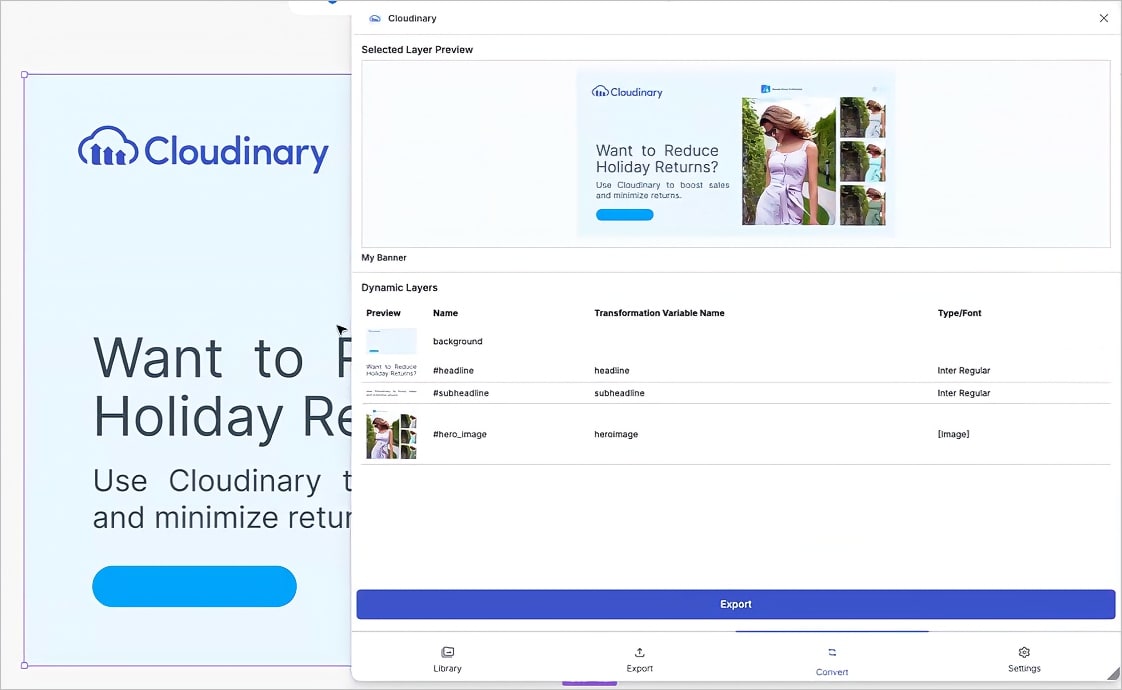
Convert layers to Cloudinary transformations (Early Access): Translate your Figma designs into Cloudinary transformation URLs with dynamic variables. This feature bridges the gap between designers and developers, enabling creative automation workflows where design variations can be programmatically generated by changing URL variables.
Improved SVG import: SVG importing now preserves all layers, ensuring your vector elements remain editable and true to their original design.
Adobe file import support: You can now import EPS, AI, and PSD files. These are automatically rasterized and imported as PNGs for effortless use inside Figma.
Learn more about the Figma Plugin
Coming soon
Enhanced search experience
The Advanced Search interface is getting a major refresh to make finding assets faster and more intuitive:
- Multiple search types: Seamlessly switch between text-based, visual, and AI-powered search methods to find assets the way that works best for you
- Improved discoverability: Saved searches and visual search are now more prominent and accessible throughout the interface
- Smarter filtering: Sort results by usage metrics to quickly find your most frequently accessed assets
- Natural language support (Visual Search): An expanded search field encourages longer, more descriptive queries for better AI-powered results
For accounts with Visual Search enabled, the search-by-image modal will be accessible from every entry point, making it easier to find visually similar assets across your Media Library.
Here's a preview of the enhanced search experience. Please note that the design isn't final and may change before release:

New Studio
We've upgraded the Studio experience to make image transformations feel smarter, more hands-on, and easier to refine.
Key highlights:
- More powerful AI assistance: Use natural language to describe how you want to edit your image. The AI suggests transformations and shows you a preview before you apply them.
- New ways to interact with images: More precise cropping and canvas control, plus the ability to fine-tune AI-powered transformations using refiners.
- A smoother, more responsive experience: A refreshed interface that's faster and more intuitive from start to finish.
With the new Studio, you can build transformations, save them as named transformations and transformation templates, apply them to one or more images, and refine AI-generated versions of images.
This version of the Studio is available for accounts on Assets Free plans, created after 15th December 2025. It will be rolled out to all customers over the coming weeks.
Cloudinary Moderation
Cloudinary Moderation, our new AI-based product for keeping visual content on-brand, high-quality, and consistent at scale, is available in Beta. Contact Support or your Cloudinary representative to request access.
Cloudinary Moderation uses AI tailored to your visual guidelines to validate assets for brand consistency, quality, and compliance. It functions like a dedicated brand reviewer, ensuring every asset meets your standards before it goes live. By automating what used to be a time-consuming manual task, it creates a scalable, reliable guardrail for teams handling high-volume content across marketing, marketplaces, and UGC flows.
Error
Rate this page:
