 Ask AI
Product Gallery
Last updated: Aug-11-2026
Cloudinary's Product Gallery is an interactive user interface for displaying your products to your users on your website or application. The Product Gallery requires only pure JavaScript to integrate, is easy to use within any web development framework, and eliminates the need to develop an in-house interactive media gallery with just a few lines of code.
This guide describes the latest version of the Cloudinary Product Gallery.
- Quick example
- Install and configure the Product Gallery widget
- Product Gallery video tutorial
- Displaying assets
- Customizing styles
- Carousel options
- Generating Product Gallery code for Media Library assets
- Responsive widget
- Cloudinary video player
- Gallery events
- Multiple zoom
- Integrating with Google Tag Manager
- Accessibility
- Product Gallery tips and considerations
For details on the available parameters, types, ENUMS, events, and instance methods, see the Product Gallery reference.
Quick example
To use Cloudinary's Product Gallery widget in your site, include a remote JavaScript file and then specify the following (minimum) information when calling the galleryWidget method to initialize the widget:
- Your Cloudinary product environment cloud name.
- The containing element on the page.
- The media assets to populate the widget - in this case:
- all images tagged with
electric_car_product_gallery_demo - all videos tagged with
electric_car_product_gallery_demo - a 360 spin set composed of all images tagged with
electric_car_360_product_gallery_demo
- all images tagged with
The render method is called to display the initialized widget:
For business-critical apps, you're advised to specify the version of the Product Gallery JavaScript file and not use latest, particularly if your implementation includes customizations.
See the Product Gallery changelog for available versions and register for notifications to stay informed of new releases. Only update the version numbers in your code after testing new releases.
Sample app: Product Gallery widget
Try out the example above in this JavaScript sample app or grab the code for your favorite framework from the Github links below.
Uncomment various config options in the sample app to add new functionality or change display preferences.
 Grab the code for your favorite framework from the Github links below
Install and configure the Product Gallery widget
To add Cloudinary's Product Gallery widget to your site:
Prerequisite: Make sure client-side asset lists are enabled.
-
Include the JavaScript file:
https://product-gallery.cloudinary.com/<version>/all.js. - Add a containing element for the widget.
-
Initialize the Product Gallery widget with the
cloudinary.galleryWidget(options)method. -
Render the Product Gallery widget with the
render()method. -
Optional. Update the Product Gallery widget with the
update(options)method.
- You can select assets from the Media Library and generate Product Gallery code for those assets in an interactive UI. The UI also enables you to set a variety of customizations and preview the output as well as the code for those settings.

- You can use the Cloudinary CLI to generate basic skeleton code for a Product Gallery:
Prerequisite: Make sure client side asset lists are enabled
The Product Gallery needs access to client-side asset lists. By default, this delivery type is restricted.
To enable it in your Console Settings, navigate to Settings > Security > Restricted media types and make sure that the Resource List checkbox is clear.
1. Include the JavaScript file
You can choose between always importing the latest version of the Product Gallery Javascript file or importing a specific version.
All the latest Product Gallery functionality is included in https://product-gallery.cloudinary.com/latest/all.js.
To include a specific version of the Product Gallery, replace latest with the version number you want to include.
For example, for a specific version (e.g., 1.2.2):
For business-critical apps, you're advised to specify the version of the Product Gallery JavaScript file and not use latest, particularly if your implementation includes customizations.
See the Product Gallery changelog for available versions and register for notifications to stay informed of new releases. Only update the version numbers in your code after testing new releases.
2. Add a containing element for the widget
Place the HTML element on the page where you want the Product Gallery to be rendered. Make sure that the element has a unique id attribute (if more than one element with the specified ID exists, the first element will be used as the container for the widget). The widget is responsive and will take up all the available width of the element: if necessary, use the style attribute of the element to constrain its width.
For example:
3. Initialize the Product Gallery widget
The JavaScript method for initializing the widget is publicly available after including the Product Gallery's JavaScript file, which instantiates the cloudinary class and grants access to the cloudinary.galleryWidget(options) method. This method creates a Product Gallery instance in memory, where options is a map of the Product Gallery parameters to apply.
The options must include the following 3 required parameters:
- Your Cloudinary product environment
cloudNameparameter. - The
containerelement on the page for the widget. - The
mediaAssetparameter with all media given as an array of assets. The individual assets in the array can be described either by an Asset object or by a PublicID string (as a shortcut for images only).
For a complete list of parameters available for configuring the Product Gallery widget, see the Parameter tables.
For example, to initialize a new widget populated with all images that have the "clock" tag:
You can additionally define a number of optional configuration parameters. For example, if you're an Advanced plan user with a private CDN and a custom distribution, you can set privateCdn and secure parameters to true, and configure the secureDistribution parameter to match your setup and ensure the widget delivers your assets using the correct URLs:
See below for more examples on populating the Product Gallery widget with assets.
4. Render the Product Gallery widget
The galleryWidget method creates and initializes the widget but doesn't display it until the render() method of the returned instance is called.
For example:
5. Optional. Update the Product Gallery widget
Use the update(options) method if you want to update an already rendered widget, where options is a map of Product Gallery widget configuration parameters to apply.
For example:
Product Gallery video tutorial
This tutorial walks you through the steps described above.
This video is brought to you by Cloudinary's video player - embed your own!
Use the controls to set the playback speed, navigate to chapters of interest and select subtitles in your preferred language.
Tutorial contents
After watching this overview video, continue reading the sections below to get details on customizing and enhancing your Product Gallery.
Displaying assets
The Product Gallery widget can display images, videos, 360 spin sets, and 3D models. Use the mediaAssets parameter to populate the widget with all media given as an array of asset objects. The individual objects in the array can be described either by an Asset object or by a PublicID string (as a shortcut for images only).
All assets are displayed alphanumerically by their PublicID in ascending order. You can add the sort parameter if you want to change the way the assets are ordered.
For example, to populate the widget with all images that have the "shoe" tag:
- The Product Gallery widget only displays media assets that were uploaded as delivery type
upload. - The Product Gallery widget is incompatible with the Strict Transformations feature due to the number of transformations that need to be generated on the fly.
Videos
To play videos in the Product Gallery widget, populate the mediaAssets parameter with an Asset object: specify the tag used for all videos with the same tag or specify the public_id of the video asset, and specify the mediaType property with a value of "video".
For example, to populate the widget with all videos that have the "shirt" tag:
360 spin sets
360 spin sets allow your users to spin a product around a central axis. In order to display a 360 spin set, the Product Gallery widget fetches all images with a particular tag and combines them into a single entity, where each image is included as a single frame of the resulting 360 spin set (sorted alphanumerically by their public ID).
To add a 360 spin set, populate the mediaAssets parameter with an Asset object: specify the tag used for all images in the 360 spin set, and specify the mediaType with a value of "spin".
For example, to populate the widget with a single 360 spin set created from all images in the demo product environment that have the clock-360 tag:
Spin sets from Panoramic 360 images
An interesting use case for spin sets is to display 360 panoramic images that can also be rotated by a user, giving the effect to the user of turning in place while seeing the 360 view. The Product Gallery below displays a 360 spin set and the original landscape image it was created from. For more details, as well as a simple script for making a spin set from a panoramic image, see the blog post on How to Turn 360 Panoramic Images Into 360 Spin Sets.
3D models
3D models are one of the best ways for your users to interact with a product and view it online from multiple angles. The Product Gallery widget supports 3D models that have been zipped and uploaded to Cloudinary (see Uploading 3D models for more information).
To add a 3D model, populate the mediaAssets parameter with an Asset object: specify the publicId of a single model (or a tag for multiple models) and specify the mediaType with a value of "3d".
You can also control how the model is displayed and the look and feel of the zoom and augmented reality (AR) controls by including the ar3dProps parameter.
For example, to populate the widget with a 3D model in the demo product environment that has the public ID of DamagedHelmet3D, and set it to rotate automatically:
Customizing AR functionality
You can customize the AR (augmented reality) experience by using your own custom AR modal and/or button instead of the default ones provided by the Product Gallery widget.
Using a custom AR modal
To use a custom AR modal while keeping the native "view in AR" button, set useCustomArModal: true and listen to the onArClick event to display your custom modal when the button is clicked:
HTML template:
Using a custom AR button
To use a custom "view in AR" button and a custom AR modal to display the QR code, set showAR: false to hide the native AR button and listen to the onQrReady event to capture the QR code data when it's ready:
HTML template:
Display mode
The following video gives a brief demonstration of the different display modes for the Product Gallery:
The Cloudinary Product Gallery widget can be configured with the following parameters of the displayProps object:
-
mode:-
classic - (Default) The assets are displayed one at a time in the main viewer.
-
expanded - The main viewer is expanded and all assets are displayed in vertical columns. Not supported by mobile devices where the widget always uses classic mode.
The following parameters of the
displayPropsobject are relevant only when themodeparameter is set to 'expanded': -
classic - (Default) The assets are displayed one at a time in the main viewer.
spacing- The spacing between assets in pixels.columns- The number of columns to display simultaneously (1 column by default).topOffset- The offset of the carousel and the selected asset from the top of the page in pixels (to account for other elements on the page, like menus).bottomOffset- The offset of the carousel and the selected asset from the bottom of the page in pixels (to account for other elements on the page, like footers).
For example, to configure the widget to display all assets in an expanded viewer:
When the widget is configured for expanded mode:
- The carousel is rendered as a floating element (by default). This property is controlled by the
stickyparameter of the carousel customization object (ThumbnailProps or IndicatorProps). - The height of your displayed assets shouldn't be larger than the viewport height, which can potentially be an issue on large screen resolutions. Note that the height is controlled indirectly by a combination of the container width + aspect ratio. Best practice is to either set a fixed width for your container, and/or select an appropriate aspectRatio (e.g., 4:3 for landscape).
- Not all browsers support 'scrollTo' behavior by default. To smoothly scroll to selected assets, instead of 'jumping' to them instantly on Edge and Safari browsers, include a polyfill for scrollTo behavior.
Responsive assets
The Cloudinary Product Gallery widget automatically resizes itself to fit within the available width of the containing HTML element. This feature includes an automatic responsive solution for displaying assets that works as follows:
- A Cloudinary dynamic transformation URL is automatically built on the fly to deliver an asset that's scaled to the closest breakpoint step (every 100 pixels by default) according to the available width and resolution.
- If the window is consequently enlarged then new higher resolution assets are automatically delivered, while using breakpoint steps (every 100 pixels by default) to prevent generating and delivering too many assets.
- If the window is scaled down, client-side scaling is used instead of delivering a new image.
To change the breakpoint step size, you can include the following optional parameters:
-
imageBreakpointto override the value for images and 360 spin sets assets (default: 100). -
videoBreakpointto override the value for video assets (default: 100).
For example, to change the breakpoint step size to every 150 pixels for the images, and to 200 pixels for the videos:
Applying transformations
By default, the widget applies the following transformations to media assets displayed in the widget:
-
For images (including 360 spin sets):
-
For videos:
You can override any of these default transformations by adding the transformation parameter to the Asset object when populating the widget with the mediaAssets parameter.
For example, to use the fill crop mode instead of the default pad crop mode:
If you also want to add other transformation parameters, use the transformation object of the transformation parameter. For example, to add images tagged with "shirt" and also add an overlay of the cloudinary_icon_blue image in the top right corner:
You can both override transformation parameters and supply additional parameters. For example, to add images tagged with "shirt" that now use the fill crop mode, and also add an overlay of the cloudinary_icon_blue image in the top right corner:
By default, the default transformations are applied before the additional transformations. If you want to apply the default transformations after the additional ones, set the prefixed parameter to false. For example, to remove the background of the images before applying the default transformations:
Populating the widget examples
The mediaAssets parameter is used to populate the widget. The parameter accepts an array of values where each of them can be described either by an Asset object or by a PublicID string (as a shortcut for a single image only).
The following are example values for the mediaAssets parameter:
-
All images tagged with "shirt":
-
All video assets tagged with "bag":
-
All images tagged with "bag" and all videos tagged with "luggage":
-
A video asset with the PublicID "t-shirt":
-
A 360 spin set created from all static images tagged with "my-360-tag":
-
An image with the PublicID "bag" with a cartoonify effect applied:
-
An image created from the middle frame of a video asset with the PublicID "clock":
-
An image with the PublicID "book", a 360 spin set created from all static images tagged with "360-book", and a video with the PublicID "book-vid":
Customizing styles
The Product Gallery interface is extensively customizable, whether you need to increase the size of thumbnails in the carousel, move the location of the zoom viewer or implement your own colorization scheme. See the Product Gallery reference documentation for a listing of all the customization options.
Carousel options
The carousel is the component of the widget that's used for indicating the amount of assets, showing which asset is currently displayed in the main viewer, and for cycling through the assets. There are 2 styles defined for the carousel, which can be set with the carouselStyle parameter:
-
thumbnails- small thumbnail images.
-
indicators- a series of small icons.
-
none- no carousel component is displayed: only the main viewer navigation buttons are available for cycling through the assets.
Both styles are highly customizable and the default values can be changed by overriding the thumbnailProps parameter with a new ThumbnailProps object or overriding the indicatorProps parameter with a new IndicatorProps object.
For example, to customize the thumbnail style to display 75x75 images, set a spacing of 4 pixels between the images, and color the navigation buttons green:
Generating Product Gallery code for Media Library assets
You can select images, videos, and 360 spin sets from your Media Library and automatically generate the code for a Product Gallery containing these assets. When you use this option, the Product Gallery generator UI opens, displaying a preview of the Product Gallery with default style and carousel options. You can then use the Generator UI options to customize the Gallery styles and carousel options. As you make your selections, both the preview and gallery code update automatically.
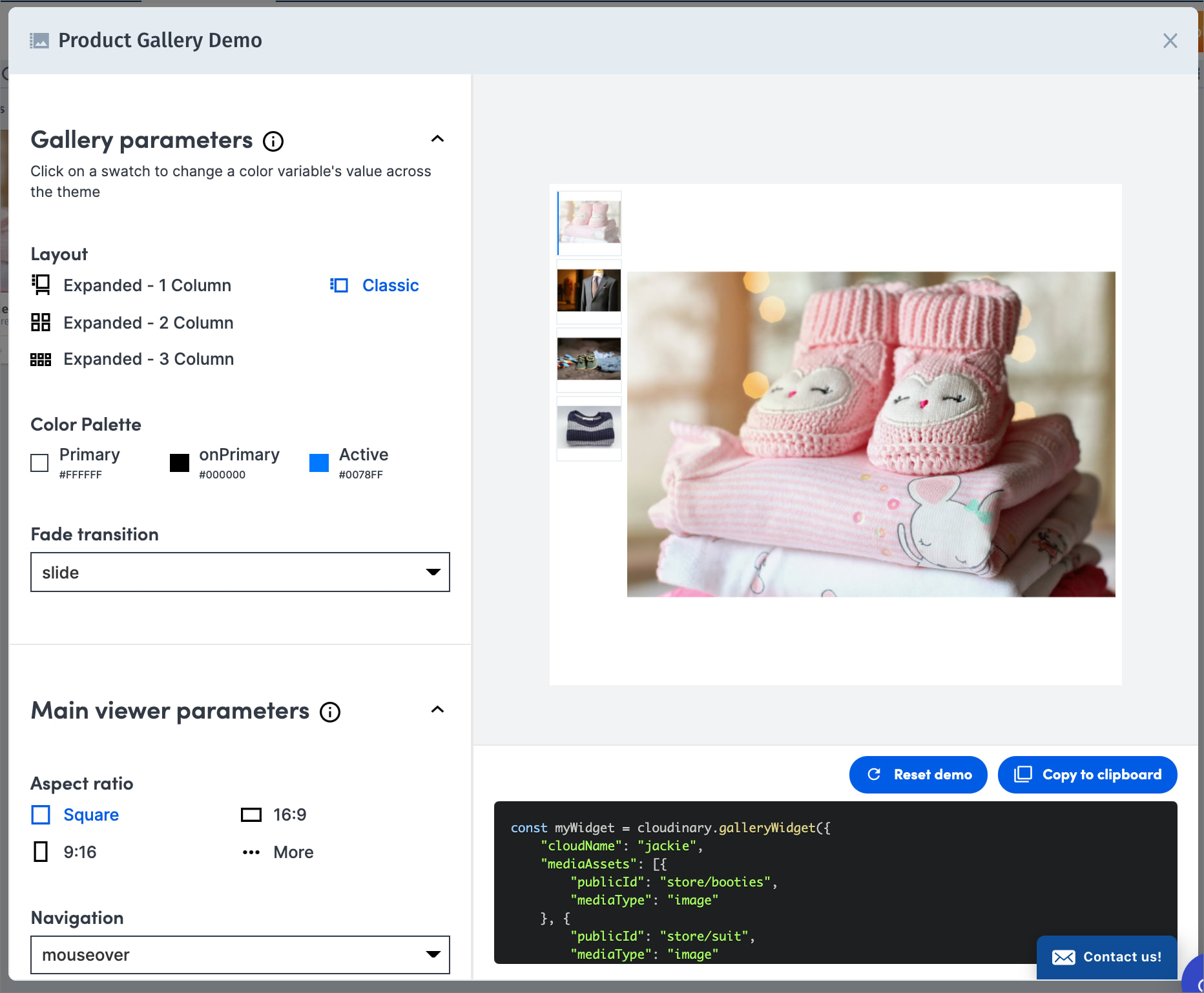
Besides enabling you to quickly generate your Product Gallery code and experiment with the various customization options, this can also be a useful tool for working together with product or marketing managers to decide on the preferred customizations before implementation.
To generate Product Gallery code from the Media Library:
- In your application code, include the Product Gallery JavaScript file and a containing element for the widget, as described in the first steps of the Product Gallery installation workflow. Additionally, verify the following options are set in your Console Settings:
- Make sure the Resource List checkbox is cleared in Settings > Security > Restricted media types.
- If your product environment is set to use Strict Transformations, add your domain to the list in Settings > Security > Allowed strict referral domains.
- Make sure the Resource List checkbox is cleared in Settings > Security > Restricted media types.
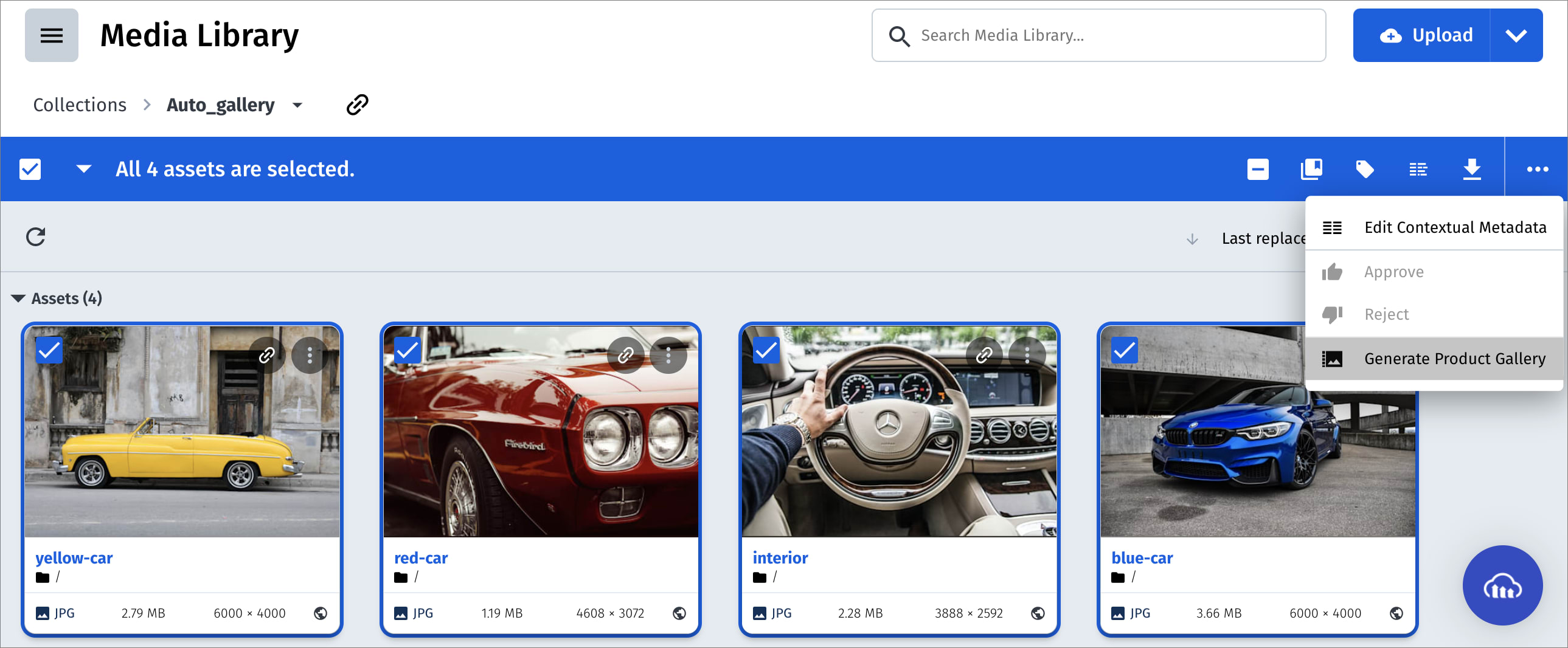
- In the Media Library, select the assets you want to include in your gallery.
- If all the required assets aren't stored in the same folder, you may first want to add them all to the same Media Library collection or perform an advanced search (based on a tag value or other value that they have in common), so that all the required assets are in the same view for easy selection.
- The assets you select must be of type
upload(not fetched or social media assets) and must be public (not restricted). - By default, the assets you select will be added to the gallery in ascending alphabetical order by public ID. If you want to control the order of the assets, you must do some reparation. For details, see Controlling the order of assets in a generated Product Gallery
- If you want to include 360 spin sets in your Product Gallery, you must do some preparation. For details, see Including 360 spin sets in a generated Product Gallery.
- Currently, adding 3D models to a generated Product Gallery via the UI isn't supported. You can add 3D models to your code manually after you copy the embed code to your container element in your application or site code.
-
In the asset toolbar, select Generate Product Gallery.

The Product Gallery Generator opens and displays the preview and embed code for the Product Gallery with your selected assets.
-
After customizing the Product Gallery options to fit your needs, use the Copy to Clipboard button to capture the embed code for your Product Gallery and paste it within a
scriptHTML tag in your application code.The generated code assumes that your container ID is:
"#my-gallery". Adjust this as needed.
Controlling the order of assets in a generated Product Gallery
When assets are added to a Product Gallery by public ID, the order that the assets are displayed is based on the order that they're specified within the mediaAssets object. By default, when you select assets from the Media Library for inclusion in the Product Gallery generator, they're added to the mediaAssets object in ascending alphabetical order by public ID. To instruct the Product Gallery generator to add the assets to the mediaAssets object in another order, add a contextual metadata key called placement to each asset. The value of this key for each asset should be a numerical value, where 1 represents the first asset displayed in the gallery.
- You can sort the assets displayed in the Assets, Folders and Collections Media Library pages where you are selecting assets by criteria such as upload date, creation date, original filename, file size, etc. This helps you determine the order for setting the
placementvalues. - The quickest way to manually set contextual metadata for individual assets is by clicking each asset and then setting the context key and value in the Preview pane on the right side of the Media Library. If the Preview pane is closed, click the Open Preview button
 to display it.
Including 360 spin sets in a generated Product Gallery
To include a 360 spin set in your Product Gallery, you must define both a unique tag and a corresponding contextual metadata key to indicate that assets with this tag should be recognized by the Product Gallery as mediaType: "spin".
- Apply a unique tag to all of the assets that make up a specific 360 spin set. You can do this easily from the Media Library, by selecting all of the assets, and then selecting the Tag option from the asset toolbar to add the same tag to all selected assets.
- Apply a contextual metadata entry to all of the assets that make up the 360 spin set, with a key called
spinset_tagand a value matching the unique tag value you set in step 1. You can do this easily from the Media Library, by selecting all of the assets, and then selecting the Edit Contextual Metadata option from the asset toolbar to add the same contextual key and value to all selected assets. - Follow the general instructions for Generating Product Gallery code for Media Library assets. When selecting the assets to include in the Product Gallery, it's enough to select any one of the assets from your spin set. Because that asset includes the
spinset_tagcontextual metadata key, this instructs the Product Gallery generator to include all assets with the specified tag as part of a singlemediaType: "spin"asset.
Responsive widget
The Product Gallery widget itself is also responsive to the available width of the user's view port (browser or mobile device). By default, the Product Gallery widget has a single viewportBreakpoint set for a width of 520 pixels, in effect creating 2 viewing modes as follows:
- Width over 520 pixels: A thumbnail styled carousel located on the left of the main viewer (the default main widget configuration).
- Width up to 520 pixels: A thumbnail styled carousel located below the main viewer.
You can set your own view port breakpoints for the Product Gallery widget by overriding the viewportBreakpoints parameter. This parameter accepts an array of BreakpointProp objects, where each object in the array defines the widget configuration settings for a specified width or less. The main widget configuration is used when the widget has a width larger than the largest given breakpoint in the array.
For example, to have 3 different viewing modes for the Product Gallery widget as follows:
- over 600 pixels: a thumbnail styled carousel located to the left of the main viewer
- up to 600 pixels: a thumbnail styled carousel located below the main viewer
- up to 300 pixels: an indicator styled carousel located below the main viewer with navigation buttons always enabled
Cloudinary video player
The Product Gallery also supports using the Cloudinary Video Player to play videos, instead of using the default HTML5 video player. The Cloudinary Video Player is a JavaScript-based video player bundled with many valuable customization and integration capabilities, and is monetization and analytics-ready.
To use the Cloudinary Video Player within the Product Gallery set the playerType property of the videoProps parameter to 'cloudinary'. This is a global setting for the Product Gallery and affects all videos played within the Product Gallery.
For example, to use the Cloudinary Video Player to play all the video assets:
Cloudinary Video Player configuration options
You can configure and customize the Cloudinary Video Player for the Product Gallery widget by also including any of the Video Player configuration options in the videoProps parameter. All the configuration options added to the videoProps parameter will affect all the videos played within the Product Gallery.
For example, to only show a larger central play button when a video is initially loaded, include the bigPlayButton parameter set to 'init':
Cloudinary Video Player source options
You can also individually configure each of the video assets (sources) you display within the Product Gallery by including any of the Video Player source options within the videoPlayerSource property for each of the video assets given in the mediaAssets parameter.
For example, to configure adaptive streaming options for playing the "dog" video, with hls as the primary format and dash as a fallback option for browsers that don't support HLS:
Cloudinary Video Player interactive video example
The following is an example of using the Interactive Video feature of the Cloudinary Video Player in the Product Gallery. Using the mediaAssets parameter, the video is configured with 2 clickable interaction areas that each play a different zoomed in version of the video, and the videoProps parameter includes the theme and layout definitions for displaying the interactive functionality:
Gallery events
You can register to a variety of Product Gallery widget events in order to introduce custom behavior in your application or for analytics tracking once your application is deployed. Use the on method with an initialized widget to register to a specific event. For example, to register the initialized myGallery Product Gallery widget to the mouseenter event:
For a full listing of available events, see the Events section in the Product Gallery reference.
Multiple zoom
If you have very high resolution images, you may want to enable the widget with multiple zoom steps to allow your users to see the fine detail in your images. The multi-zoom functionality is only available for the 'popup' type zoom option, and you can set the number of zoom steps between 0 and 5, where each step zooms in according to the value of the level property. You can also limit the number of steps, so as not to zoom in beyond the original image size, with the stepLimit boolean property.
For example:
- For the best user experience, this feature should only be used when displaying high resolution images, as zooming in on a low resolution image will appear blurry and unclear.
- The zoom popup covers the whole screen area, full screen, with +/- buttons that let the user zoom in and out (mobile devices use pinch to zoom, and the +/- buttons aren't displayed).
- After zooming in, the user can drag the zoomed image to see all parts of the image - only a partial view of the image may be shown on screen each time as the image may be bigger than the screen size.
Integrating with Google Tag Manager
If you have integrated Google Tag Manager on your page, you can tell the Product Gallery widget to update Google Tag Manager's dataLayer array whenever an event is triggered by including the analytics boolean parameter set to true. For example:
Accessibility
Accessible navigation
The Product Gallery enables keyboard accessibility, attending to users who only use a keyboard (unable to use a mouse) or are visually impaired and use a keyboard and a screen reader. Product Gallery end users can use the following keyboard actions as set by accessibility standards:
- Tab and Shift+Tab to navigate forwards and backwards
- Enter to view an asset or zoom
- Esc to exit zoom
- Spacebar to play/pause videos
Cloudinary recommends the following best practice configuration settings for the most 'accessible' experience:
-
displayProps: {mode: "expanded"}- in expanded mode the focus area is more visually prominent. -
zoomProp: {type: "popup"}- zoom appears in a pop-up box. -
videoProps: {controls: "play"}- displays only the play/pause video controls.
Accessible text
The Product Gallery adds alt texts to each asset for enhancing SEO and enabling screen readers. The alt text can be configured via the accessibilityProps parameter, which receives an object detailing the source of the alt text string to use for each asset. The Product Gallery can be configured to take this string either from an asset's Contextual metadata field, or from an asset's Structured metadata field. If neither of these options is configured, the gallery will default to adding a string to the alt text of each asset in the form of "Gallery asset n of m".
The AccessibilityProps object includes the following properties:
-
mediaAltSource- One of:-
contextual: use the value of a Contextual metadata field for each asset, as given by the key passed in the 'mediaAltId' property. -
metadata: use the value of a Structured metadata field for each asset as given by the external_id passed in the 'mediaAltId' property. -
auto: (default) use the order of the asset within the gallery using the template: "Gallery asset n of m".
-
-
mediaAltId- Either the key of a Contextual metadata key-value pair, or the external_id of a Structured metadata field.
For example:
mediaAltSource of 'contextual' or 'metadata' only works when adding mediaAssets with 'tag', and not individually with 'publicId' (you can add the altText property for each individual asset you add)).Sample app: Product Gallery accessibility
Check out this code on GitHub that demonstrates the Product Gallery's accessibility features.
Product Gallery tips and considerations
- The Product Gallery widget only displays media assets that were uploaded as delivery type
upload. - Take note of any special configurations parameters you may need to add when you initialize the Product Gallery widget, for example if you have a private CDN distribution or a custom delivery hostname (CNAME).
- The Product Gallery widget is incompatible with the Strict Transformations feature due to the number of transformations that need to be generated on the fly. A possible workaround is to navigate to Settings > Security > Allowed strict referral domains in your Console Settings and add your domain to the list.
- For best results, and depending on the assets you want to display, you may want to use the 'fill' crop mode and set the correct aspect ratio (especially for multi-columns expanded mode).
- Consider overriding the default gravity parameter to use
autogravity (see Automatic cropping for more details). - In order to comply with Google autoplay policy changes:
- With video autoplay in classic mode, a video will have sound muted by default if the video is the first asset presented, regardless of the value of the
soundparameter in the VideoProps object. - With video autoplay in expanded mode, all videos will have sound muted by default regardless of the value of the
soundparameter in the VideoProps object.
- With video autoplay in classic mode, a video will have sound muted by default if the video is the first asset presented, regardless of the value of the
- Transformation vs bandwidth trade-off: By default, the Product Gallery widget is optimized for bandwidth savings by dynamically transforming assets to minimize file size while delivering the best image to the requesting device/browser, at a cost of using up a large number of transformations. If you want to reduce the number of transformations used at the cost of increasing bandwidth usage, you can:
- Set a larger value for the imageBreakpoints parameter to reduce the number of images generated.
- Set a fixed width for your Product Gallery container element.
- Override the values of the default transformations for one or more of
dpr,fetch_format,quality, to reduce the number of transformations needed. - Set the placeholderImage parameter to false. This parameter determines whether to load and display a low-quality blurred placeholder image while waiting for a higher quality image, instead of displaying a loading spinner (which results in a better user experience for a person on a slow connection).
Error
Rate this page:
