 Ask AI
Assign roles
Last updated: Oct-21-2026
- Free and self-serve paid accounts: All free and self-serve paid accounts have been migrated to the new Roles and Permissions system. Use this guide.
- Enterprise accounts: Enterprise rollout has begun. If your team hasn't already been moved with Cloudinary's help, you're still on the legacy system. See Role-based permissions.
You can confirm which permissions system you have. Open Console Settings and look for Role Management. If it's listed, your account is on Roles and Permissions. If it isn't listed, you're still on the legacy permissions model.
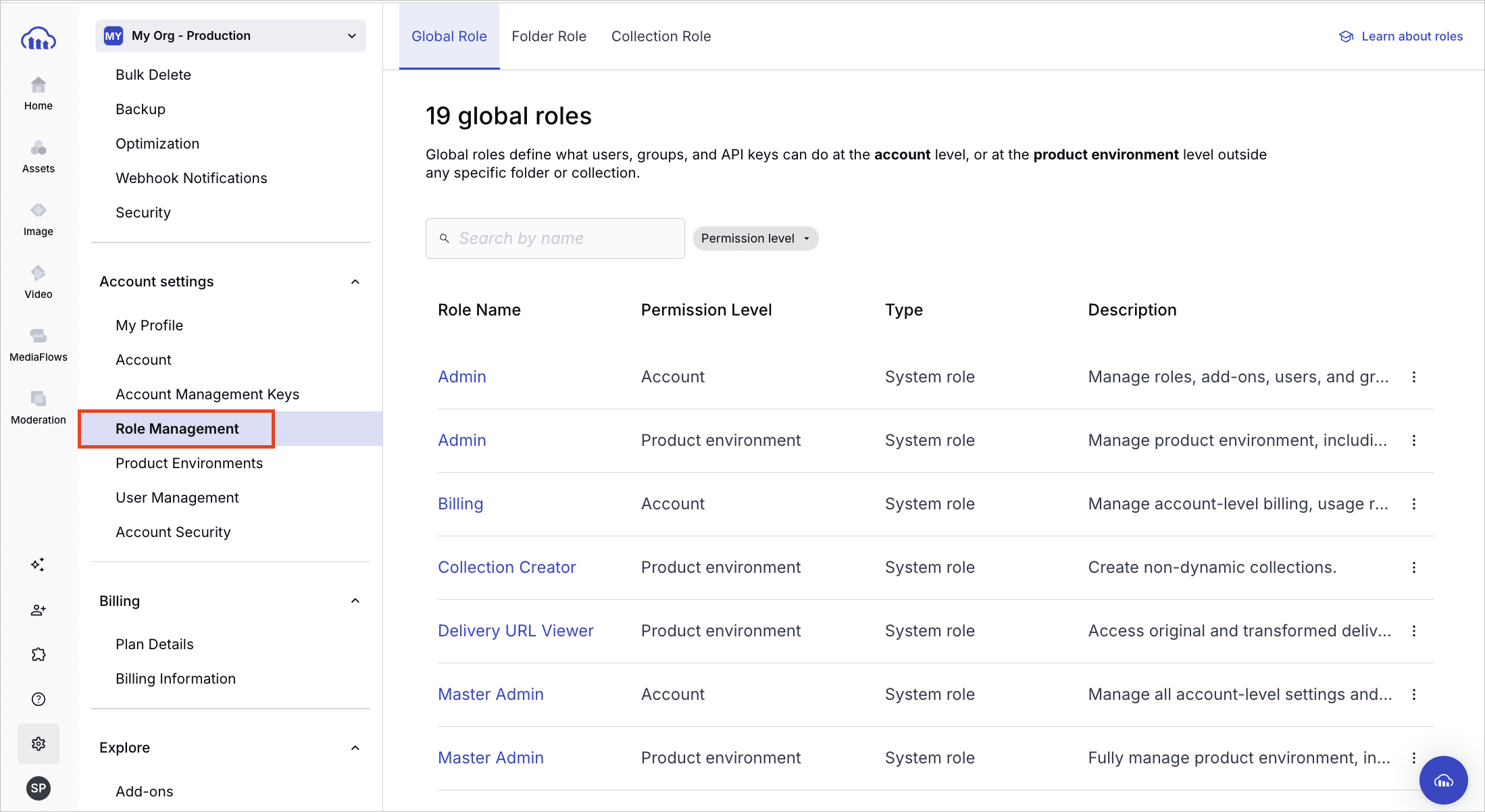
- For a quick comparison, see Roles and Permissions vs. legacy.
- If your account is being migrated, see Migrating to Roles and Permissions to understand what changes.
Overview
You can assign all roles defined in your account to principals, including users, groups, and API keys.
Use the Permissions API to assign global, folder, and collection roles. Enterprise plans only.
Use the Admin API to assign folder roles. All plans.
On the Free plan and on self-serve paid plans, you can:
- Manage and assign system roles on the Role Management page of the Console Settings.
- Assign folder roles to API keys and other principals programmatically via the Admin API.
Assign roles via the Permissions API
Use an account management key, a credential available on Enterprise plans only, to manage and assign all roles via the Permissions API.
Each role assignment requires the role's id:
- For system roles, see the System role and policy reference or the public catalog endpoint (no authentication required).
- For all roles, including system and custom, use the GET /roles endpoint.
Base URL and authentication
All Permissions API endpoints on this page use the following base path:
Replace ACCOUNT_ID with your actual account ID.
Find your account ID and credentials in the Account Management Keys page of the Console Settings.
Method 1: Assign a role to multiple principals
Use this method when you want to assign the same role to multiple principals.
Endpoint:
PUT /permissions/roles/{role_id}/principals
The request body should include:
- An
operationfield (at the top level) that defines whether to add or remove the listed principals. - A
principalsarray containing one or more principal assignment objects.
| Field | Applies To | Description |
|---|---|---|
operation |
Top-level | Whether to add or remove the listed principals from the role. Values: add, remove
|
| Principal object fields: | (Each object in the principals array must include the following fields.) |
|
principal_type |
Each role assignment | Type of principal. Values: user, group, apiKey, provisioningKey
|
principal_id |
Each role assignment | Unique ID of the user, group, or key receiving the role. |
scope_id |
Each role assignment (if scoped to a product environment) | The product environment ID. Find this on the Product Environments page. |
policy_parameters |
Each role assignment (if the role applies to a specific folder or collection) | ID of the folder or collection the permission applies to. |
Example 1: Assign principals to an account role
Example 2: Assign a global role across different product environments
Example 3: Assign a content role to different folders
Example 4: Remove a principal from a role
Method 2: Assign roles to a principal
Use this method to assign multiple roles of different permission types and scopes (account, product environment, global, and content) to a single principal:
PUT /permissions/principal_roles
The request body should include:
- An
operationfield (at the top level) that defines whether to add or remove the roles from the specified principal. - A
principalobject specifying the principal to assign roles to. - A
rolesarray containing one or more role assignment objects. Each object may optionally includescope_idand/orpolicy_parameters, depending on the role.
| Field | Applies To | Description |
|---|---|---|
operation |
Top-level | Whether to add or remove the listed roles from the principal. Values: add, remove
|
| Principal object fields: | (The principal object must include the following fields.) |
|
principal_type |
The principal | Type of principal. Values: user, group, apiKey, provisioningKey
|
principal_id |
The principal | Unique ID of the user, group, or key receiving the role. |
| Role object fields: | (Each object in the roles array must include the following fields.) |
|
id |
Each role | ID of the role to apply to the principal. |
scope_id |
Each role assignment (if scoped to a product environment) | The product environment ID. Find this on the Product Environments page. |
policy_parameters |
Each role assignment (if the role applies to a specific folder or collection) | ID of the folder or collection the permission applies to. |
Example: Assign multiple roles of different types to a principal
Inspecting role assignments
Use these endpoints to view current role assignments and permissions:
| Endpoint | Use Case |
|---|---|
| GET /roles/{role_id}/principals | See who has a specific role. |
| GET /principal_roles | See what roles a user or key has. |
| GET /principal_roles/inspect | View effective permissions for a user or key (debug access issues). |
View effective permissions
Use the GET /principal_roles/inspect endpoint to check which roles or permission policies apply to a user, group, or key, based on specific content, product environments, or scopes.
This endpoint is especially useful for debugging access issues, such as:
Why a user can or can't access a folder or collection
Whether a key has permission to perform an action in a specific product environment
Confirming inherited or global role assignments
You can filter by:
Principal:
principal_typeandprincipal_idScope:
scope_type(accountorprodenv), andscope_idif neededContent instance:
folder_id,collection_id, orasset_id
To inspect broad access, you can also use special values like folder_id=all.
Assign folder roles via the Admin API
You can use the Admin API to assign folder roles to users, groups, and API keys. For full details, see folder_operations in the Admin API.
The folder_operations endpoint provides an alternative way to assign folder roles alongside the Permissions API.
You currently can't assign folder roles to API keys in the Console, so the only way to do so is programmatically.
folder_operations endpoint is your only programmatic option here. The Permissions API isn't available on the Free plan or on self-serve paid plans, so use this endpoint to assign folder roles to API keys.
For other role management tasks, see:
- Role-based permissions: An overview of Cloudinary's role-based permissions solution
- Role management in the Console: UI-based role management
- Manage roles: How to manage roles via API
- System role and policy reference: A list of all system roles and system permission polices provided by Cloudinary
- Permissions API reference: Full list of endpoints and schemas
- Define custom policies: Create and apply policies outside of roles
Error
Rate this page:
