 Ask AI
Migrating to Roles and Permissions
Last updated: Apr-20-2026
What to expect
Cloudinary is rolling out a modern, unified Roles and Permissions system designed to provide enterprise-grade access control, structured collaboration, secure automation, and safe AI-driven workflows.
Here's what the migration means for you:
- Zero downtime and zero action required: The migration is fully managed by Cloudinary and requires no downtime or asset reprocessing.
- Continuity of access: All existing permissions are preserved. Any user who could previously view assets, perform actions, or manage folders will continue to do so. Existing roles are automatically mapped to the new system using predefined mappings.
- No rollback: The legacy permissions model is fully retired after migration. Migrated accounts cannot revert to the old system.
- Free and self-serve paid accounts: All free and self-serve paid accounts have been migrated to the new Roles and Permissions system.
- Enterprise accounts: Enterprise rollout has begun. If your team hasn't already been moved with Cloudinary's help, you're still on the legacy system.
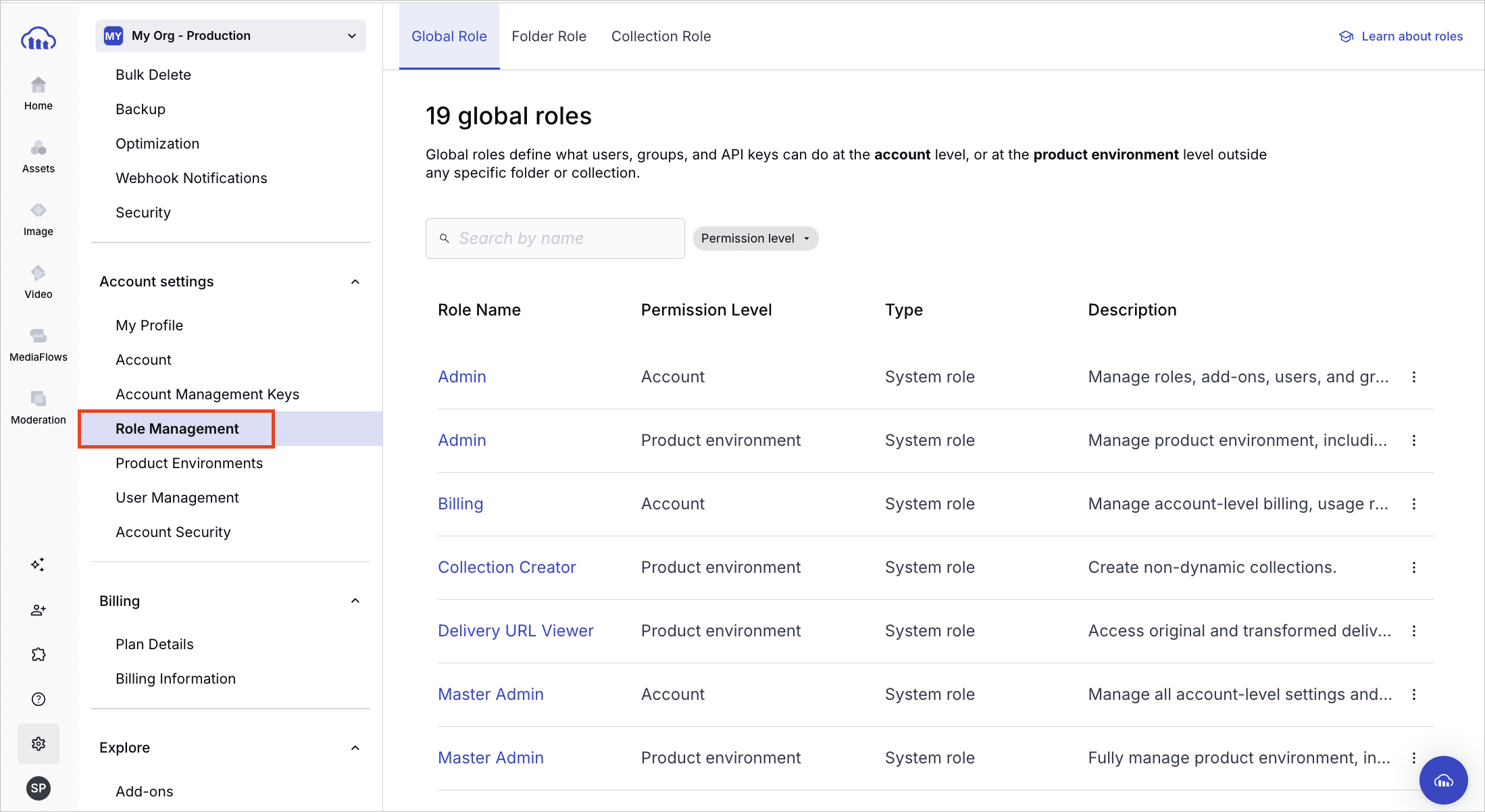
You can confirm which permissions system you have. Open Console Settings and look for Role Management. If it's listed, your account is on Roles and Permissions. If it isn't listed, you're still on the legacy permissions model (your account hasn't been migrated yet).
What's new
After migration, you'll notice a brand-new, centralized UI for managing roles and permissions:
- Centralized Role Management page: Instead of permissions being scattered across different areas, there is now one unified place in the Console to manage roles and assignments across the entire platform.
- Redesigned invite and assignment modals: The modals for inviting users, managing groups, and configuring API keys have been completely redesigned. When inviting users, you can assign them to groups, apply an access bundle for quick setup, or assign roles directly:
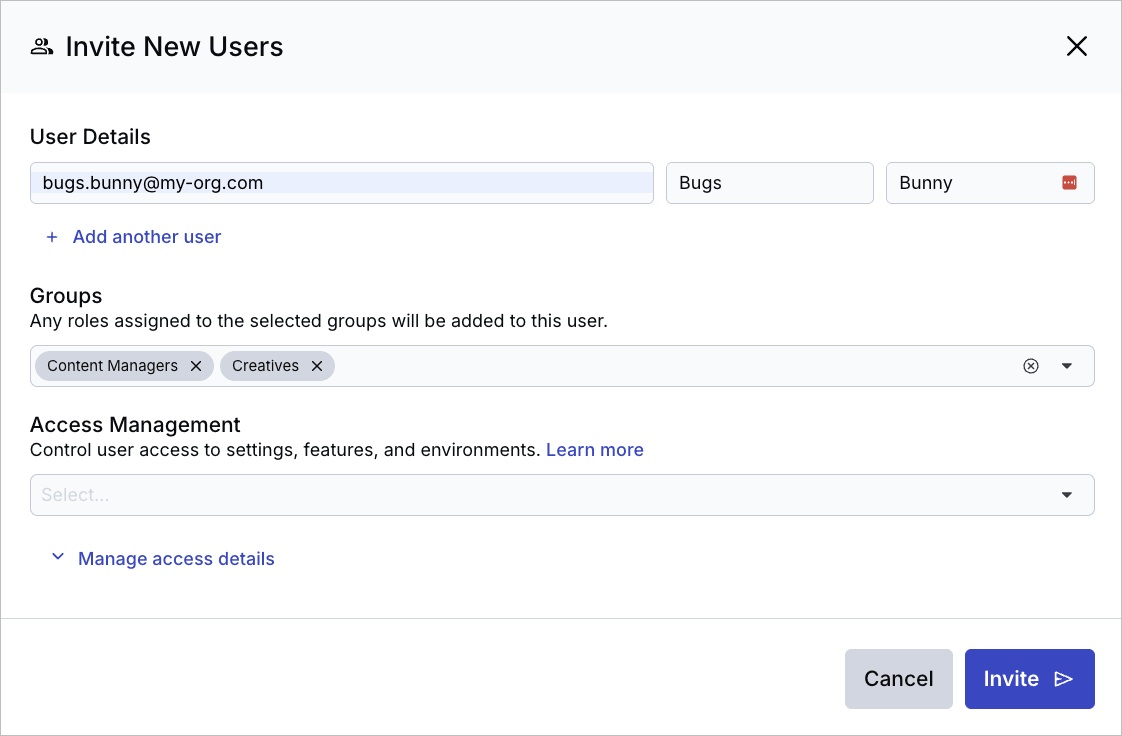 Assign to groups
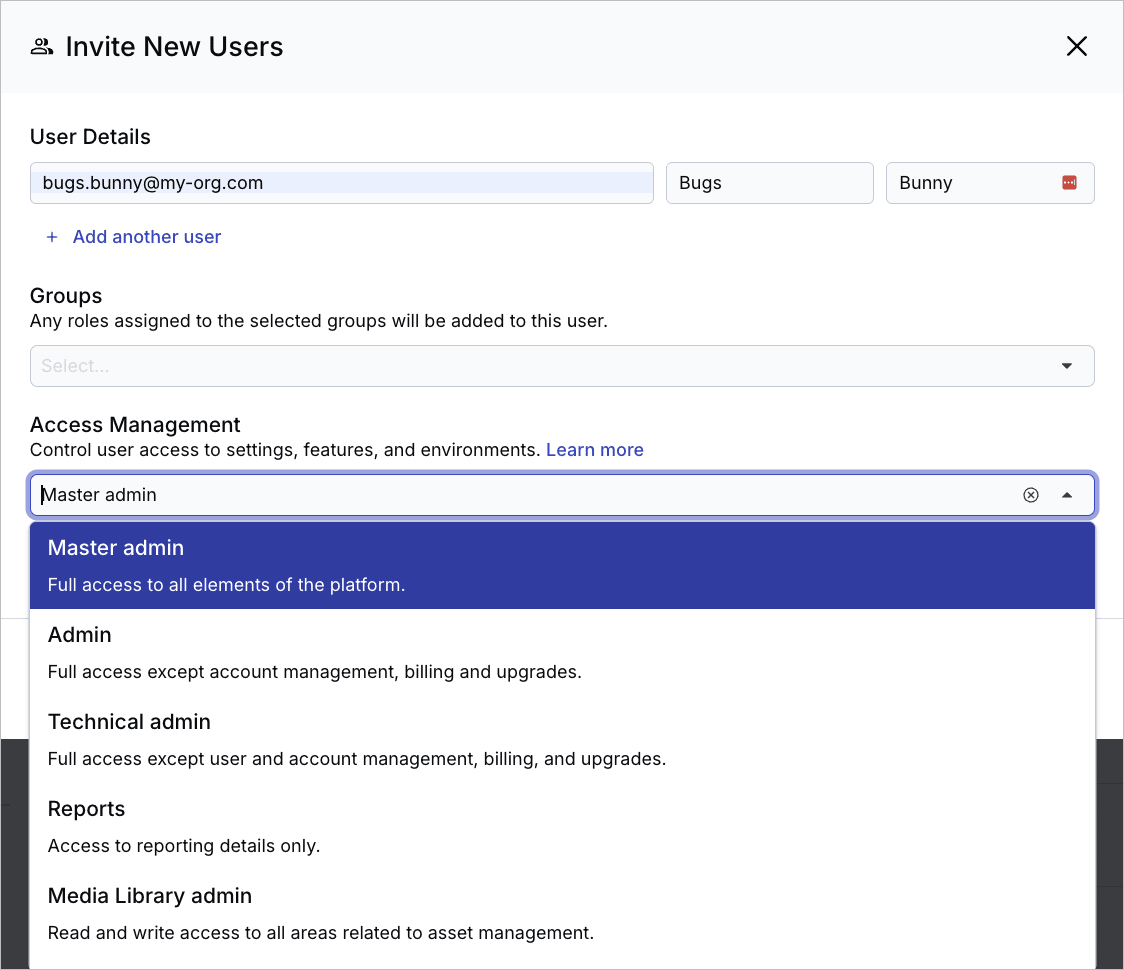 Apply an access bundle
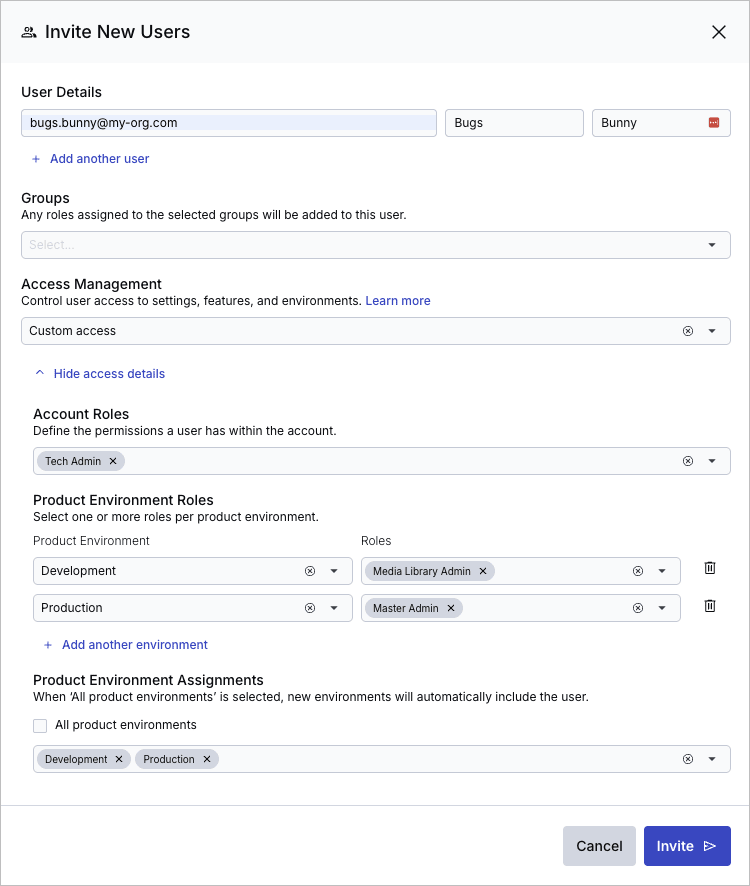 Assign roles directly
- Multiple roles per user, group, or API key: You're no longer restricted to a single role per principal. The new system is aggregative — access is determined by the union of all assigned roles.
Key structural changes
While your existing access is preserved, the underlying model has been upgraded for much more flexibility:
- Account vs. product environment roles: In the past, roles applied globally across your entire account. Now, roles are split. You can assign account-level roles (such as Account Master Admin, Account Admin, Account Billing) and product environment-level roles (such as Master Admin, ML Admin, Moderator) separately.
- Different roles per environment: You can now assign different roles to the same user across different product environments. For example, a user can be an Admin in your Staging environment but only have Viewer access in your Production environment.
- Global roles for user groups: Previously, groups could only carry folder and collection access permissions, with the primary role assigned to each member individually. Now you can assign the primary role in the form of global roles (account-level and product environment-level) directly to a group, and all members inherit those roles automatically.
- Consistent UI and API enforcement: Permissions are now consistently enforced across the Cloudinary Console and APIs, ensuring backend-level access control.
Changes to user, folder, and collection management
Folder roles
Previously, folder-level access was restricted to users with the Media Library User role. In the new system, content roles (Viewer, Contributor, Editor, Manager) can be used much more flexibly by different users.
If you're used to sharing folders, the modal looks and feels mostly the same, but there's an additional folder role called Distributor, which grants permission to manage public links.

Media Library permissions as standalone roles
Specific Media Library capabilities that used to be toggles inside the user invite modal — such as Show delivery URL, Create collection, and Create proof — are now standalone global roles (Delivery URL Viewer, Collection Creator, Proof Manager). Because they are independent roles, they can be assigned to anyone in the system.
Collection roles
The existing collection permission levels (Can view, Can share, Can collaborate, Can manage) have been unified into the central role-based access control infrastructure as predefined content roles.

Changes to API and account management keys
To improve security and support safe automation, both product environment API keys and account management keys (formerly provisioning API keys, and account API keys, Enterprise only) are now fully integrated into the role-based access control system. New keys of either type are created with no default permissions. You must explicitly assign a role for them to work.
Existing keys are automatically migrated to preserve current access:
- Product environment API keys: Migrated to the product environment Master Admin role.
- Account management keys: Migrated to the account Master Admin role.

Permissions tiers
While the unified permissions foundation applies to everyone, advanced capabilities depend on the permissions capabilities available to your account.
- Core permissions capabilities: Includes the Roles and Permissions infrastructure and UI, role assignments across product environments, role assignments to API keys, multiple roles per user or group, and out-of-the-box global and content predefined roles.
- Global role granularity: Unlocks granular action-level role configuration. You can create custom roles, both global and content roles, and grant granular API key permissions based on specific allowed actions. Also unlocks the new Permissions API for automated, programmatic management of roles and groups at scale.
- Content role granularity: Unlocks granular folder-level and content-level access control. You can assign predefined content roles to users, groups, and API keys on specific folders and collections, so each principal gets only the access they need to the content they work with.
Role mapping reference
The following tables show exactly how your existing roles, permissions, and API keys are automatically translated into the new system during migration.
Global user roles
In the legacy system, roles were applied globally. They are now split between account and product environment contexts.
| Legacy role | New account role | New product environment role |
|---|---|---|
| Master Admin | Account Master Admin | Master Admin |
| Admin | Account Admin | Admin |
| Technical Admin | Account Tech Admin | Tech Admin |
| Billing | Account Billing | — |
| Reports | Account Reports | — |
| Media Library Admin | — | ML Admin |
| Media Library User | — | ML User |
(Custom) modify_account_settings & view_reports
|
Account Billing | — |
Media Library permissions (standalone roles)
Previously, these were hidden toggles inside the user invitation modal under the Media Library User role. They are now explicitly assigned as standalone roles at the product environment level.
| Legacy Media Library permission | New standalone role |
|---|---|
create_collection |
Collection Creator |
show_delivery_url |
Delivery URL Viewer |
moderate_asset |
Moderator |
create_proof |
Proof Manager |
Folder roles
Legacy folder permissions map directly to the new folder roles.
| Legacy folder permission | New folder role |
|---|---|
viewer |
Viewer |
contributor |
Contributor |
editor |
Editor |
manager |
Manager |
Collection roles
Legacy collection permissions map directly to new collection roles.
| Legacy collection permission | New collection role |
|---|---|
viewer |
Viewer |
share (legacy distributor)
|
Distributor |
collaborate |
Collaborator |
owner |
Manager |
share_collection permission and was a manager of a specific folder or an owner of a specific collection, they will automatically be granted the new Distributor role for those specific folders and collections, to preserve their ability to share public links.Product environment API keys and account management keys
To ensure integrations continue running without interruption, existing keys are assigned the highest environment-appropriate role.
| Legacy key type | New role assignment |
|---|---|
| Product environment API key | Master Admin (product environment) |
| Account management API key | Account Master Admin |
public_apps keys) are excluded from this migration and are not altered.Error
Rate this page:
