
Key takeaways:
- WebCodecs gives developers low-level, browser-native control over audio and video processing, including frame-level encoding and decoding, bitrate, resolution, compression, timing, and codec selection for advanced media applications.
- It is particularly useful for browser-based editing, live streaming, real-time effects, and low-latency workflows, but varying codec and hardware support across browsers means production implementations often require runtime detection and fallback strategies.
- WebCodecs and Cloudinary can serve complementary roles: WebCodecs handles custom processing close to the user, while Cloudinary can handle scalable storage, transformation, optimization, format selection, and global media delivery.
Modern web applications increasingly rely on rich media experiences, from live streaming and video editing to real-time communication tools. As these use cases grow more complex, the limitations of high-level media APIs become more apparent, and where technology like Webcodecs emerge.
Teams building advanced media features often require greater control over how audio and video are processed in web browsers. Addressing this need has led to a new class of browser capabilities designed to support low-level workflows.
The WebCodecs API is a key part of this evolution, giving developers a way to work more closely with the underlying media pipeline.
This article explains how WebCodecs works, where it fits into modern media workflows, and how it can be used alongside platforms like Cloudinary to support scalable video processing and delivery.
In this article:
- What is the WebCodecs API?
- How to Use WebCodecs in Your Projects
- WebCodecs and Media Optimization
- Simplifying Codec Decisions with Cloudinary
What is the WebCodecs API?
The WebCodecs API is a browser-native interface that provides direct access to audio and video codecs (algorithms that encode and decode media for compression and playback). Rather than relying on high-level HTML elements like <video>, it exposes the lower-level processing layer.
It enables developers to work with raw frames and encoded chunks, offering precise control over how media is processed, compressed, and prepared for delivery.
Core capabilities include:
- Processing raw video frames.
- Encoding and decoding media streams.
- Controlling bitrate, resolution, and compression behavior.
- Building custom media pipelines in JavaScript.
How WebCodecs work behind the scenes
WebCodecs operate using two primary components:
- Encoders: VideoEncoder, AudioEncoder
- Decoders: VideoDecoder, AudioDecoder
Media is handled as a sequence of frames or chunks. A typical flow is as follows:
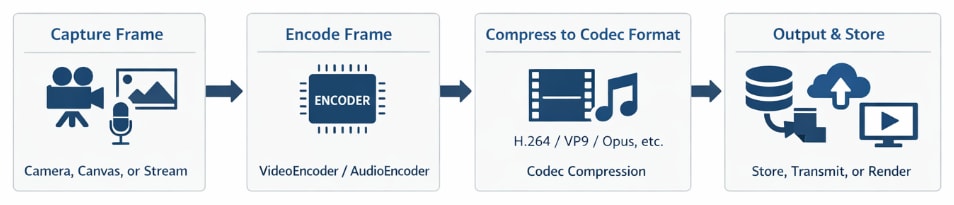
- A frame is captured from a source such as a camera, canvas, or stream
- The frame is passed into an encoder
- The encoder compresses it into a codec-specific format
- The encoded output is stored, transmitted, or rendered
These sources and destinations are not abstract. WebCodecs integrates directly with browser primitives such as Canvas, MediaStream, and WebRTC, allowing frames to move seamlessly between rendering, capture, and real-time transmission contexts.
At this juncture, the mechanics are clear: frames move through a controlled encode/decode pipeline. The next practical question is what formats this pipeline can handle in real-world environments.
What WebCodecs Supports
WebCodecs supports a range of video and audio codecs depending on browser and device capabilities. These may include:
- Video: VP8, VP9, H.264, AV1 (varies by browser)
- Audio: Opus, AAC, PCM
Codec support directly affects compatibility and performance. For example, AV1 offers strong compression efficiency but is not universally supported, while H.264 provides broader compatibility with larger file sizes. These tradeoffs influence how media pipelines are designed for different devices and audiences.
Browser support varies, so production implementations typically include fallback strategies. In production environments, these differences create practical constraints. A pipeline that works in one browser may fail or degrade in another due to missing codec support or limited hardware acceleration. As a result, teams often need fallback strategies, such as switching codecs or adjusting encoding settings based on runtime detection.
This level of control is particularly valuable in scenarios where latency, performance, or customization requirements cannot be met by higher-level media abstractions.
How to Use WebCodecs in Your Projects
Using WebCodecs involves initializing encoders or decoders, configuring them, and processing media frames in sequence. The API provides flexibility, but requires a clear understanding of how media pipelines operate.
Common use cases include:
- Browser-based video editing tools
- Live streaming and broadcasting applications
- Real-time video effects and transformations
- Low-latency media processing workflows
In a browser-based editor, for example, WebCodecs can process frames directly from a canvas, apply transformations, and re-encode the result without relying on external services. This reduces latency and keeps processing closer to the user, which is critical for interactive experiences.
Example: Processing Video Frames and Uploading to Cloudinary
In many workflows, WebCodecs is used for in-browser processing, while Cloudinary manages media after ingestion, covering storage, transformation, optimization, and delivery.
The following example outlines a simplified pipeline:
-
- Encode frames in the browser
- Convert the output into a Blob
- Send it to a backend for upload
const chunks = [];

const encoder = new VideoEncoder({
  output: chunk => {
    chunks.push(chunk);
  },
  error: e => console.error(e)
});

encoder.configure({
  codec: "vp8",
  width: 640,
  height: 480,
  bitrate: 1_000_000
});

function processFrame(frame) {
  encoder.encode(frame);
}

async function finalizeVideo() {
  await encoder.flush();

  const blob = new Blob(chunks.map(c => c.data), { type: "video/webm" });

  const formData = new FormData();
  formData.append("file", blob);

  await fetch("/api/upload-to-cloudinary", {
    method: "POST",
    body: formData
  });
}
In this example, the encoder configuration directly affects output quality and performance. The selected codec (vp8) provides broad browser compatibility, while the bitrate determines the balance between file size and visual fidelity. Lower bitrates reduce bandwidth usage but can introduce compression artifacts, especially in motion-heavy scenes.
Resolution also plays a key role. Encoding at 640×480 reduces processing overhead compared to higher resolutions, making it suitable for real-time scenarios or constrained environments. In production systems, these parameters are often adjusted dynamically based on user device capabilities and network conditions.
This approach keeps encoding logic close to the user while offloading infrastructure concerns. Once uploaded, media can be transformed, optimized, and delivered globally without requiring custom encoding pipelines on the server.
WebCodecs and Media Optimization
WebCodecs provides direct control over how media is encoded and processed, which directly affects playback performance and efficiency. This means it controls things including:
- Bitrate
- Compression settings
- Resolution and scaling
- Frame timing and processing
- Codec selection
These controls make it possible to support low-latency streaming, real-time processing, and custom encoding pipelines.
However, they also introduce some tradeoffs. Reducing bitrate improves playback on constrained networks but can introduce compression artifacts. Increasing resolution improves visual clarity but raises bandwidth and processing requirements. These decisions are typically tuned based on device capabilities, network conditions, and user experience goals.
In reality, these optimization choices are seldom fixed. For example, a live streaming application may lower the bitrate dynamically to maintain smooth playback under fluctuating network conditions, while a video editing tool may prioritize quality over size during export. This variability requires systems that can adapt encoding behavior in real time.
Simplifying Codec Decisions with Cloudinary
Managing codecs across browsers, devices, and network conditions introduces significant complexity. Cloudinary reduces this complexity by dynamically adapting video delivery based on runtime conditions.
This removes the need to maintain separate encoding strategies for different environments. Instead of managing multiple output formats manually, media delivery adapts automatically at request time.
This is particularly valuable in multi-device environments, where the same video must perform well across mobile, desktop, and varying network conditions. Instead of pre-generating multiple versions of a video, Cloudinary enables on-the-fly adaptation, reducing storage overhead and simplifying delivery logic.
Example: Delivering Optimized Video Without Manual Codec Selection
<video controls width="640">
  <source src="https://res.cloudinary.com/demo/video/upload/f_auto,q_auto/sample.mp4" type="video/mp4">
</video>
In this example:
- f_auto selects the most appropriate format for the device.
- q_auto adjusts quality based on bandwidth and performance conditions.
This ensures that the same video asset is delivered in an optimized format without requiring manual codec selection or device-specific logic at the delivery stage, complementing earlier encoding decisions made in the browser with WebCodecs.
In many applications, video URLs are dynamically generated rather than hardcoded. The following example shows how an optimized Cloudinary delivery URL can be constructed programmatically:
const cloudName = "demo";
const publicId = "sample";

const optimizedVideoUrl =
  `https://res.cloudinary.com/${cloudName}/video/upload/f_auto,q_auto/${publicId}.mp4`;

const videoElement = document.getElementById("product-video");
videoElement.querySelector("source").src = optimizedVideoUrl;
videoElement.load();
This approach allows applications to adapt video delivery at runtime while keeping implementation logic simple. Instead of managing multiple encoded versions or writing conditional logic for different browsers and devices, optimization is automatically handled at the delivery layer. This removes the need to maintain separate encoding strategies across environments while still allowing developers to control quality, format behavior, and delivery performance through configuration.
Build Smarter Media Workflows With WebCodecs
The WebCodecs API expands what is possible in browser-based media processing by exposing low-level control over encoding and decoding. However, this control can introduce additional complexity, particularly around compatibility and scaling.
A balanced approach works best. Use:
- WebCodecs for processing and customization in the browser
- Cloudinary for media management, transformation, optimization, and delivery
Combining both allows teams to build flexible, high-performance media workflows without having to manage every layer of the pipeline.
To simplify media workflows and deliver optimized video at scale, explore how Cloudinary’s video platform can integrate with your application architecture.
Frequently Asked Questions
What is the difference between WebCodecs and HTML5 video?
HTML5 video provides a high-level interface for playing media, but it abstracts away the details of encoding and decoding. Webcodecs, on the other hand, gives developers direct access to raw audio and video frames, allowing fine-grained control over how the media is processed.
This makes WebCodecs better suited for advanced use cases like custom video editors, real-time processing, and low-latency streaming, while HTML5 video is ideal for standard playback scenarios.
When should developers use WebCodecs instead of other media APIs?
Developers should use WebCodecs when they require precise control over encoding, decoding, or frame-level manipulation. This includes applications such as live-streaming tools, browser-based editing software, and real-time video effects.
For production use cases (ranging from simple video delivery to complex media workflows), platforms like Cloudinary handle storage, transcoding, optimization, and global delivery automatically, reducing the need to manage these concerns manually.
How does WebCodecs work with platforms like Cloudinary?
WebCodecs and Cloudinary serve different roles in a media workflow. WebCodecs is used in the browser for low-level media processing and encoding, while Cloudinary manages media across its lifecycle through upload, transformation, optimization, storage, and delivery.
In practice, teams can first upload media to Cloudinary and then use it throughout their application, or use Webcodecs in the browser to process media before or after Cloudinary is part of the workflow. These two are complementary: WebCodecs give developers direct control inside the browser, while Cloudinary handles scalable media management and delivery across devices, browsers, and network conditions.


