Key Takeaways:
- The main benefits of digital asset management (DAM) are faster search, consistent branding, controlled rights and permissions, and less duplicate work, because every approved file lives in one governed library.
- The gains grow with the number of people, channels, and markets using the same media. A DAM that also transforms and delivers files adds page-speed and production gains that storage-only tools can’t.
- Setup decides the payback: clear metadata, a named owner, and usage tracking separate a DAM people rely on from one they route around.
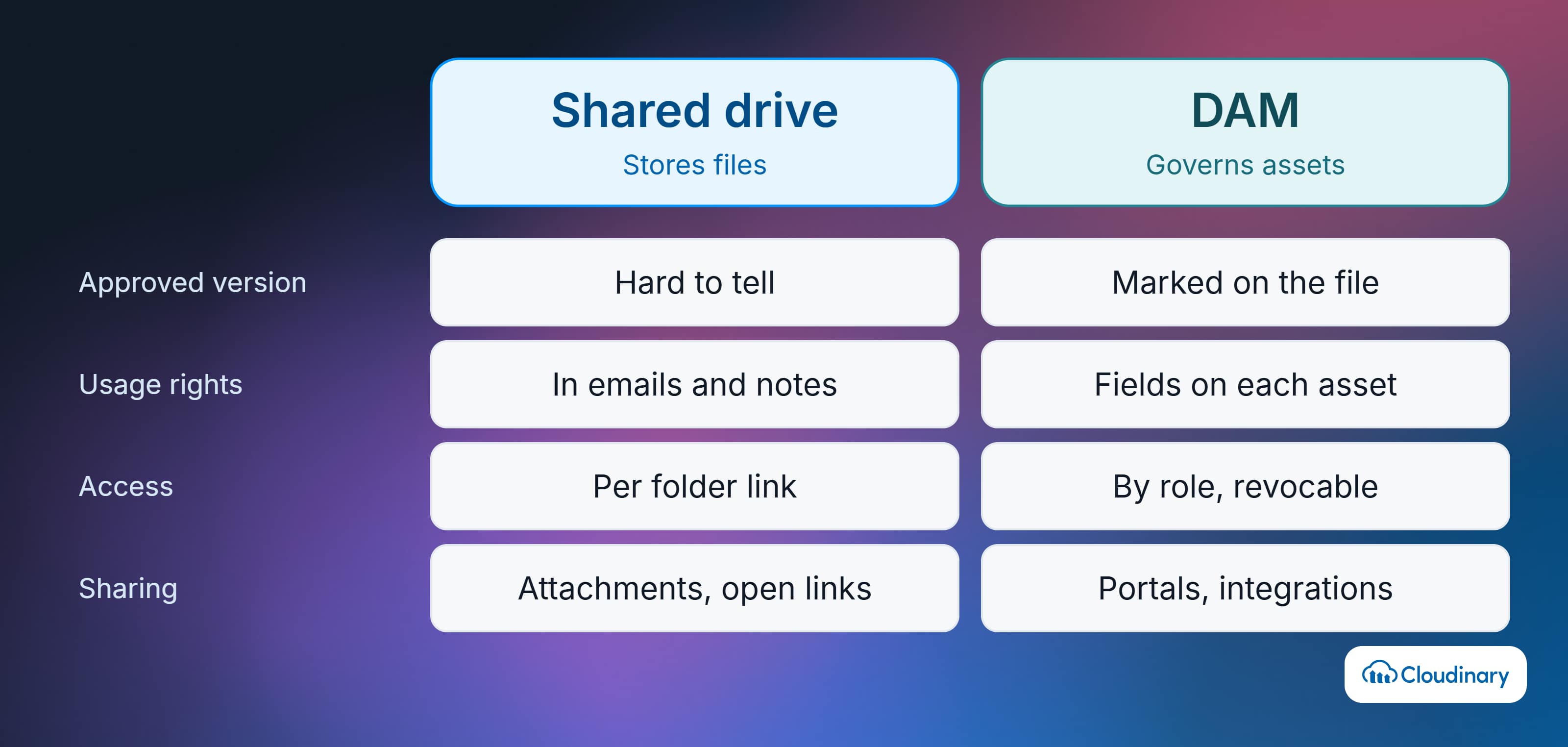
Most teams decide they need a DAM after the same small failure repeats: someone asks for “the latest product shot,” three people reply with three different files, and one of them goes live with last year’s packaging. A shared drive can store files, but it can’t tell anyone which version is approved, who’s allowed to use it, or when its license runs out.
That’s the gap a digital asset management system fills. The benefits of digital asset management come from attaching metadata, permissions, versions, and usage rights to every file, then making the approved version easy to find and send wherever it’s needed.
Below are the 12 benefits teams see most often, how they differ by role, how to measure them, and the setup problems that stop them from showing up.
In this article:
- What a DAM Does Before It Delivers Any Benefit
- 12 Benefits of Digital Asset Management
- DAM Benefits by Team
- How to Measure the Benefits of a DAM
- Why DAM Benefits Sometimes Don’t Show Up
- How Cloudinary Delivers These Benefits
What a DAM Does Before It Delivers Any Benefit
A DAM is a central, searchable library for an organization’s images, videos, design files, documents, and brand files. Every benefit below traces back to four things it adds that cloud storage doesn’t:
- Metadata that describes each asset, such as product, campaign, region, and usage rights
- Versions and approval status, so people can tell the final file from a draft
- Permissions that control who can view, download, edit, or share each asset
- Distribution through share links, portals, and integrations with a CMS, ecommerce platform, or creative tools
If you’re still working out whether you need one at all, the comparison of DAM vs cloud storage covers where a drive stops being enough.
12 Benefits of Digital Asset Management
These are listed roughly in the order teams notice them. The first few show up within weeks of a rollout; the later ones depend on integrations and enough usage data to act on.
1. One Source of Truth for Approved Assets
A DAM replaces the shared drives, inboxes, laptops, and chat threads where files usually end up. Everyone pulls from the same digital asset library, so there’s one current logo, one approved hero image, and one place to check before publishing.
This matters most for organizations with regional offices or several brands. Without a central library, each market tends to build its own folder structure, and the marketing team becomes the help desk for every file request.
2. Faster Search and Less Time Spent Hunting for Files
Metadata turns a folder of files into something people can filter by product, campaign, region, format, or approval status. AI tagging fills in descriptive tags (like objects, scenes, and colors) at upload, and many platforms accept natural-language searches such as “red sneakers on a white background.”
The practical result is that people stop needing to know a file’s name or who made it. A sales rep can find an approved product image in the library instead of messaging a designer and waiting a day.
3. Consistent Branding Across Teams, Markets, and Partners
When every team pulls from the same approved set, outdated logos and off-brand imagery stop reaching customers. Replacing or retiring a file in the DAM removes the old version from everywhere the DAM feeds, which is far harder to guarantee with copies spread across drives.
Brand teams often pair the library with guidelines and templates, which is where DAM overlaps with brand asset management.
4. Less Duplicate Work and More Asset Reuse
If people can’t find a file, they recreate it or buy another stock image. A searchable library shows what already exists, so teams adapt past work for new campaigns, regions, and channels instead of starting over.
Reuse also cuts external spend. When a brand manager can see that a usable lifestyle shoot already exists, there’s less reason to commission another one.
5. Faster Reviews and Approvals
Reviewers comment and annotate on the asset itself, and approval steps route work from draft to final in a set order. Version history shows what changed between rounds, so nobody reconciles feedback from five email threads.
For the process side of moving work from brief to approved file, see creative workflow management.
6. Rights, Licensing, and Expiration Control
A DAM records license terms, territories, talent agreements, and expiration dates as fields on each asset. The platform can flag or hide files when a license ends, which reduces the risk of a stock photo or influencer clip running after its contract expires.
This is one of the clearest benefits for regulated industries, where marketing assets pass legal or medical review and teams need to prove what was approved and when. Our guide to DAM for pharmaceuticals shows how that works in practice.
7. Permissions, Security, and Audit Trails
Role-based permissions decide who can view, download, edit, approve, or share each folder or asset. A regional team can see its own market’s files without accessing assets for products it doesn’t sell, and an agency can upload work without seeing the full library.
Audit logs record who did what, which supports internal reviews and security requirements. Setting these rules well is part of a wider DAM governance policy.
8. Controlled Sharing With Agencies, Retailers, and Press
External partners need files too, and email attachments or open drive links lose control the moment they’re sent. A brand portal gives each audience a curated collection with its own access rules, so retailers, franchisees, and journalists serve themselves.
Access can be narrowed or revoked later, which isn’t possible once a file has been downloaded from an inbox.
9. Connections to Your CMS, Ecommerce Platform, and Creative Tools
Integrations let approved assets move into the systems that publish them without manual downloads and re-uploads. Common connections include a CMS, ecommerce platform, product information management (PIM) system, Adobe Creative Cloud or Figma, and project management tools. Our guides to DAM vs CMS and PIM vs DAM explain how those pairings work.
APIs cover the rest. Developers can automate uploads, tagging, and delivery for systems that don’t have a pre-built connector.
10. Fewer Manual Exports, Faster Pages
Some DAMs can resize, crop, and convert files on request, so teams don’t export a separate copy for every social format, email, and product page. The original stays untouched while each channel gets the dimensions it needs.
A DAM that also delivers media can speed up the pages those assets appear on. Images are the Largest Contentful Paint (LCP) element on about 76% of mobile pages, according to the HTTP Archive’s 2025 Web Almanac. Serving each image at the right size and in the most efficient format the browser supports reduces the bytes behind that metric.
Approve an image once, then deliver it at the right size everywhere.
Cloudinary transforms and delivers assets from the same library, picking the format and quality for each browser automatically. Contact us to see it with your own media.

11. Usage Data That Shows What Content Works
DAM analytics show which assets people download, share, and search for, and which searches return nothing. Zero-result searches point to missing content or weak metadata; assets nobody touches point to work that may not have been worth producing.
This data also feeds the business case. Download counts and reuse rates are among the inputs for measuring DAM ROI.
12. A Governed Source for AI Tools and Agents
Generative tools and AI agents are only as reliable as the files they draw from. When they pull from a DAM, they inherit its permissions and rights data, so an agent building a campaign draft doesn’t grab an expired image or a product shot from the wrong market.
Agentic DAM goes a step further, with agents that enrich metadata or find assets inside the library under human-set rules. Provenance matters here too: standards like C2PA Content Credentials record whether an image was captured, edited, or AI-generated, which helps teams meet the EU AI Act’s transparency rules as they take effect.
DAM Benefits by Team
The same library pays off differently depending on who’s using it. This is why a DAM evaluation usually needs input from more than the marketing team.
| Team | Benefit They Feel Most | Example |
|---|---|---|
| Marketing and Brand | Consistent, approved assets across every channel | A rebrand replaces the logo once, and every portal and integration picks it up |
| Creative and Design | Fewer file requests and resize jobs | Designers stop exporting 12 sizes of a banner for social, email, and display |
| Ecommerce | Accurate product media at catalog scale | New colorway photos reach the product page and marketplaces without manual uploads |
| Sales and Regional Teams | Self-service access to current materials | A rep finds the approved deck and product shots without emailing marketing |
| Legal and Compliance | Rights tracking and audit history | Expired talent images are flagged before a campaign relaunch |
| Developers and IT | APIs, permissions, and fewer one-off scripts | Uploads and tagging run through the API instead of a custom pipeline |
| Agencies and Partners | Controlled access to the files they need | A retailer downloads approved images from a portal instead of requesting them |
Industry also shifts the priorities. Retailers lean on catalog scale and marketplace formats, which is why DAM for retail centers on product media, while pharmaceutical teams put approval records first. For a closer look at roles, see who uses digital asset management. Marketing teams running campaign work can also see our guide to marketing asset management.
Larger organizations feel the governance and integration benefits most, and smaller teams usually feel search and sharing first. If you’re on the smaller end, DAM for small business covers which features matter at that size; for enterprise requirements, see enterprise DAM software.
How to Measure the Benefits of a DAM
Record a baseline before rollout, then compare the same numbers three and six months in. Without a baseline, the benefits are real but hard to prove to whoever approved the budget.
| Metric | What It Tells You | Where to Get It |
|---|---|---|
| Search-to-Download Rate | Whether people find what they need on the first try | DAM analytics |
| Zero-Result Searches | Gaps in content or metadata | DAM analytics |
| Asset Reuse Rate | How often existing files are used again instead of recreated | Download and usage reports |
| Asset Requests to Marketing or Design | Whether self-service is replacing help-desk work | Ticket or request log, before and after |
| Approval Cycle Time | Time from submission to sign-off, and rounds per asset | Workflow reports |
| Expired or Unlicensed Assets in Use | Rights exposure | Rights fields plus a channel audit |
| Active Users by Team | Adoption outside the core team | DAM user reports |
| Image Weight and LCP on Key Pages | Delivery gains, if the DAM serves media | PageSpeed Insights or your real-user monitoring |
Search and request numbers usually move first, since they depend only on the library and its metadata. Reuse, rights, and page-speed gains take longer because they depend on integrations and on enough history to compare. To turn these numbers into a cost case, the DAM ROI guide walks through the calculation.
Why DAM Benefits Sometimes Don’t Show Up
When a DAM goes underused, the cause is usually setup. These problems hold the benefits back most often:
- Inconsistent metadata: if each team tags differently, search returns noise and people go back to asking colleagues for files.
- A migration that copied the mess: moving every old folder as-is brings duplicates and outdated files into the new library. Audit first and leave low-value files behind; our DAM migration guide covers how.
- No named owner: without someone accountable, permissions drift, duplicates pile up, and expired assets stay live.
- A harder experience than the shared drive: occasional users bypass a DAM that takes longer than their old folder. Integrations into the tools they already use help more than training alone.
- Missing integrations: if approved files still have to be downloaded and re-uploaded to the CMS or store, the speed and consistency gains stop at the library’s edge.
A written DAM strategy that sets owners, metadata rules, and success metrics before migration avoids most of these. The DAM implementation guide covers the rollout steps.
How Cloudinary Delivers These Benefits
Cloudinary Assets is a cloud-based DAM that manages and delivers media from the same platform. Here’s how its features map to the benefits above:
- Search and organization: AI auto-tagging through add-ons for Amazon Rekognition, Google Cloud Vision, and Imagga, plus structured metadata fields and visual search in the Media Library.
- Governance and rights: granular permissions, creative approval flows, and audit history. Enterprise accounts can request C2PA Content Credentials on delivered images.
- Sharing and measurement: Portals give partners curated access, and DAM Analytics reports on downloads, searches, and engagement.
- Variants without exports: Cloudinary Studio generates resized, cropped, and AI-edited variations from templates without changing the original.
- Delivery: automatic format and quality selection, responsive sizing, and CDN delivery, which is where the page-speed gains in benefit 10 come from.
- Automation: MediaFlows builds low-code pipelines for tagging, moderation, and approvals, and APIs and SDKs connect the library to your CMS and ecommerce platform.
Because storage and delivery sit together, there’s no export step between approving an asset and publishing it.
Getting More From Your Digital Assets
The benefits of digital asset management come down to one approved library that people can search, trust, and share from, with rights and permissions attached to every file. Search, consistency, and fewer file requests arrive first; reuse, delivery, and AI-related gains follow once integrations and usage data are in place.
If your team also needs to get media onto websites and apps quickly, choose a DAM that handles optimization and delivery as well as storage. Contact Cloudinary to see how Cloudinary Assets fits your workflow.
Frequently Asked Questions
Why Use a Digital Asset Management System?
Teams use a DAM so everyone can find the approved version of a file, know where they’re allowed to use it, and share it without email attachments. It’s usually worth it once file requests, duplicate files, or version mix-ups start slowing work down.
What Is the Main Benefit of a DAM?
The main benefit is a single governed library for approved assets. Faster search, brand consistency, and rights control all depend on that one source of truth.
Is a DAM Worth It for a Small Team?
It can be, if the team shares files with several people or partners and spends real time searching for or resending them. Smaller teams usually benefit first from search and sharing, and can start on lower-cost or free tiers before needing advanced governance.
Will AI Replace Digital Asset Management?
No. AI handles tagging, search, and variant creation inside the DAM, but it still needs a governed library with accurate rights and permissions to draw from. AI tools connected to a DAM are more reliable because they inherit those controls.