Next-generation video codecs are reshaping how quickly high-quality content reaches viewers, and two names are at the top: AV1 vs VP9. AV1 offers strong compression gains that help deliver crisp video at lower bitrates, which matters when audiences expect smooth playback on any connection. VP9 is known for its maturity and broad browser support, giving teams a reliable way to stream efficient video without extra setup.
Both formats solve similar problems but differ in performance, compatibility, and ease of adoption, so choosing between them depends on your audience and your delivery goals. Understanding how each one works will help you decide which format fits your strategy as you prepare your video library for the future.
Key takeaways:
- Video codecs turn raw video into a digital format that can be stored, streamed, and played, like when you watch videos on YouTube or Netflix. They also handle compression to reduce file size, and different codecs offer various trade-offs in quality, speed, compatibility, and storage use.
- AV1 offers better video quality and smaller file sizes than VP9 due to its higher compression efficiency, making it great for streaming high-resolution videos. However, VP9 is faster, uses less CPU, and is more widely supported, so it’s better for real-time use and older devices.
- Choosing between AV1 and VP9 depends on your needs: use AV1 when saving storage or bandwidth is important, like in video streaming or archiving, because it gives better quality at smaller sizes. Use VP9 when you need broad compatibility or faster performance on low-power devices, such as mobile apps or smart devices with limited processing power.
In this article:
- The Basics of Video Codecs
- The Key Differences of AV1 vs VP9
- Which Codec Should You Pick: AV1 vs VP9?
The Basics of Video Codecs
You can think of video codecs as the specifications that govern how raw video data should be transformed to an equivalent digital format that can be transmitted, stored, and played back. So, if you’re watching an online video on one of the streaming platforms, a video codec is what enables your browser to compress, decompress, and view it.
Let’s clarify this more with an example: Assume two people are communicating with each other by sending and receiving written letters. Now they want to communicate not only simple messages, but also some drawings and shapes that they can see and want to describe to each other.
So first, they agreed on a standard representation for each shape by a specific alphabetical letter, let’s say a square is represented by letter S, and a circle is represented by letter C. Additionally, for describing the shape size, a number following these letters will represent the side length of the square or the diameter of the circle.
Now let’s say the sending person has a drawing that includes a circle with a diameter of 2 and a square with a side length of 5, and he wants the receiver to see the same drawing, so he describes the drawing in a message that says “C2S5” and then sends it. When the receiver gets the message, he can now draw the shapes correctly according to the standard “codec” they agreed on, which specifies that C is a circle, 2 is its diameter, S is a square, and 5 is its side length.
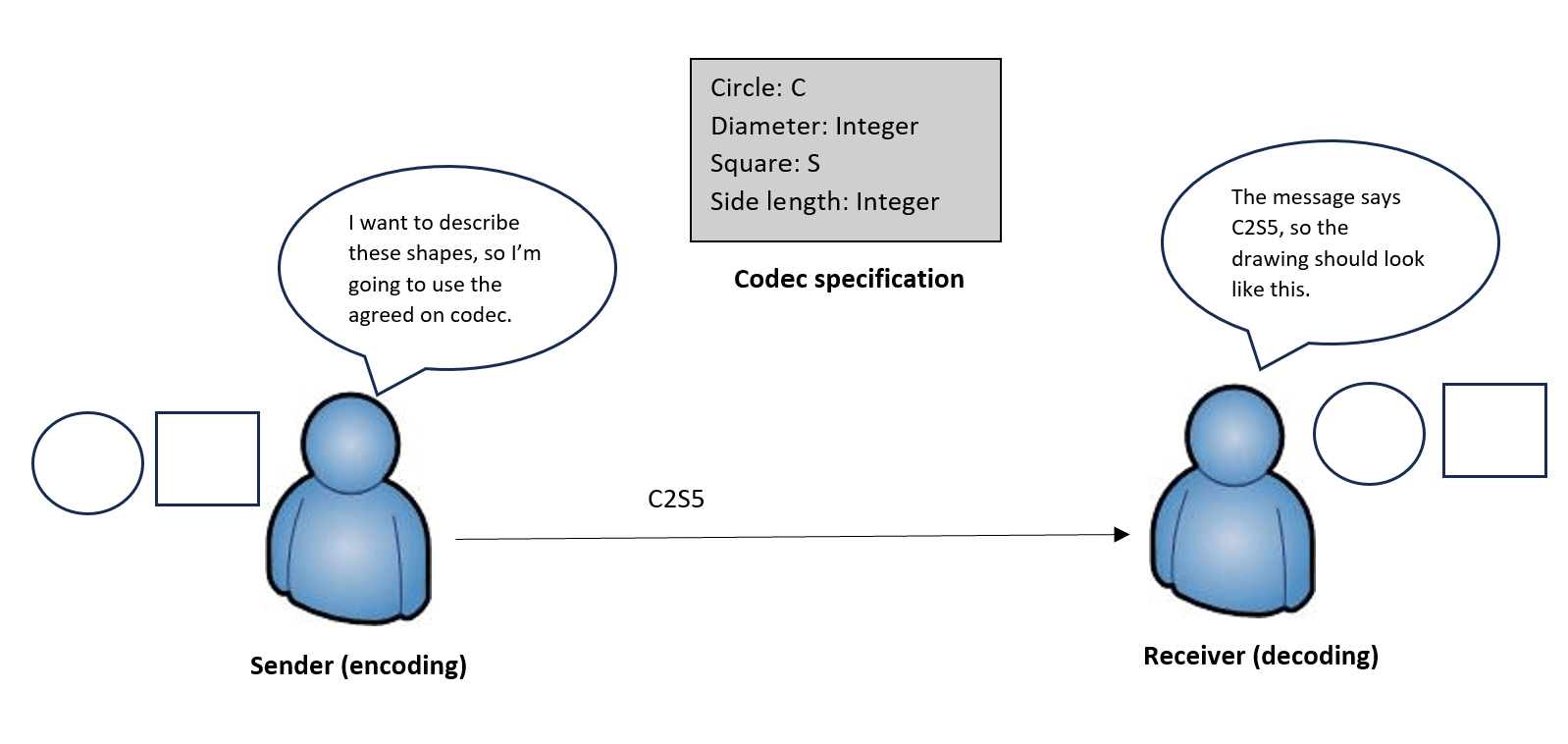
Of course, this is a super simplified example, and the actual codecs include much more details and specifications on how video data should be transformed into a specific format, but this is just to get the idea and importance of codecs. It’s like the language that hardware or software components speak to understand and represent the video contents.
Also in video codecs, the process of encoding the video data (transforming it into its corresponding digital representation) typically includes a compression process as part of it. This compression is an integral part of the encoding process to reduce the size of the raw video footage and enable efficient storing and transmission of the data.
The encoding and compression techniques or algorithms applied are part of the codec specification that is used. Different codecs can provide different video compression levels, which might also provide different video qualities according to which compression method is applied. Selecting a video codec also involves other considerations like compatibility, network bandwidth, storage usage, processing power, and licensing costs.
What Is the AV1 Codec?
AV1 codec is a video encoding standard that is developed by the Alliance for Open Media and focuses on delivering high quality web video content. It is an open-source and royalty-free standard, which encourages more adoption as it solves the licensing problems associated with other codecs like H.265.
AV1’s ability to compress video at a higher rate than other standards, without sacrificing quality, is a major advantage. Hence, it is generally more efficient in bandwidth and storage. It is also optimized for high resolution videos and real-time video applications (like web conferencing, live streaming, screen sharing).
Although it’s still not universally adopted or very widespread, AV1 popularity is rapidly growing, and it’s considered to be the strongest candidate for video codecs in the future.
What Is the VP9 Codec?
VP9 is an open-source and royalty-free video codec developed by Google as part of the WebM project. It is the successor to the previous VP8 codec, and it offers better compression efficiency while maintaining high-quality video content.
Since its release in 2013, VP9 has gained widespread support and adoption through software and hardware companies, in addition to video content providers. Almost all major web browsers, operating systems, and video streaming services support the VP9 codec. This large-scale adoption offers a huge advantage for VP9 in terms of compatibility.
VP9 also provides different bitrate modes that enable controlling the balance between compression rate and video quality. Depending on the encoding tool you use, you can typically set specific parameters to achieve your desired VP9 bitrate configuration.
The Key Differences of AV1 vs VP9
Now that we understand the basics of video codecs and the main features of AV1 and VP9, let’s highlight the main differences between them.
| Feature | AV1 | VP9 |
| Compression Efficiency | Higher, up to 30% more than VP9 | Good, but lower than AV1 |
| Video Quality | Better video quality than VP9 | Lower quality than AV1 |
| File Size | Small, due to better compression | Larger than AV1 |
| Network Bandwidth Usage | Less than VP9 | Higher than AV1 |
| Encoding Speed | Slower, due to the complexity of the algorithm | Faster, due to simpler algorithm compared to AV1 |
| CPU Usage for encoding/decoding | High | Lower |
| Compatibility and Support | Less compatible, still no widespread support, but growing in popularity | Higher compatibility and support, almost universally adopted |
| License | Royalty-free | Royalty-free |
Compression: Which is More Efficient?
AV1 provides superior compression efficiency compared to VP9. It can provide up to 30% more compression rate, which reduces the file size and network bandwidth usage. This makes it more optimized for streaming high-resolution videos.
AV1’s better compression efficiency also comes without reducing video quality, so AV1 can still deliver better video quality even at lower bitrates.
Video Quality: What is the Best Quality?
When it comes to video quality, AV1 also has the upper hand compared to VP9. It offers a better video quality even with the higher compression rate, thanks to the better frame partitioning and advanced prediction techniques that it uses.
AV1’s better video quality is most apparent when encoding higher resolution videos, and it can maintain a high quality at lower bitrates, so it can be a better option than VP9 for video streaming apps when network bandwidth is a limitation.
Performance: Analyzing CPU Usage and Encoding Speed
AV1’s superior compression and video quality are offset by its complex algorithm. AV1 uses a more advanced and complex encoding technique compared to VP9, but this complexity puts a higher load on the CPU and slows down the encoding process.
VP9 is considered a better option than AV1 when CPU usage is an important factor, like when the encoding/decoding device has limited resources. VP9 is also significantly faster in terms of the encoding speed, which can benefit scenarios like real-time applications.
Compatibility: Which Codec is Better Supported?
VP9 has larger support and is more widespread than AV1. It is currently adopted in most of the software/hardware products that work with video content. This broader compatibility of VP9 makes it a better choice for building products that are planned to reach a larger scale.
AV1, on the other hand, is mostly compatible with newer devices that have implemented the codec in their design. The intricacies of AV1 are also delaying its implementation and making it difficult to support a wide range of devices, but this is slowly improving, with expectations of quicker adoption in the upcoming years.
Which Codec Should You Pick: AV1 vs VP9?
Choosing between AV1 and VP9 is a matter of trade-off. So you’ll have to sacrifice one feature in favor of the other. For example, if compression efficiency is your priority, you can go for AV1, but if you need large-scale compatibility, you can pick VP9.
So let’s summarize when to use each of these codecs with examples.
When To Use AV1
You can pick AV1 for scenarios where storage consumption or network bandwidth is a constraint. For example, applications for video sharing or data archiving can be a fit for using AV1. Since it provides better compression efficiency, you’ll have a reduced file size that saves much storage space and allows for better transmission over limited network bandwidth.
Because AV1 also doesn’t compromise video quality and offers a higher quality than VP9 at lower bitrates, it is suitable for applications like video streaming which requires the delivery of high resolution videos.
When To Use VP9
The major driver for choosing VP9 is when widespread compatibility and support is a priority. For example, if you’re building a web or mobile based video content application, choosing VP9 almost guarantees that it will be compatible with most modern web browsers and mobile operating systems.
VP9 is also a preferred choice in scenarios where devices have limited compute power. This is because its simpler algorithm (compared to AV1) is less CPU intensive. For example, IoT or edge devices typically have less CPU and hardware resources, so they can benefit from using VP9 in case these devices will take part in the video encoding/decoding process.
AV1 vs VP9: Who Wins?
When choosing between AV1 vs VP9, there’s no one-size-fits-all solution. Each of the two codec standards has its own edge for specific use cases.
AV1 is a newer standard that’s designed to offer better compression efficiency while maintaining higher video quality. It can have a significant advantage for saving network bandwidth and reducing storage costs. It can also be considered as a future-proof option when building newer software or hardware video processing products.
However, since this higher efficiency is achieved through a more complex algorithm, it is considered very CPU-intensive and involves slower encoding speeds.
VP9 is a more mature and widespread codec that strikes a balance between compression efficiency and CPU utilization. It also offers good compression rates, but it’s significantly less efficient compared to AV1.
The major advantage of VP9 is its large-scale support and compatibility, as it’s adopted by most modern web browsers, operating systems, and other software tools and hardware devices.
Transform your videos instantly with Cloudinary’s powerful API tools. Sign up for a Cloudinary account today and see how easy video transformation can be.
Frequently Asked Questions
What is the difference for AV1 vs VP9 video codecs?
AV1 offers better compression efficiency than VP9, delivering higher quality video at lower bitrates. VP9, while slightly less efficient, is faster to encode and has broader hardware support, especially on older devices. Both are royalty-free, but AV1 is considered more future-proof for high-resolution streaming.
Is AV1 better than VP9 for streaming?
Yes, AV1 is generally better for streaming because of its superior compression, which reduces bandwidth usage while maintaining high visual quality. However, it requires more processing power and is not yet universally supported across all devices. For maximum compatibility, VP9 may still be the safer choice sometimes.
Which devices support AV1 and VP9?
VP9 is widely supported across most modern browsers, Android devices, smart TVs, and streaming platforms. AV1 support is growing and is available on newer devices, browsers like Chrome and Firefox, and platforms like YouTube and Netflix.


