Key Takeaways:
- DAM integration connects a digital asset management (DAM) platform to the systems where teams create and publish content, such as a CMS, PIM, ecommerce platform, and design tools. Approved assets and their metadata then become available inside those tools.
- Integrations come as native connectors, APIs and webhooks, or third-party connector platforms. The biggest design choice is whether each connected system stores a copy of a file or a reference to the DAM’s master version.
- Plan integrations around which system owns each piece of data, how updates and expirations reach connected channels, and how permissions carry over. Cloudinary offers prebuilt integrations, APIs, SDKs, and MCP servers for this.
A DAM is only as useful as its connections to the tools people already work in. When the library sits apart from the CMS, the ecommerce platform, and design apps, teams download files, re-upload them somewhere else, and lose track of which version is live.
DAM integration closes that gap. Done well, an editor picks an approved image inside the CMS, a designer places a logo in InDesign without leaving the app, and a license expiry set in the DAM pulls the asset from every connected channel.
This guide covers what DAM integration is, the methods available, how data moves between systems, which systems to connect first, and how to plan and evaluate integrations for an enterprise rollout.
In this article:
- What Is DAM Integration?
- Why DAM Integrations Matter
- Types of DAM Integration
- How DAM Integration Works
- Which Systems Should a DAM Integrate With?
- How to Plan a DAM Integration
- Common DAM Integration Challenges
- What to Look for in DAM Integration Capabilities
- DAM Integration and AI Agents
- How Cloudinary Handles DAM Integration
What Is DAM Integration?
DAM integration is the connection between a digital asset management system and the other software that creates, stores, or publishes content. It lets those systems search, insert, sync, or deliver assets from the DAM, along with the metadata, permissions, and version history attached to them.
An integrated DAM is a DAM set up this way: each asset is stored and governed once in the library, then used in many places. A standalone DAM holds the same files but relies on people to download and re-upload them, so its control over versions and rights stops at the download.
DAM integrations generally do one or more of four jobs:
- Find and insert: users browse and search the DAM from inside another app, such as a CMS editor or Photoshop.
- Sync: assets and metadata move between systems on a schedule or when something changes, such as linking product images to SKUs in a PIM.
- Deliver: connected channels display assets through a URL served by the DAM or its CDN instead of storing their own copy.
- Automate: an event in one system triggers work in another, such as tagging new uploads or notifying a team when processing finishes. Our guide to digital asset management workflows covers these automations in detail.
Why DAM Integrations Matter
Disconnected software is a problem across the enterprise, and media is no exception. Salesforce’s 2026 Connectivity Benchmark Report found that the average organization runs 957 applications, and only 27% of them are integrated. Assets sit in the middle of that sprawl, because nearly every customer-facing system needs images, video, or documents.
For teams managing assets at scale, integration changes five practical things:
- Adoption: people use the DAM when it shows up in the tools they open every day. When it doesn’t, they save files to desktops and shared drives, and the library drifts out of date.
- Version control: if the CMS and storefront reference the DAM’s master file, one update changes every channel. If each system holds its own copy, someone has to find and replace every one.
- Rights compliance: license terms and expiration dates set in the DAM only protect you if connected channels respect them. Integrations that read rights metadata can hide or remove expired assets automatically.
- Time to publish: removing the download and upload step between approval and publishing shortens the time it takes for a campaign or product page to go live.
- Measurement: when channels pull from the DAM, usage data can flow back to the asset record, so teams can see which content actually gets used.
These gains are a large part of the wider benefits of digital asset management, and most of them depend on the library being connected rather than standalone.
Types of DAM Integration
There are three common ways to connect a DAM to another system. Most enterprises end up using all three, depending on the system and how much control they need.
Native Connectors and Plugins
Native connectors are built by the DAM vendor or the partner platform, such as a WordPress plugin, a Contentful app, or an Adobe Creative Cloud panel. You install and configure them instead of writing code, so setup is quick, and the vendor updates them when either platform changes. The trade-off is scope: a connector does what it was designed to do, and custom fields or unusual workflows may fall outside it.
APIs, SDKs, and Webhooks
For custom builds, a DAM’s API gives developers direct access to upload files, run searches, update metadata, and generate delivery URLs. SDKs wrap those APIs in the languages and frameworks a team already uses. Webhooks notify your own systems when something happens in the DAM, such as an upload finishing or a metadata field changing.
This is the most flexible route and the usual choice for headless and composable architectures, where the CMS, commerce engine, and front end are separate services. The cost is ownership: your team writes and maintains the code.
Connector Platforms and iPaaS
Some vendors specialize in linking DAMs to everyday tools. Connector platforms such as CI HUB embed DAM search inside Adobe Creative Cloud, Microsoft 365, and Google Workspace. Integration platform as a service (iPaaS) and automation tools such as Zapier and n8n link a DAM to hundreds of other apps with little or no code. These fill gaps quickly, though each one adds a vendor, a license, and another permission layer to manage.
| Method | Best For | Setup Effort | Flexibility | Maintained By |
|---|---|---|---|---|
| Native Connector or Plugin | Popular CMS, ecommerce, and design platforms | Low: install and configure | Limited to the connector’s features | DAM vendor or partner |
| API, SDK, and Webhooks | Custom sites, headless stacks, internal tools, automated pipelines | High: developer time | Full control over data flow | Your team |
| Connector Platform or iPaaS | Productivity apps and tools without a native connector | Low to medium | Moderate, depends on the platform | Third-party vendor |
How DAM Integration Works
Every DAM integration answers the same questions: what moves between systems, in which direction, how often, and under whose permissions.
Copies vs. References
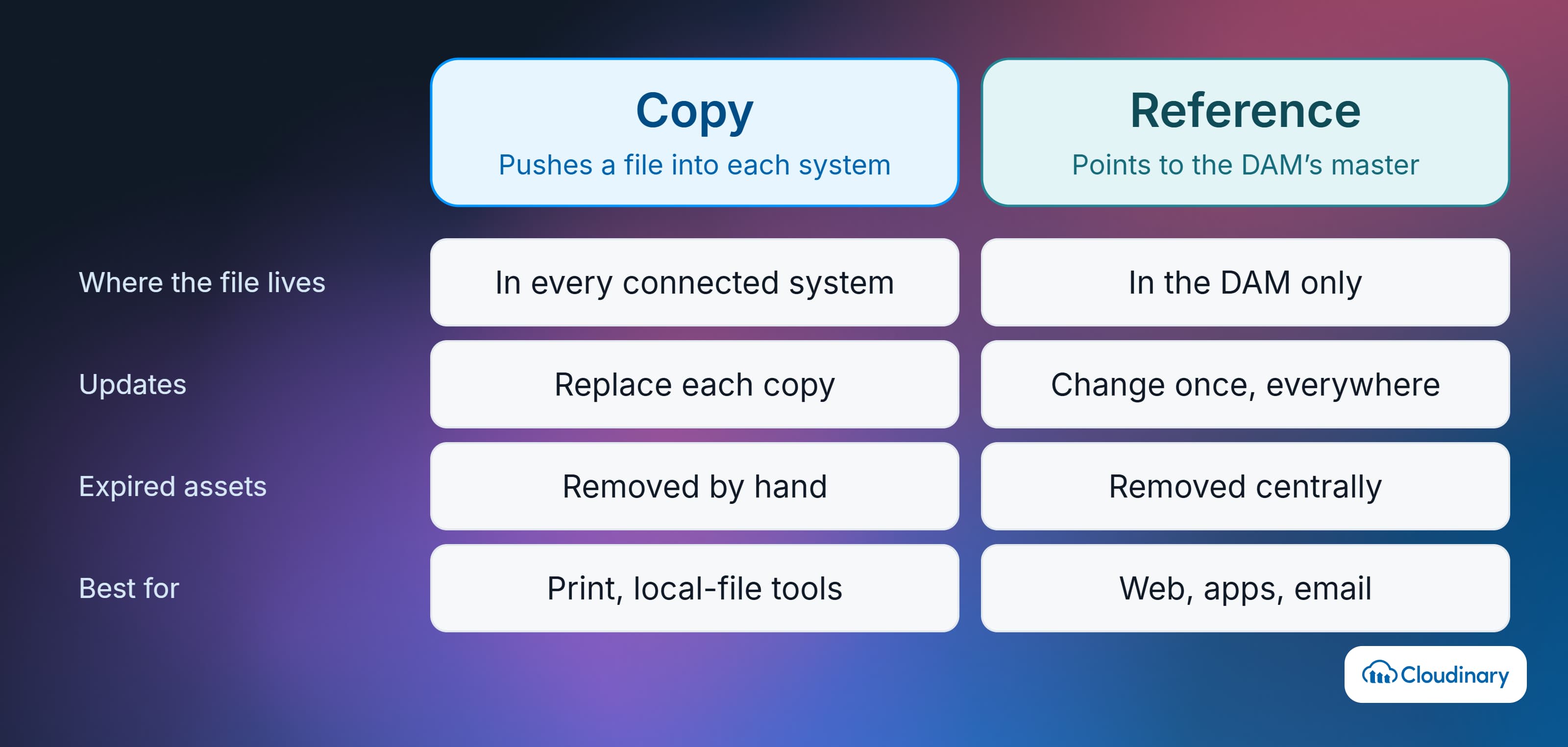
The most important decision is whether a connected system stores its own copy of an asset or a reference to the DAM’s version.
- Copy (sync): the file is pushed into the other system’s storage. This suits platforms that need local files, such as print layouts or tools that can’t display remote media, but every copy can fall out of date.
- Reference (link): the other system stores an asset ID or delivery URL, and the DAM serves the file when it’s requested. Updates, crops, and format changes happen in one place, and expired assets can be removed centrally.
For websites, apps, and email, references are usually the better default, because one change in the DAM reaches every page or campaign that uses the asset. Keep copies for the systems that genuinely require local files.
Direction and Timing
Data can flow one way or both ways. A CMS integration is usually a pull: editors bring assets from the DAM into pages. Creative tool integrations are often two-way, because designers place assets from the DAM and save finished work back to it. PIM integrations may sync both files and product attributes.
Timing matters as much as direction. Event-driven integrations use webhooks to act as soon as something changes. Scheduled syncs run at set intervals, which is simpler to build but means connected systems can lag behind the DAM for hours.
Metadata Mapping and Ownership
An integration is only as good as its metadata mapping. Fields such as SKU, campaign, region, alt text, and license expiry need a defined match in each connected system, and each field needs one owner. A common split: the PIM owns product attributes, the DAM owns rights and usage metadata, and the CMS owns page context.
When two systems can both edit the same field, they overwrite each other and nobody trusts the data. Our guide to metadata management software covers how teams keep shared fields consistent.
Authentication and Permissions
Each integration authenticates with the DAM, usually through API keys or OAuth, and has to decide whose permissions apply. A connector that runs under one shared service account can show users assets they shouldn’t see, so check whether it respects each person’s DAM roles. Single sign-on (SSO) through the company identity provider keeps access consistent across the DAM and the tools connected to it.
Keep one master file behind every channel.
Cloudinary Assets connects to your CMS, commerce platform, and creative tools through prebuilt integrations and APIs, and delivers each asset from its CDN, so an update in the Media Library reaches every page that references it. Contact us.
Which Systems Should a DAM Integrate With?
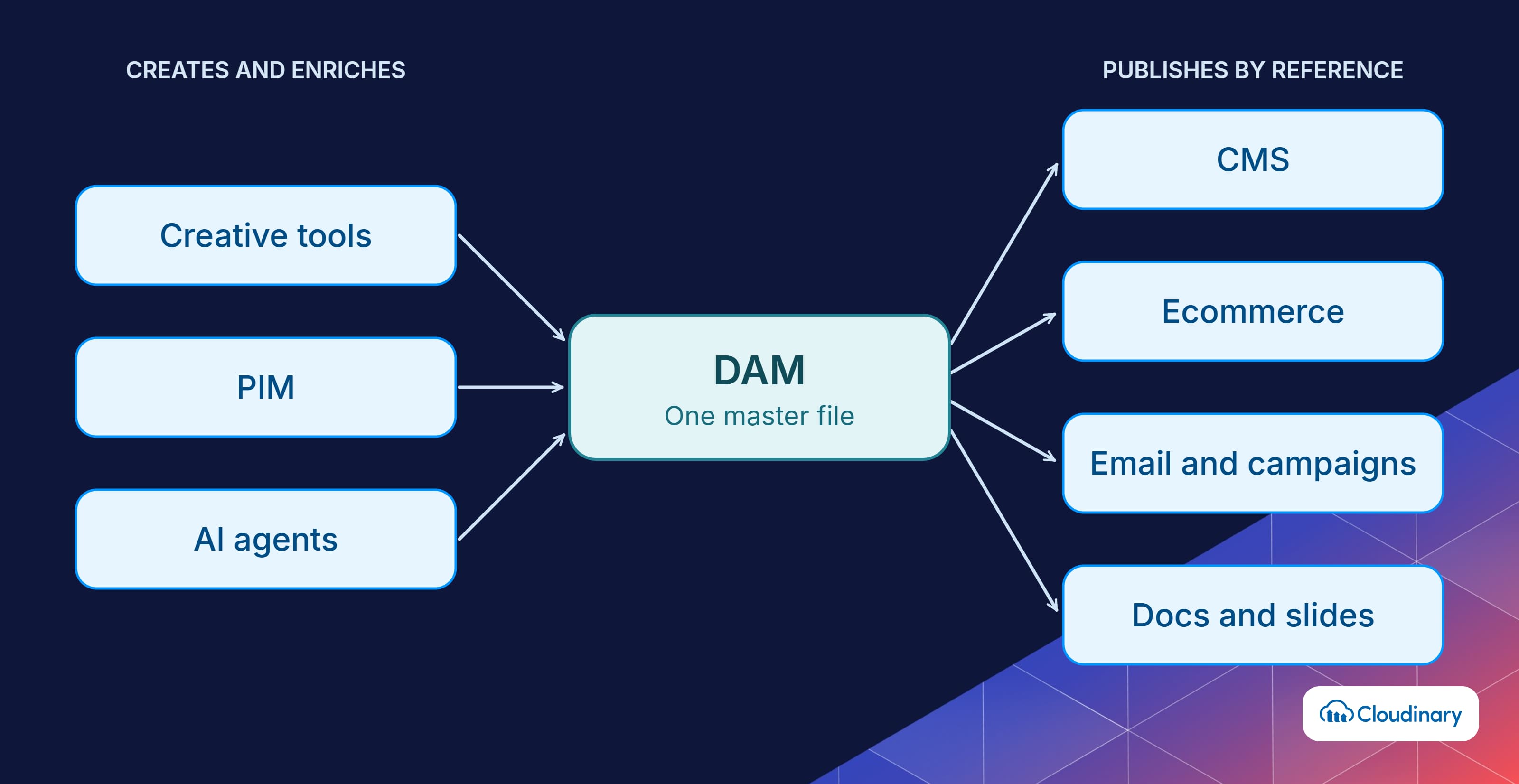
Start with the systems that publish the most assets to customers, then work back toward the tools that create them. For most enterprises, that means the CMS first, then commerce, then creative and marketing tools.
Content Management Systems (CMS)
The CMS is usually the first integration, because the website is where outdated or oversized media is most visible. Editors browse and insert DAM assets inside the page editor. Headless CMS platforms such as Contentful, Sanity, and Storyblok store a reference that the front end resolves at delivery. Our DAM vs CMS guide explains how the two systems divide the work.
PIM and Ecommerce Platforms
Ecommerce teams connect the DAM to their product information management (PIM) system so product images, videos, and spec sheets stay matched to the right SKU. Those assets then go to the storefront and marketplaces. Shopify, Adobe Commerce, Salesforce Commerce Cloud, SAP Commerce, and commercetools all have established DAM integration patterns. See PIM vs DAM for how product data and media responsibilities split.
Creative Tools
Designers need to place approved assets into layouts and check finished work back in without exporting and re-uploading. Integrations with Adobe Creative Cloud apps (like Photoshop, Illustrator, and InDesign) and Figma keep a link to the DAM’s master file, so a refreshed logo or product shot can update in the layout. Saving work back to the DAM also routes it into creative workflow management and approval steps.
Marketing Automation and Email
Email and campaign platforms such as Braze, Klaviyo, and Salesforce Marketing Cloud can pull assets from the DAM into campaigns. Referencing DAM URLs instead of uploading images into each campaign means a single change, such as a new price on a banner, reaches every email that uses it. For how marketing teams organize those campaign files, see marketing asset management.
Productivity and Collaboration Apps
Sales and regional teams build decks and documents in Microsoft 365 or Google Workspace. Connectors that let them search and insert approved assets in PowerPoint, Word, Slides, or Docs keep old logos and off-brand images out of customer-facing material.
Identity, Rights, and Project Management
Behind the scenes, enterprises connect the DAM to identity providers for SSO, rights management platforms for license tracking, and project management tools so assets attach to briefs and tasks. These integrations don’t put assets in front of customers, but they control who can use what and when, which is the basis of DAM governance.
How to Plan a DAM Integration
Integration work goes faster when the key decisions are made before anyone installs a connector or writes code. A typical planning sequence looks like this:
- Map current asset flows. List every system that creates, stores, or publishes media, and trace how a file moves between them today, including the manual steps.
- Rank integrations by impact. Prioritize the channels where a wrong or outdated asset costs the most, which are often the website, product pages, and sales materials.
- Assign data ownership. Decide which system owns each metadata field and which one is the source of truth for the file itself.
- Choose copy or reference for each system. Default to references for web, app, and email delivery, and use copies only where a system requires local files.
- Pick the integration method. Use a native connector where one fits, an API build where you need custom logic, and a connector platform for the remaining tools.
- Set authentication and permissions. Confirm how each integration signs in and whether user-level DAM roles carry through to the connected app.
- Pilot, then expand. Launch with one team and one channel, measure search success and time to publish, and fix mapping gaps before rolling out further.
Integration planning often runs alongside a migration. If you’re moving assets from another system, our guide to DAM migration covers field mapping and phasing, and the DAM implementation guide places integrations in the wider rollout plan.
Common DAM Integration Challenges
Most integration problems show up after launch, once real content and real users hit the connections. The ones teams run into most often:
- Metadata that doesn’t map: custom DAM fields have no equivalent in the CMS or PIM, so information gets dropped in transit.
- Duplicate copies: sync-based integrations create copies that drift from the master, recreating the version problem the DAM was bought to solve.
- Connector gaps: a prebuilt connector covers the standard workflow but not a team’s custom steps, which fall back to manual work.
- Breakage after upgrades: a major release of the CMS, commerce platform, or DAM can break a connector until it’s updated.
- Permission leaks: integrations that use one shared credential can bypass role-based access in the DAM.
- No clear owner: nobody monitors the integrations, so failures go unnoticed until a product page shows a broken image.
Clear field ownership, reference-based delivery, and a named owner for each integration prevent most of these.
What to Look for in DAM Integration Capabilities
When comparing DAM platforms, treat integration as a core evaluation criterion, not a line on a feature list. Ask vendors to show you:
- Prebuilt connectors for the CMS, ecommerce platform, creative tools, and marketing systems you run today
- Documented REST APIs and SDKs for the languages and frameworks your developers use
- Webhooks or event notifications for uploads, metadata changes, and deletions
- Delivery URLs and a CDN, so connected channels can reference assets instead of copying them
- Structured metadata that keeps rights, expiry, and usage fields attached through each integration
- Permission-aware connectors with support for SSO and OAuth
- Clear support terms covering who maintains each integration and how upgrades are handled
- Access for AI agents, such as MCP servers, under the same permission controls as other integrations
For the full evaluation framework, see our DAM buyer’s guide. If procurement needs a formal process, our guide to writing a DAM RFP includes integration requirements you can adapt.

DAM Integration and AI Agents
AI agents are a new kind of integration. Instead of a person searching the DAM from inside a CMS, an agent calls the DAM directly to find, tag, transform, or upload assets as one step in a larger task. The Model Context Protocol (MCP), an open standard for exposing tools and data to AI models, is becoming the usual way to connect them.
Agents make the earlier groundwork more important. An agent uses whatever assets it can reach, so untagged files, missing rights data, and broad permissions show up quickly in its output. Before connecting agents, make sure metadata and rights fields are reliable and give each agent scoped credentials.
Our guide to agentic DAM explains how agents work inside the library, and metadata agents shows one of the most common uses. For setup details, see Cloudinary for AI agents.
How Cloudinary Handles DAM Integration
Cloudinary Assets is an API-first DAM: the platform that stores and governs assets also exposes them to the rest of the stack through connectors, APIs, and delivery URLs. Integration options include:
- CMS: apps and plugins for WordPress, Contentful, Contentstack, Sanity, Storyblok, Hygraph, Magnolia, Progress Sitefinity, and others, so editors can insert transformed assets from inside the CMS.
- Ecommerce: integrations for Adobe Commerce, Salesforce Commerce Cloud, SAP Commerce, commercetools, and Shopify, including Shopify AssetLink, which links Media Library assets to products through metadata matching.
- PIM: connections for Akeneo (through MediaFlows), Syndigo, Actindo, and other PIM platforms.
- Creative tools: an Adobe Creative Cloud connector for InDesign, Illustrator, and Photoshop, a Figma plugin, and a Chrome extension that inserts asset URLs into browser-based apps.
- Productivity apps: CI HUB-powered connectors for Microsoft 365 and Google Workspace, so teams can place approved assets in Word, PowerPoint, Docs, and Slides.
- Marketing: Braze, Klaviyo (in beta), and Salesforce Marketing Cloud integrations for email and campaign media.
- Automation: Zapier and n8n integrations, plus MediaFlows for low-code media workflows.
- Developers: Upload and Admin APIs, more than 25 SDKs, and webhook notifications for upload and processing events.
- AI agents: MCP servers that let AI tools such as Claude and Cursor upload, search, organize, and transform assets in your account.
Because Cloudinary delivers assets from its own CDN, connected systems can store a delivery URL instead of a copy. A product image replaced or recropped in the Media Library changes everywhere it’s referenced, and format and quality are selected automatically for each device at delivery. Structured metadata fields and role-based permissions carry the DAM’s rules into each connection. The full list is in the Cloudinary integrations documentation.
Map Cloudinary to the tools you already run.
Prebuilt CMS, commerce, creative, and marketing integrations cover the common connections, and APIs, webhooks, and MCP servers handle the rest. Talk to our team.
Getting DAM Integration Right
DAM integration decides whether a library becomes the source every team pulls from or another place where files sit unused. Start with the channels that publish the most assets, default to references over copies for web delivery, give every shared metadata field a single owner, and pilot with one team before scaling.
If your stack includes a headless CMS, an ecommerce platform, and creative and marketing tools, look for a DAM that connects through both prebuilt integrations and APIs and delivers assets itself, so updates reach every channel without manual exports. Contact Cloudinary to see how Cloudinary Assets fits into your stack.
Frequently Asked Questions
What Is DAM Integration?
DAM integration connects a digital asset management system to other tools, such as a CMS, PIM, ecommerce platform, or design software, so teams can find, use, and deliver approved assets without downloading and re-uploading them. Metadata, permissions, and versions stay attached as assets move between systems.
What Is an Integrated DAM?
An integrated DAM shares assets and their metadata with other business systems through connectors and APIs. Each asset is stored and governed once in the DAM, then used across every connected channel.
What Systems Should a DAM Integrate With?
Most enterprises start with the CMS, then add PIM and ecommerce, creative tools, marketing automation, and productivity apps. Identity, rights management, and project management integrations support governance behind the scenes.
Does Cloudinary Integrate With Other Platforms?
Yes. Cloudinary has prebuilt integrations for CMS, ecommerce, PIM, creative, marketing, and automation platforms. It also offers APIs, SDKs, webhooks, and MCP servers for custom and AI-driven workflows.

