Key Takeaways:
- Content operations is the system of people, processes, technology, and governance that turns a content strategy into repeatable work. It covers how content is requested, created, reviewed, approved, stored, published, reused, and retired.
- Strategy decides what content to make and why. Operations decides who does each step, in what order, in which system, and to what standard, then measures where work slows down.
- Most teams build content operations by mapping how work moves today, naming owners, standardizing high-volume workflows, and giving approved assets one trusted home. Visual assets need extra attention because every channel asks for its own sizes and formats.
A campaign brief lands on Monday. By Friday, the hero image exists in four versions across two shared drives, legal has approved one of them, and the regional team has already posted a different one. Nobody did anything wrong. There just wasn’t an agreed way for the work to move.
Content operations is that agreed way. It’s the behind-the-scenes system that decides how content goes from a request to a published, measured, and eventually retired asset, and who’s accountable at each step.
This guide covers what content operations is, how it differs from content strategy, the components and roles involved, how to build a framework (with a template you can adapt), which metrics to track, and where tools and AI fit.
In this article:
- What Is Content Operations?
- Content Operations vs. Content Strategy
- Core Components of Content Operations
- How Content Operations Works Across the Content Lifecycle
- Key Content Operations Roles
- Why Content Operations Matters for Enterprise Teams
- Common Pain Points in Content Operations
- How to Build a Content Operations Framework
- Content Operations Metrics to Track
- Content Operations Software and Platforms
- AI in Content Operations
- How Cloudinary Supports Content Operations Teams
What Is Content Operations?
Content operations (often shortened to ContentOps) is the coordinated system of people, processes, technology, and governance an organization uses to plan, produce, manage, distribute, and maintain content at scale. It’s the operating model that turns content strategy into consistent execution.
Every company that publishes content already has some form of content operations, even if it lives in one editor’s head and a chain of chat messages. The discipline is about making that system explicit and repeatable, so it keeps working when volume grows, people change roles, or a new channel launches.
In practice, content operations covers work like:
- Running a structured intake process so requests arrive with an audience, purpose, deadline, and owner
- Assigning briefs and giving writers, designers, and agencies the templates, brand guidelines, and approved assets they need
- Routing drafts through brand, legal, product, and compliance review with recorded decisions
- Storing final assets with metadata, rights information, and version history in a system of record
- Publishing to websites, apps, email, social, sales tools, and regional markets
- Auditing, updating, reusing, and retiring content once it’s live
Like DevOps for software, content operations borrows a simple idea: accountable people, running repeatable processes, supported by connected tools, produce better results than individual heroics.
Content Operations vs. Content Strategy
Content strategy defines what content to create, for whom, and why. Content operations defines how that content gets made, approved, delivered, and maintained. A strategy without operations produces plans, while operations without a strategy produces a lot of content with no clear purpose.
The boundary isn’t perfectly fixed (some practitioners put governance under strategy), but this working split is how most teams divide responsibilities:
| Aspect | Content Strategy | Content Operations |
|---|---|---|
| Core Question | What content should exist, for whom, and why? | How does content get made, approved, published, and maintained? |
| Main Outputs | Audience definitions, messaging, editorial priorities, success criteria | Workflows, roles, tooling, governance checkpoints, operational metrics |
| Time Horizon | Quarterly and annual direction | Daily and weekly execution |
| Signs It’s Failing | Content doesn’t serve the audience or the business | Content is late, inconsistent, duplicated, or stuck in review |
Content operations also sits next to a few related terms and functions:
- Content supply chain is the end-to-end flow that moves content from request to published asset to performance data. Content operations is the team and discipline that designs, runs, and improves that flow. Our content supply chain guide covers each stage in detail.
- Creative operations focuses on design and video production: briefs, creative resourcing, proofing, and delivery of creative work. It’s usually one part of a wider content operations model. See creative operations software for the tools involved.
- Marketing operations owns revenue-facing systems such as marketing automation, campaign infrastructure, CRM data, and attribution. Content operations owns the production system that feeds those channels.
- Project management plans and tracks a specific campaign or deliverable. Content operations designs processes that repeat across every campaign, so each project doesn’t start from scratch.
Core Components of Content Operations
Effective content operations rests on six connected components. A weakness in one shows up as a symptom in another, which is why buying software rarely fixes a broken workflow and hiring rarely fixes a disconnected tool stack.
People and Ownership
Someone has to own each step: who requests, who creates, who reviews, who approves, who publishes, and who maintains content after launch. In small teams, these duties blur across a few people. As volume grows, coordination becomes a job of its own, and missing owners show up as dropped handoffs and review queues nobody clears.
Processes and Workflows
Processes are the repeatable paths content follows from intake to retirement. A good test is transferability: if a new freelancer can pick up a brief and know what happens next, who signs off, and where files go, the process is documented. If not, it lives in someone’s memory. Our guide to digital asset management workflows covers how approval routing works in practice.
Technology and Integrations
The tool stack usually includes work management, creative tools, a digital asset management (DAM) platform, a CMS, and analytics. What matters most is how they connect. Salesforce’s 2026 Connectivity Benchmark Report found the average organization runs 957 applications, with only 27% of them integrated. Every gap between tools becomes a manual download, re-upload, or copy-paste step for the content team.
Governance
Governance sets the rules that keep content accurate, on-brand, and compliant: style and brand guidelines, approval requirements, permissions, usage rights, accessibility standards, and lifecycle rules for when content gets updated or retired. The goal is control without making every request a negotiation. See DAM governance for how teams apply these rules to assets.
Data and Metadata
Metadata makes content findable, traceable, and reusable. Fields such as owner, campaign, region, product SKU, approval status, license expiry, and alt text let teams search a library, filter what’s approved, and pull expired assets from live channels. A shared asset taxonomy keeps those fields consistent across teams, and metadata management software helps enforce them.
Measurement
Content teams usually track audience performance (traffic, engagement, conversions). Content operations adds operational performance: how long content takes to publish, where it waits, how often it needs rework, and how much of it gets reused. Those numbers show where the process itself needs work.
How Content Operations Works Across the Content Lifecycle
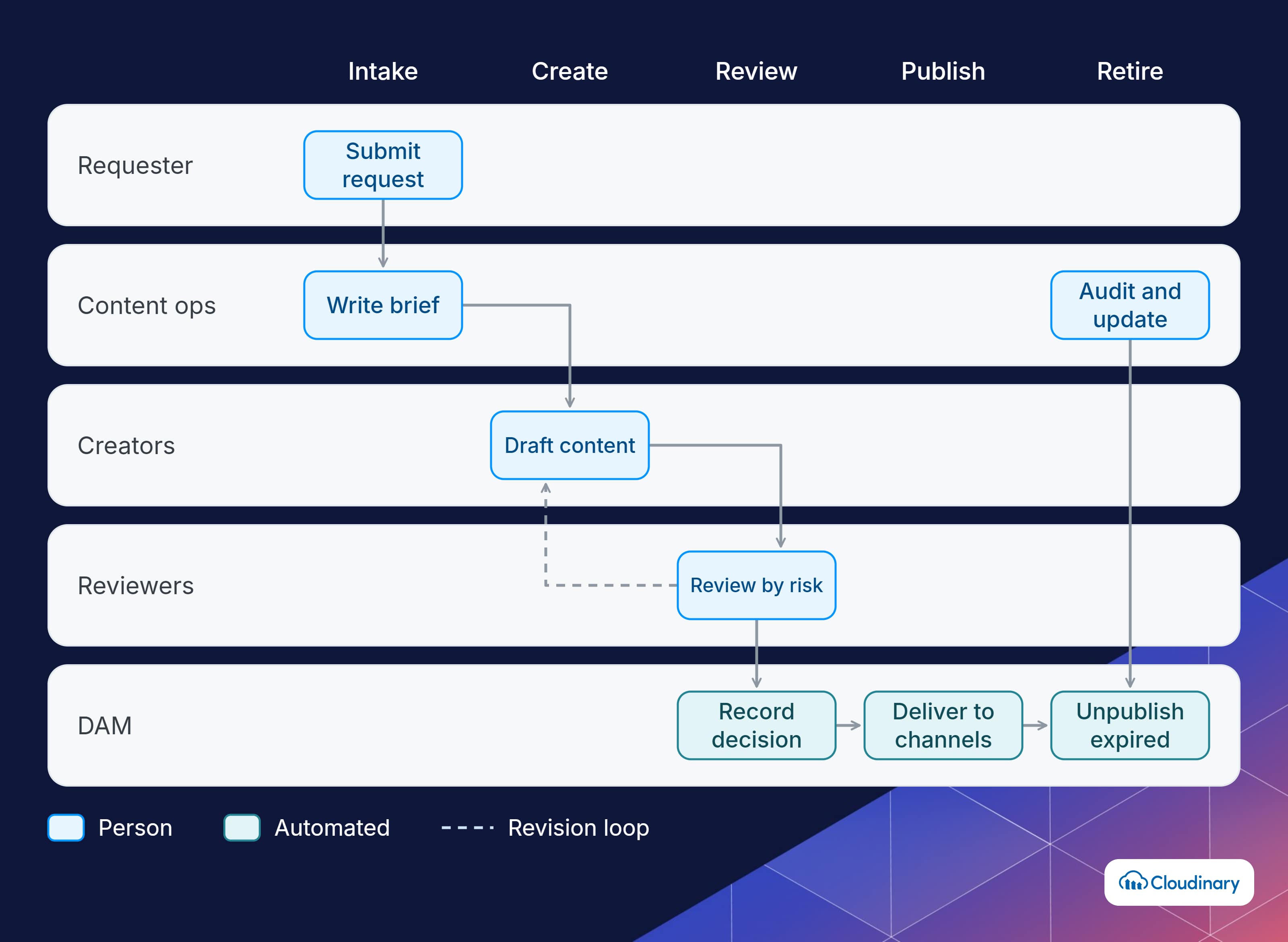
Content operations assigns an owner, a system, and a standard to every stage of the content lifecycle. The stages themselves (intake, planning, creation, review, asset management, distribution, and measurement) make up the content supply chain. The operations team’s job is deciding how each stage runs and making sure work moves between them.
For each stage, a content operations model answers four questions:
- Who owns it? One named role is accountable for the stage, even when several people contribute.
- What does it need to start? The inputs that must be complete before work begins, such as a brief with every channel and format listed.
- Where does it happen? The system the work runs in, so files and feedback don’t scatter across email and chat.
- What counts as done? The exit criteria that move work to the next stage, such as “approved by brand and legal” or “tagged and marked approved in the DAM.”
Two stages get less attention than they need. Review is where most content waits, usually because approvers or sign-off rules aren’t defined (our glossary entry on the content review process covers common review models). Retirement is often nobody’s job, so outdated pages and expired assets stay live. A content operations model gives both a named owner and a schedule.
Key Content Operations Roles
Content operations is a coordination function, so clear roles matter as much as tools. Larger organizations may have a dedicated team, while smaller ones assign these responsibilities to existing roles.
- Head of content operations or content operations manager: designs workflows, owns the tool stack and publishing cadence, runs review cycles, tracks operational metrics, and clears bottlenecks. In many companies, this person reports into the content, creative, or product marketing organization.
- Content strategist: sets editorial direction, audience priorities, and quality standards that the operational system works toward.
- Creative operations or production lead: manages creative resourcing, briefs, and production schedules for design and video work.
- DAM administrator or digital librarian: maintains the asset library, metadata schema, permissions, and taxonomy. Our guide to DAM jobs covers this role in more detail.
- Reviewers and approvers: brand, legal, compliance, and product experts who sign off on accuracy and risk.
- Platform and martech owners: run the CMS, DAM, PIM, and integrations that content moves through.
- Analysts: report on content performance and operational efficiency.
The owner doesn’t have to be a new hire. A defined part of an existing role, with real authority over workflows and tools, works better than a new title without it.
Why Content Operations Matters for Enterprise Teams
Content operations matters most when several teams, regions, and channels share the same content. At that scale, coordination failures multiply: one missed approval can put an off-brand or non-compliant asset in dozens of places.
A working content operations model helps teams:
- Publish faster: standardized intake and review cut the time content spends waiting, which is usually longer than the time it takes to create.
- Stay consistent: governance checkpoints and a single source of approved assets keep brand, messaging, and legal requirements intact as volume grows.
- Reduce duplicate work: when teams can find what already exists, they stop recreating the same banner, product shot, or one-pager.
- Lower risk: rights and expiry data attached to assets let teams pull licensed content before it becomes a legal problem.
- Understand costs: tracking time and effort per content type shows which formats and workflows deliver the best return.
- Handle change: documented processes survive reorganizations, new hires, agency changes, and new channels.
Common Pain Points in Content Operations
Most content operations problems look like people problems at first, but they usually trace back to unclear ownership, disconnected tools, or missing rules. The ones teams report most often:
- No clear owner: handoffs between teams get dropped, and review queues stall with nobody responsible for clearing them.
- Scattered assets: files live across shared drives, desktops, email attachments, and several platforms, so nobody’s sure which version is current and approved.
- Approval bottlenecks: reviewers are added to every request regardless of risk, and feedback arrives in several places at once.
- Variant overload: each channel, market, and device needs its own size, crop, or format, and designers spend hours exporting versions of the same asset instead of making new work.
- Manual handoffs between tools: people download from one system and upload to another, losing metadata and creating duplicates along the way.
- No life after publishing: nobody’s assigned to update or retire content, so outdated pages and expired assets stay live.
- Measuring output, not flow: teams count pieces published but don’t track cycle time, rework, or reuse, so bottlenecks stay invisible.
Run approvals where the asset lives.
Cloudinary Assets routes media to named reviewers with creative approval flows and keeps the decision, version history, and required metadata on the asset itself, so nothing gets published from an unapproved copy. Contact us.

How to Build a Content Operations Framework
A content operations framework documents how your organization handles content: who owns what, which workflows content follows, which tools it runs through, and how success is measured. You don’t need a transformation program to start, just an honest inventory and a named owner.
A practical sequence:
- Audit the current state. Map content in flight, the tools in use, and every handoff between teams. Note where work waits and where files get duplicated.
- Document the lifecycle. Write down how content actually moves today, from request to retirement, including who approves what. Compare it with how people think it moves.
- Name an owner. Assign one person accountable for workflows, tooling, and cadence, even if it’s part of an existing role.
- Standardize high-volume workflows first. Fix the content types you produce most often (product pages, campaign assets, social) before automating anything. Automating a broken process makes it fail faster.
- Set governance rules. Define review tiers by risk, so a social post doesn’t need the same sign-off as a regulated product claim. Document brand, accessibility, and rights requirements.
- Give approved assets one home. Choose a system of record for final assets, define the metadata schema, and connect it to the tools where content gets used. If assets are moving from an older system, our DAM migration guide covers how to keep metadata intact.
- Design for reuse. Structure content and assets so one approved piece can feed several channels, formats, and markets.
- Measure and review on a schedule. Hold a short weekly production review, a monthly look at operational metrics, and a quarterly content audit. The cadence keeps the framework from drifting back into ad hoc habits.
Content Operations Template
Use this table as a starting template for each content type you produce. Fill in one row per lifecycle stage, and keep it somewhere every contributor can find it.
| Stage | Owner | Inputs Needed | System | Exit Criteria | Target Time |
|---|---|---|---|---|---|
| Intake | Requesting team | Audience, goal, channels, deadline, budget | Work management tool | Request accepted and prioritized | 1 business day |
| Brief | Content ops manager | Strategy, messaging, brand guidelines | Work management tool | Brief approved by requester | 2 days |
| Creation | Writer, designer, or agency | Brief, templates, approved assets | Creative tools, DAM | Draft submitted for review | Varies by type |
| Review | Brand, legal, product (by risk tier) | Draft, review checklist | DAM or proofing tool | Approved, or changes logged | 2 to 3 days |
| Asset Management | DAM administrator | Final files, metadata, rights, expiry | DAM | Asset tagged and marked approved | Same day |
| Distribution | Channel owners | Approved asset, channel specs | CMS, ecommerce, email, social | Live in all planned channels | 1 day |
| Measurement | Analyst or content ops | Performance and usage data | Analytics, DAM usage reports | Results logged, next action set | Monthly |
| Retirement | Content owner | Audit results, expiry dates | CMS, DAM | Updated, archived, or removed | Quarterly audit |
The target times are placeholders. Set your own from the audit in step 1, then tighten them as the process improves.
Content Operations Metrics to Track
Content operations metrics show whether the operating model is being followed and where it breaks, separate from how the content performs. Throughput measures such as cycle time, reuse rate, and cost per asset are covered in our content supply chain metrics section. The measures below focus on the health of the process the operations team owns.
| Metric | What It Shows | How to Measure It |
|---|---|---|
| Intake Completeness | Whether requests arrive ready to work on | Share of requests accepted without going back for missing details |
| Standard Intake Adoption | Whether teams use the agreed process | Share of work that entered through the official form or queue, compared with email and chat requests |
| Review SLA Adherence | Whether review tiers and deadlines hold | Share of reviews completed within the agreed time, by reviewer group |
| First-Time Approval Rate | Brief quality and clarity of standards | Share of drafts approved without changes |
| Revision Rounds | Rework caused by unclear feedback | Average review rounds per asset, by content type |
| Metadata Completeness | Whether assets can be found and governed | Share of approved assets with all required fields filled, such as owner, rights, expiry, and region |
| Ownership Coverage | Whether published content has someone accountable | Share of live pages and assets with a named owner |
| Expired Assets Live | Rights and compliance risk | Assets past their expiry date still in use on live channels |
Pick the three that match the biggest problem you found in your audit. If reviews stall, start with review SLA adherence and revision rounds. If teams can’t find approved assets, start with metadata completeness.
Content Operations Software and Platforms
There isn’t a single content operations platform that covers everything. Most organizations combine several categories of software and connect them:
- Work management and planning: intake forms, briefs, task assignment, and production calendars. Larger organizations often tie plans to budgets and capacity with marketing resource management (MRM) software.
- Creative tools: design, video, and writing applications where content gets produced.
- Digital asset management (DAM): the system of record for approved images, video, and documents, with metadata, permissions, rights, and versioning.
- CMS or digital experience platform (DXP): creates and publishes content on websites and apps.
- Product information management (PIM): keeps product data consistent for ecommerce content.
- Proofing and approval: review, annotation, and sign-off, sometimes built into the DAM.
- Automation and AI: tagging, transformations, routing, and notifications that remove repetitive steps.
- Analytics: content performance and usage reporting.
When evaluating content operations software, look less at feature lists and more at how each tool fits the workflow. Useful questions include whether it connects to the systems you already run, whether metadata and permissions survive the trip between tools, whether it supports approval workflows that match your risk tiers, and whether it reports on operational data such as cycle time and reuse. Our guide to DAM integration covers how assets move between these systems.
For teams where images and video make up most of the work, the DAM tends to carry the most weight, because it’s where approved assets, rights, and versions live. It’s also where variant production can either multiply or shrink. Our comparison of the best digital asset management tools covers the main options.
AI in Content Operations
AI fits into content operations as extra capacity inside existing workflows, governed by the same approvals as everything else. Used outside that structure, it mostly creates more content to review.
The most practical uses today are:
- Metadata tagging: automatic tags and descriptions make large libraries searchable without manual cataloging. Our guide to metadata agents shows how this works.
- Variant generation: resizing, cropping, background removal, and format conversion for each channel.
- Routing and notifications: moving work to the next reviewer and flagging overdue steps.
- Compliance checks: screening content against brand rules and moderation policies before it reaches a human reviewer.
- Drafting and localization: first drafts and translations that editors and local experts then check.
AI depends on clean operational data. In Adobe’s 2026 AI and Digital Trends in Content Creation and Management report, 75% of respondents said data integration and quality issues are major obstacles to implementing agentic AI. Consistent metadata, clear rights information, and scoped permissions are what let AI agents work with content safely. Our guide to agentic DAM explains how agents operate inside an asset library.
How Cloudinary Supports Content Operations Teams
Cloudinary gives content operations teams one platform to manage, transform, and deliver images, video, and 3D assets, so approved media moves from creation to every channel without manual exports. Its capabilities map to the framework above:
- One source of truth: Cloudinary Assets stores media with structured metadata, version history, role-based permissions, and expiration dates, and connects to CMS, ecommerce, PIM, and creative tools.
- Create once, adapt everywhere: delivery-time transformations generate the crops, sizes, and formats each channel needs from one approved master, with automatic format and quality selection for each device. Teams don’t store or approve a separate file per variant. The supply chain guide’s section on automating variants and delivery shows an example URL.
- Automated workflows: MediaFlows, a low-code workflow builder, runs steps on upload, such as AI tagging, background removal, and moderation. See media workflows and media automation for examples.
- Review and approval: creative approval flows route assets to reviewers inside the DAM and record decisions against each version. Our guide to creative workflow management covers how to set these up.
- Governance and sharing: moderation queues, permissions, and shareable collections and portals control what’s published and what external partners can access, and a brand portal gives agencies and regional teams a controlled place to get approved logos, templates, and imagery.
- Rules in the data: required metadata fields, controlled vocabularies, and expiration dates turn governance rules into fields the system enforces, which is what makes the metadata completeness and expired-assets metrics above measurable.
- AI agents: MCP servers let AI tools search, tag, transform, and upload assets under the same permissions as other integrations. See Cloudinary for AI agents for setup.
Because channels reference the approved master instead of their own copies, an update in the library reaches every channel, and an expired asset can be removed in one place. The Cloudinary for content operations teams page includes case studies from Zalando, adidas, and Trek.
Give every approved asset one home.
Cloudinary Assets combines structured metadata, approval flows, and delivery-time transformations, so content teams can find, approve, and publish media from one platform. Talk to our team.
Building Content Operations That Last
Content operations works when it’s explicit: named owners for each stage, documented workflows for the content you produce most, governance tiers matched to risk, one home for approved assets, and a few operational metrics you review on a schedule. Start with an audit of how work moves today, fix the highest-volume workflow first, and expand from there.
For teams where images and video drive most of the workload, the biggest gains often come from putting approvals, metadata rules, and delivery in the same place as the approved assets, so the model is enforced by the system instead of by reminders. Contact Cloudinary to see how Cloudinary Assets can support your content operations.
Frequently Asked Questions
What Is Content Operations?
Content operations is the system of people, processes, technology, and governance an organization uses to plan, create, manage, distribute, and maintain content. It turns content strategy into repeatable execution.
What Is the Role of Content Operations?
Content operations makes content production predictable and efficient. It defines who owns each step, how content moves from request to publication, which tools it runs through, and how teams measure and improve the process.
How Is Content Operations Different From Content Strategy?
Content strategy decides what content to create, for whom, and why. Content operations decides how that content gets made, approved, published, and maintained.
Do Small Teams Need Content Operations?
Yes, though it can be lightweight. A shared intake form, a documented review process, and one place for approved assets cover most of what a small team needs, and they make it easier to scale later.