Key Takeaways:
- Video asset management (VAM) is a system for storing, organizing, searching, approving, and delivering video from one library. It’s a video-focused form of digital asset management, built for large files, rich metadata, and multi-step review.
- Marketing, creative, production, and web teams all use VAM, but each needs something different from it: self-service access and brand control, review and version control, or fast delivery to sites and apps.
- When comparing VAM software, weigh AI search and tagging, approval workflows, integrations with the tools your team already uses, and how video gets from the library to viewers.
Video asset management (VAM) is the practice and software used to store, organize, find, and deliver video content from a single library. It gives editors, marketers, and web developers the same approved files, the metadata to find them, and a controlled path to publish them. Platforms such as Cloudinary combine a searchable video library with automated transcoding and delivery, so the system that organizes a video also prepares it for every screen.
Video is harder to manage than images or documents. Files run to gigabytes, one campaign can produce dozens of cuts and formats, and a clip is only useful if someone can find the moment they need inside it. Shared drives and CMS media libraries weren’t built for that, which is why teams with growing video libraries move to dedicated VAM.
This guide covers how VAM works, how it differs from DAM and MAM, which teams use it, and how to compare VAM software in 2026.
In this article:
- What Is Video Asset Management?
- VAM vs. DAM vs. MAM
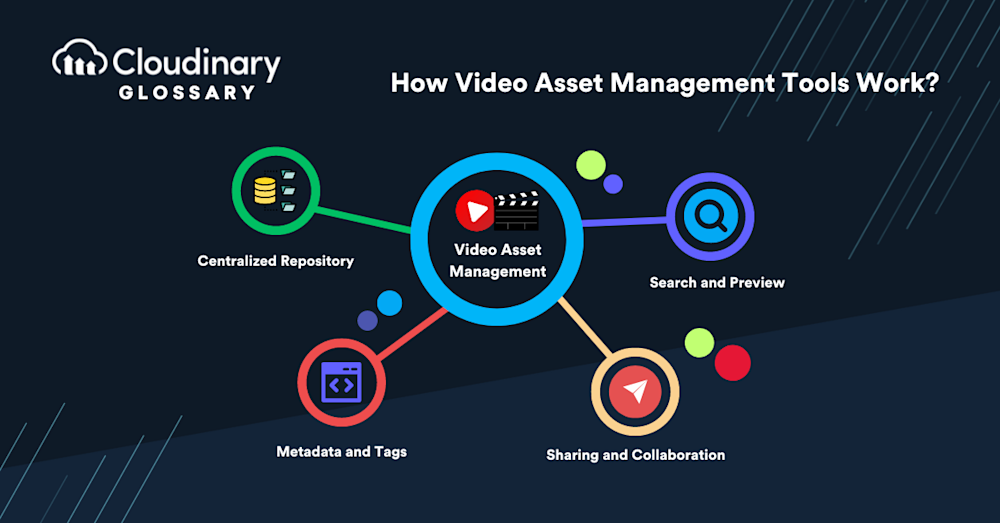
- Core Features of Video Asset Management Software
- Who Uses Video Asset Management?
- Video Asset Management for Websites
- How to Choose Video Asset Management Software
- Video Asset Management Software Compared
- How Cloudinary Supports Video Asset Management
What Is Video Asset Management?
Video asset management is a centralized system for storing, organizing, searching, and distributing video files and the information attached to them. Instead of living across local drives, shared folders, and email threads, every clip, cut, and final export sits in one library with consistent metadata, permissions, and version history.
A VAM system covers the whole life of a video: ingest (uploading raw footage or finished files), organization (tags, metadata, and collections), review and approval, and distribution to channels such as websites, social platforms, and online stores. Because video files are large and come in many formats, VAM platforms also handle work that generic storage can’t, such as generating previews, transcoding into delivery formats, and making what’s said and shown inside a video searchable.
For a team with a few dozen videos, a shared drive may be enough. Once a library reaches hundreds or thousands of assets used by several teams, the time spent finding files, checking which version is current, and re-exporting formats becomes the real cost. That’s the problem VAM is built to solve.
VAM vs. DAM vs. MAM
VAM, DAM, and MAM overlap heavily, and many vendors use the terms interchangeably. The real difference is focus: which files each system is built around and which teams it serves.
Digital asset management (DAM) covers every asset a brand owns, including images, documents, design files, and video. VAM is a video-focused subset of DAM. Media asset management (MAM) grew out of broadcast and post-production, where the work centers on raw footage, audio, and editing.
| Type | Main Focus | Typical Users | Typical Strengths |
|---|---|---|---|
| DAM | All digital assets: images, documents, design files, and video | Marketing, brand, and ecommerce teams | Brand governance, sharing portals, metadata, and approvals |
| VAM | Video files and their metadata | Marketing, content, and web teams that work heavily with video | Video previews, search inside video, version control, and delivery |
| MAM | Video, audio, and broadcast media in production | Production, post-production, and broadcast teams | Proxy editing, editing-tool integrations, and timecode-level logging |
In practice, the lines blur. Many DAM platforms now include strong video features, and some organizations run a DAM for brand assets alongside a MAM for production. If your video is mostly finished content that needs organizing and publishing, a DAM with VAM capabilities usually fits. If your team edits raw footage every day, MAM-style production features matter more.
Core Features of Video Asset Management Software
Most VAM software shares a core feature set. Platforms differ in how deep each feature goes and which teams it’s designed for.
- Centralized video library: One searchable home for raw footage, edits, and final exports, with consistent naming and ownership so teams stop duplicating files.
- Metadata and AI tagging: Descriptive, technical, and rights metadata, such as title, codec, resolution, and license expiry, plus AI tags generated from the objects, scenes, and faces in the footage.
- Search inside video: Speech-to-text transcription and visual recognition let people search for a spoken phrase or a scene, not just a file name.
- Previews and proxies: Lightweight preview versions let reviewers watch and scrub large files in a browser without downloading the original.
- Review and approval: Comments, annotations, and approval steps keep feedback attached to the asset. Production-focused tools add time-coded comments tied to specific frames.
- Version control: Each cut is tracked, so everyone knows which version is approved and older versions stay available for reference.
- Permissions and rights management: Role-based access, download restrictions, and expiry dates control who can view, edit, or publish each video, and for how long.
- Integrations: Connections to editing software, design tools, CMS platforms, and ecommerce systems, so assets move between tools without manual export and re-upload.
- Transcoding and delivery: Automatic conversion into the formats, resolutions, and aspect ratios each channel needs, ideally with adaptive streaming for web and mobile playback.
- Usage analytics: Data on downloads, views, and where assets are used, so teams know what to reuse, update, or retire.
Who Uses Video Asset Management?
Different teams need different things from the same video library. Knowing which team drives your VAM decision tells you which features to weight most.
Marketing and Brand Teams
Marketing teams publish video across websites, paid campaigns, email, and social channels, often in several cuts and aspect ratios per campaign. Their priorities are finding approved content quickly, keeping brand assets current, and sharing files with agencies and partners without sending large attachments.
The features that matter most are AI search, collections, branded sharing portals, approval workflows, and expiry dates that keep outdated content from staying live.
Creative and Video Production Teams
Production teams work with raw footage, project files, and many intermediate cuts. They need proxy previews of large files, time-coded review comments, strict version control, and integrations with editing software such as Adobe Premiere Pro, DaVinci Resolve, or Final Cut Pro.
Many production teams run a dedicated editing or review tool for work in progress and a DAM or VAM platform for finished assets. Connecting the two lets approved exports move into the main library without manual uploads, so the rest of the organization only sees final versions.
Web, Product, and Developer Teams
Teams building websites and apps care about what happens after a video is approved: how it’s transcoded, how quickly it loads, and how it plays on different devices and networks. They look for video APIs, CMS integrations, automatic format and quality selection, adaptive streaming, and a customizable player.
Ecommerce Teams
Ecommerce teams attach product videos to listings in their own store and on marketplaces, each with different format and size requirements. VAM helps them keep each video tied to the right product, update it when the product changes, and deliver it quickly on product pages, where slow-loading media hurts the shopping experience. Our guide to DAM use cases in ecommerce covers this workflow in more depth.
Video Asset Management for Websites
On a website, video asset management is as much about performance as organization. Video is usually the heaviest asset on a page, so how it’s stored and delivered affects load times, playback, and search visibility.
Adaptive Delivery and Format Handling
Visitors arrive on different devices, browsers, and connections. A VAM platform built for web delivery serves each viewer a suitable format and resolution automatically, and uses adaptive bitrate streaming (formats like HLS and MPEG-DASH) so playback adjusts to network conditions. Teams upload one master file instead of exporting and managing a separate version for every screen size.
Integrating VAM With Your CMS
VAM works best on websites when videos are stored in the VAM platform and referenced from the CMS, rather than uploaded into each page. One video can then appear on many pages while being managed in one place: when the asset is updated or replaced, every page that uses it updates too.
Editors should be able to search for, preview, and insert videos from inside the CMS. The VAM platform’s permissions should also match the review rules your CMS already enforces, so video doesn’t bypass approvals that other content goes through. The differences between a DAM and a CMS explain why the two systems work better side by side than as one.
SEO and Accessibility
Video helps search visibility only when search engines can understand it and the page still loads quickly. Keeping titles, descriptions, and transcripts in the VAM platform means that metadata stays consistent wherever a video is embedded.
Captions and transcripts serve viewers who are deaf or hard of hearing and people watching with the sound off. Storing them with the asset keeps them attached to the right version when a video is updated or reused across pages.
How to Choose Video Asset Management Software
Start with your workflow, not a feature list. The best VAM software for a production team can be a poor fit for a marketing team, and the reverse is just as true.
- Audit your current library. Count your videos, note where they live, and find the duplicates, outdated versions, and missing metadata. This tells you the scale you’re buying for.
- Involve every team that touches video. Marketing, production, web, ecommerce, legal, and IT will each judge the system differently, and adoption depends on all of them.
- Set measurable goals. For example, less time spent searching for footage, fewer re-exports, or faster campaign publishing.
- Weight the criteria that match your workflow. The most common are:
- Search and AI tagging quality, tested on your own footage
- Review and approval tools, including time-coded comments if you edit in-house
- Integrations with your editing tools, CMS, and ecommerce platform
- Delivery, including transcoding, adaptive streaming, and CDN performance
- Security, such as SSO, role-based permissions, and the compliance certifications your IT team requires
- Pricing as storage, users, and video volume grow
- Run a pilot with real assets. Test shortlisted platforms with a representative sample of your library and the people who’ll use them every day.
Choosing a platform is only part of the work. Naming conventions, metadata standards, and permissions decide whether teams keep using it, and they’re covered in detail in our guide to video asset management best practices.
Stop tagging video by hand.
Cloudinary can use AI to tag videos, generate transcripts and captions, and create smart previews when footage is uploaded, so new video is searchable as soon as it lands in your library. Talk to a Cloudinary expert.
Video Asset Management Software Compared
The platforms below are widely used for managing video in 2026. They’re grouped by the kind of team each is built around, because the right choice depends more on your workflow than on any ranking.
| Platform | Type | Best For | Video Strengths |
|---|---|---|---|
| Adobe Experience Manager Assets | Enterprise DAM | Large organizations already using Adobe Experience Cloud and Creative Cloud | Dynamic Media delivery with adaptive video, Smart Tags for video, Creative Cloud integration |
| Bynder | Brand-focused DAM | Marketing-led teams managing brand guidelines and campaign assets | Brand guidelines, approval workflows, Studio for templated video creation |
| Canto | DAM | Mid-market marketing teams moving off shared drives | Face recognition, AI tagging, approval tools |
| MediaValet | Enterprise DAM | Organizations with large video libraries that need search inside video | Transcription, frame-level search, built on Microsoft Azure |
| Brandfolder | DAM | Teams already working in Smartsheet | AI tagging, asset usage analytics, Smartsheet integration |
| Cloudinary | DAM with built-in media delivery | Marketing, content, and developer teams that manage video and publish it to websites, apps, and stores | AI tagging and transcription, portals, creative approval, automated transcoding and adaptive streaming |
| Frame.io | Video review and collaboration | Editors and post-production teams | Time-coded review, Premiere Pro and After Effects integration, camera-to-cloud uploads |
| iconik | Cloud media asset management | Distributed production teams using a mix of cloud and on-premises storage | Proxy editing through a Premiere Pro panel and time-based review comments |
| Orange Logic | Enterprise DAM and MAM | Broadcasters, archives, and rights-heavy organizations | Deep metadata, rights management |
Wistia, Vimeo, Panopto, and similar tools are video hosting platforms rather than VAM systems. Teams whose main need is secure streaming for training or internal communications should compare enterprise video hosting platforms instead.
How Cloudinary Supports Video Asset Management
Cloudinary Assets is a digital asset management platform with video management and delivery built in. Marketing and creative teams work in a visual library, while developers use APIs to automate uploads, transformations, and delivery for the same assets.
- AI tagging and video intelligence: Videos can be auto-tagged, transcribed, captioned, and translated with AI, and smart previews make long footage quick to scan.
- Collections and portals: Teams curate assets into collections and share them through branded portals with colleagues, agencies, and partners.
- Creative review and approval: Reviewers comment on and annotate videos, and assets move forward only after they’re approved.
- Workflow automation: No-code rules trigger actions when an asset is uploaded, its metadata changes, or it reaches an expiry date.
- Adobe Creative Cloud Connector: Designers open and save assets directly from Photoshop, Illustrator, and InDesign.
- Automated delivery: Videos are transcoded on the fly into the right format, quality, and size, with adaptive bitrate streaming, smart cropping for different aspect ratios, and a customizable video player.
- Usage dashboards: Teams see top downloads, the most active users, and trending assets, so they know which content is working.
Production teams that edit in Premiere Pro or DaVinci Resolve every day can pair Cloudinary with their editing and review tools, sending finished exports into Cloudinary for management and delivery.
Building a Video Library Your Teams Will Use
Video asset management gives every team that works with video one library, one set of approved versions, and a reliable way to get content where it needs to go. The right platform depends on who drives the work. Marketing teams need search, sharing, and approvals, production teams need proxies, time-coded review, and editing integrations, and web teams need fast, adaptive delivery.
Start by auditing your library and listing the workflows that cost your teams the most time, then test shortlisted platforms with your own footage before you commit.
Cloudinary brings video management, AI tagging, approvals, and delivery into one platform. Create a free Cloudinary account or talk to our team to see how it fits your video workflow.
Frequently Asked Questions
Why Do Teams Need Video Asset Management?
Video files are large, come in many versions and formats, and are hard to find by file name alone. VAM gives teams one library with metadata, search, version control, and approvals, so they spend less time hunting for footage and re-exporting files.
Which Digital Asset Management System Is Best for Video?
It depends on who’ll use it. Marketing teams usually need strong search, sharing portals, and approvals, production teams need proxy editing and editing-tool integrations, and web teams need automated transcoding and adaptive delivery. Compare shortlisted platforms on those criteria using your own footage.
Is Video Asset Management Only for Enterprises?
No. Enterprises have the largest libraries, but any team that publishes video regularly across several channels loses time to scattered files and outdated versions. Smaller teams often start with a DAM that handles video well rather than a dedicated enterprise system.
How Do You Choose a Video Asset Management Platform for Remote Teams?
Look for browser-based previews of large files, comments and approvals attached to each asset, role-based permissions, and reliable access from any location. Test with team members in different regions before committing, since upload and playback speed can vary.