
Debouncing is a popular performance optimization technique used in web development to deliver a consistent UI experience and save computing resources. MDN defines debouncing as “a means to discard operations that occur too close together during a specific interval, and consolidate them into a single invocation.” Simply put, Debouncing delays code execution triggered by another action.
In this article, we’ll walk you through practical use cases of debounce in Vue applications such as responding to user input and making async API calls. We’ll also look into third party libraries like useDebounceFn and Lodash that simplify debouncing for advanced use cases.
In this article:
- Debouncing vs. Throttling
- Using Debounce With Vue 3 Composition API
- External Libraries For Implementing Debounce in Vue
- Handling Edge Cases: Immediate Calls and Cancelling
- Debouncing in Vue with Cloudinary Driven Searches
Debouncing vs. Throttling
When building interactive Vue applications, we often encounter situations where users trigger events rapidly, such as typing in search boxes, resizing windows, scrolling through a page or auto-saving contents of a file. These frequent actions can overload your app with unnecessary work if not managed carefully.
Debouncing and throttling are strategies developers use to control function execution during rapid events. While both techniques are crucial for performance optimization, they are often confused with each other because they are closely related. However, they serve different purposes and lead to distinct execution patterns.
Debouncing
Debouncing is a technique that ensures a function is only executed once after a specified period of time has passed since the last time the event was triggered.
As an example, in an online-based editor like Google Docs, your progress is usually saved automatically at a specific time interval (for instance, 5 seconds) after you stop typing. However, if you press another key on your keyboard (say at 3 seconds) before the 5 seconds delay is complete, the auto-save is skipped and another 5 seconds countdown starts.
Throttling
Throttling, on the other hand, limits the rate of execution of a function. Essentially, it only runs a function once per X milliseconds, regardless of event frequency. Throttling is especially used to improve the performance of functions attached to browser events such as mouse movement, scrolling, and window resizing that run several times within a second.
Consider a scenario where you need to run a function updatePositionAndAnimate that updates the position of an element in an animation using the scroll event. Without throttling, the function will be called every time the page scrolls by a pixel. If updatePositionAndAnimate is an expensive function, this can overwhelm the browser and lead to poor performance or UI issues.
Using Debounce With Vue 3 Composition API
Now that you have an idea of how debounce works, let’s break it down further with a practical example.
In JavaScript, debouncing is usually implemented using the setTimeout() and clearTimeout() methods of the Window interface. setTimeout() allows us to set a timer that runs a function after the timer has elapsed, while clearTimeout() cleans up the timer created by setTimeout() by canceling the pending execution.
Imagine you’re building a search feature where users type in a query, and your application sends a request to the database to fetch results that match that input. In a typical Vue application, you’d want to define the API call in a watch() function that reacts to changes in the search input. Without debouncing, each keystroke by the user will trigger the API call, which can possibly overwhelm your API rate limits.
Add the following code to a new component:
<script setup>
import { ref, watch, onBeforeUnmount } from "vue";

// generate mock data
const generateMockData = () => {
  const categories = ["Electronics", "Clothing", "Books", "Home & Garden", "Sports", "Toys"];
  const adjectives = ["Premium", "Deluxe", "Professional", "Vintage", "Modern", "Classic"];
  const products = ["Laptop", "Headphones", "Shirt", "Novel", "Chair", "Ball", "Camera", "Watch"];


  return Array.from({ length: 1000 }, (_, i) => ({
    id: i + 1,
    name: `${adjectives[i % adjectives.length]} ${products[i % products.length]} ${i + 1}`,
    category: categories[i % categories.length],
    price: Math.floor(Math.random() * 500) + 10,
    description: `High-quality ${products[i % products.length].toLowerCase()} for your needs`,
  }));
};

const searchQuery = ref("");
const debouncedQuery = ref("");
const results = ref([]);
const isSearching = ref(false);
const searchCount = ref(0);

const debounceTimerRef = ref(null);
const mockData = ref(generateMockData());
const DEBOUNCE_DELAY = 500;

console.log(mockData.value.slice(0, 100));

// Debounce searchQuery
watch(searchQuery, (newQuery) => {
  isSearching.value = true;

  if (debounceTimerRef.value) clearTimeout(debounceTimerRef.value);

  debounceTimerRef.value = setTimeout(() => {
    debouncedQuery.value = newQuery;
    isSearching.value = false;
  }, DEBOUNCE_DELAY);
});

// Perform search after the query is debounced
watch(debouncedQuery, (query) => {

  if (query.trim() === "") {
    results.value = [];
    return;
  }

  const lower = query.toLowerCase();
  const filtered = mockData.value.filter(
    (item) =>
      item.name.toLowerCase().includes(lower) ||
      item.category.toLowerCase().includes(lower) ||
      item.description.toLowerCase().includes(lower)
  );

  searchCount.value++;
  results.value = filtered;
});

// Cleanup timers
onBeforeUnmount(() => {
  if (debounceTimerRef.value) clearTimeout(debounceTimerRef.value);
});
</script>

<template>
  <div class="min-h-screen flex bg-linear-to-br from-blue-50 to-indigo-100 p-8">
    <div class="min-w-2xl">
      <div class="bg-white rounded-lg shadow-lg p-6 mb-6">
        <div class="relative">
          <input
            type="text"
            v-model="searchQuery"
            placeholder="Search products by name, category, or description..."
            class="w-full pl-3 pr-4 py-3 text-gray-600 border-2 border-gray-200 rounded-lg focus:border-indigo-500 focus:outline-none transition-colors"
          />
          <div v-if="isSearching" class="absolute right-3 top-1/2 transform -translate-y-1/2 text-gray-500 text-sm">
            Searching...
          </div>
        </div>

        <div class="pt-3 pl-0.5 flex gap-4 text-sm text-gray-600">
          <span>Searches performed: {{ searchCount }}</span>
        </div>
      </div>

      <div class="bg-white rounded-lg shadow-lg p-6">
        <h2 class="text-xl font-semibold text-gray-800 mb-4">
          Results <span v-if="results.length > 0">({{ results.length }})</span>
        </h2>

        <div v-if="searchQuery === ''" class="text-center py-12 text-gray-500">
          <p>Start typing to search through the products</p>
        </div>

        <div v-else-if="results.length === 0" class="text-center py-12 text-gray-500">
          <p>No results found for "{{ searchQuery }}"</p>
        </div>

        <div v-else class="grid gap-3 max-h-96 overflow-y-auto">
          <div
            v-for="item in results.slice(0, 50)"
            :key="item.id"
            class="border border-gray-200 rounded-lg p-4 hover:border-indigo-300 hover:shadow-md transition-all"
          >
            <div class="flex justify-between items-start">
              <div class="flex-1">
                <h3 class="font-semibold text-gray-800">{{ item.name }}</h3>
                <p class="text-sm text-gray-600 mt-1">{{ item.description }}</p>
                <span class="inline-block mt-2 px-2 py-1 bg-indigo-100 text-indigo-700 text-xs rounded">
                  {{ item.category }}
                </span>
              </div>
              <div class="text-right ml-4">
                <p class="text-lg font-bold text-indigo-600">${{ item.price }}</p>
              </div>
            </div>
          </div>
          <div v-if="results.length > 50" class="text-center py-4 text-gray-500 text-sm">
            Showing first 50 of {{ results.length }} results
          </div>
        </div>
      </div>
    </div>
  </div>
</template>
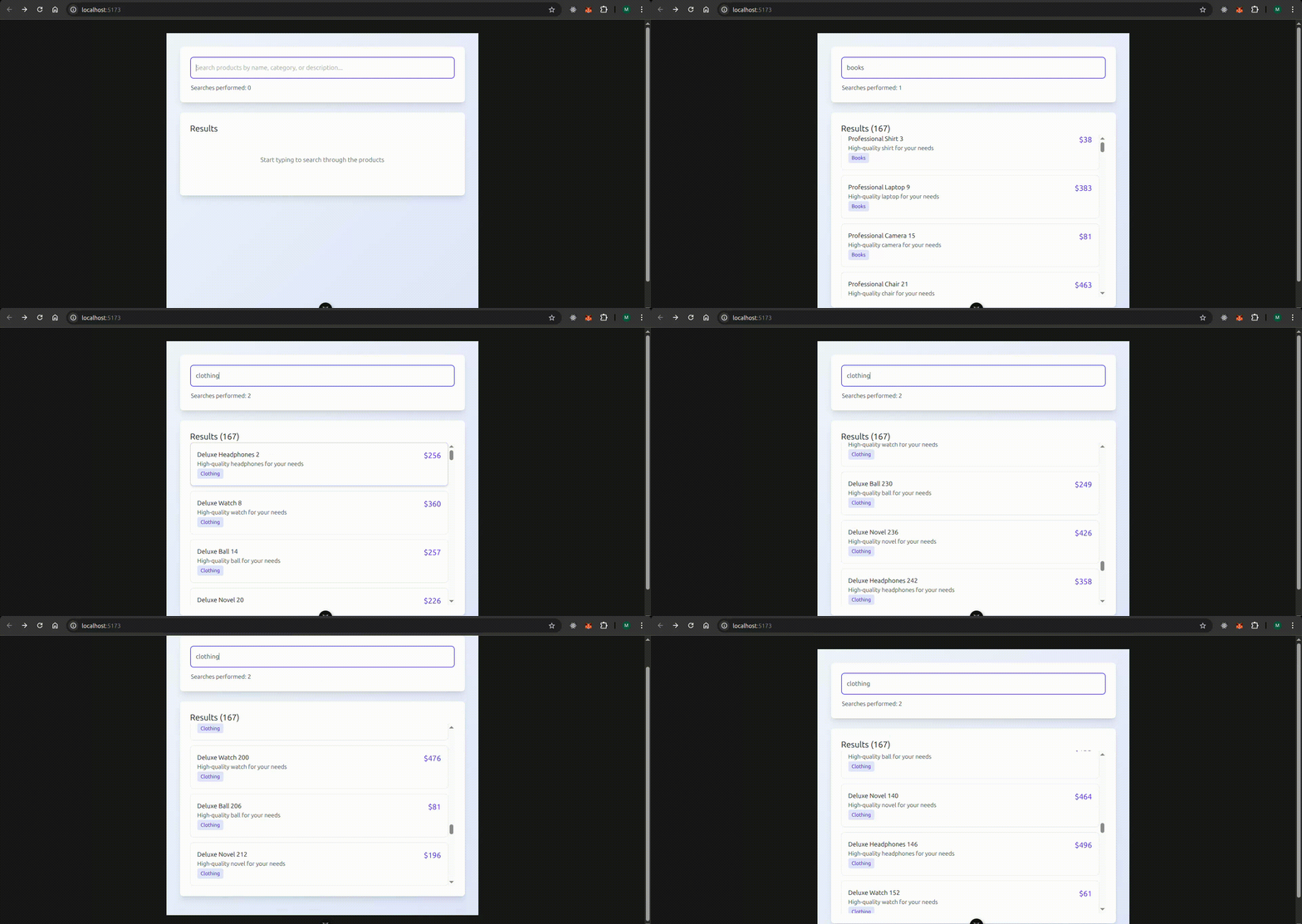
Here’s what’s happening in the code above:
- To simulate a real database, we generate a mock dataset containing 1000 items using random values.
- Next, we create the debouncing logic by attaching a watcher on
searchQuerythat reacts to every change in the user’s input. Basically, the function checks if there’s an existing timer (debounceTimerRef.value) and clears it usingclearTimeout. This is the essential part of debouncing: resetting the timer if the user types again before the delay is up. Then we set a new timer usingsetTimeoutwith theDEBOUNCE_DELAY.When the timer finally executes (i.e., the user hasn’t typed for 500ms), we updatedebouncedQuery.valueto the new value. - The second watcher is the search logic that performs the search/filter when the debounced value changes (after the 500ms delay).
- Finally, we use the
onBeforeUnmountlifecycle hook to clear any pending debounce if the component is destroyed.
Here’s the output:
External Libraries For Implementing Debounce in Vue
While writing your own debounce functionality can cover most simple use cases, there are several specialized libraries that offer unique features, better TypeScript support, or different performance characteristics that might better suit complex scenarios. Here, we’ll cover two of the most commonly used ones.
VueUse: useDebounceFn
VueUse is a third-party collection of utility functions and composables that extend the functionality of Vue.js, particularly leveraging the Composition API. useDebounceFn is one of its utility functions that encapsulates debouncing logic and allows us to reuse the logic within different components.
You can install it with NPM via npm install @vueuse/core
Then use it as follows:
import { useDebounceFn, useEventListener } from '@vueuse/core'

const debouncedFn = useDebounceFn(() => {
  // do something
}, 1000)

useEventListener(window, 'resize', debouncedFn)
Lodash
Lodash is a popular utility library that includes a _.debounce function for delaying function execution. Although it’s not Vue-specific, it works great in Vue projects. To use it in Vue, we need to install the lodash-es npm package – the modern ES module version of Lodash with tree-shaking and smaller bundle size.
The function has the following syntax:
import debounce from "lodash-es/debounce";
func: The function you want to debouncewait: Milliseconds to wait after the last call before executingfunc.options: An object of advanced options. It includes:{ leading: boolean, trailing: boolean, maxWait: number }
Here’s our previous example modified to use Lodash debounce:
import debounce from "lodash-es/debounce";

//...

const searchQuery = ref("");
const results = ref([]);
const isSearching = ref(false);
const searchCount = ref(0);
const mockData = ref(generateMockData());

const DEBOUNCE_DELAY = 500;

// Debounced function
const runSearch = debounce((query) => {
  if (query.trim() === "") {
    results.value = [];
    isSearching.value = false;
    return;
  }

  const lower = query.toLowerCase();

  results.value = mockData.value.filter(
    (item) =>
      item.name.toLowerCase().includes(lower) ||
      item.category.toLowerCase().includes(lower) ||
      item.description.toLowerCase().includes(lower)
  );

  searchCount.value++;
  isSearching.value = false;
}, DEBOUNCE_DELAY);

// Run debounce when searchQuery changes
watch(searchQuery, (newQuery) => {
  isSearching.value = true;
  runSearch(newQuery);
});

//...
Handling Edge Cases: Immediate Calls and Cancelling
Immediate Execution
Sometimes you want the function you’re debouncing to execute immediately on the first call (also known as the leading edge). Take for instance, we want to save a draft of a file immediately the user types a letter, we can set the leading option in debounce to true:
import debounce from 'lodash-es/debounce';

const saveDraft = debounce(
  async (content) => {
    await fetch('/api/save-draft', {
      method: 'POST',
      body: JSON.stringify({ content })
    });
  },
  1000,
  { leading: true, trailing: false }
);
Cancelling
To optimize performance, it’s recommended to always cancel debounced functions in Vue after execution to prevent memory leaks. Take our previous runSearch debounced function for example:
import debounce from 'lodash-es/debounce';

const runSearch = debounce((query) => {
//...
}, DEBOUNCE_DELAY);

// Cancel on component unmount
onUnmounted(() => {
  debouncedSearch.cancel();
});
In the above example, the cancel() method is automatically included in the function returned by debounce() from Lodash.
Debouncing in Vue with Cloudinary Driven Searches
Debouncing is valuable when building search or filter interfaces that rely on Cloudinary’s media APIs. Every keystroke in a search bar can trigger an expensive request if not controlled. Debouncing ensures you wait until the user pauses typing before sending a query.
In Vue, you can debounce with a simple utility or with a dedicated library. This keeps your components clean while allowing you to regulate how often Cloudinary’s search endpoints are triggered. The result is lower bandwidth usage and faster perceived responses.
When combined with Cloudinary’s rich search syntax, metadata features, and SDK, debouncing helps deliver responsive media browsing. Users can type freely while Vue waits for a stable input before fetching results. This improves the flow of the interface and protects your application from unnecessary API saturation.
Bouncing Away from Vue Debouncing
Debouncing is one of the easiest ways to make your Vue apps feel faster and also save server resources. It allows you to limit the frequency of expensive operations like API calls triggered by user input, reduce server load, and eliminate UI lags. If you want a simple, custom solution, you can quickly create your own debounce function using JavaScript’s setTimeOut() and clearTimeOut() methods. If you desire a more robust solution that can handle edge cases, the Lodash debounce utility and VueUse useDebouncedFn are industry standards that will cover your needs.
Frequently Asked Questions
What delay time should I use for debouncing?
There’s no one-size-fits-all answer for this. The ideal debounce delay depends on your use case, but for standard search inputs, 300-500ms is commonly recommended. You can start with this range and adjust as needed based on performance and user feedback.
Can I debounce computed properties?
No, you cannot directly debounce a computed property in Vue. Computed properties must be synchronous and return a value immediately as they’re designed for reactive, cached derivations from other data. Debouncing introduces asynchronous delays, which conflicts with this.
Does debouncing affect user experience negatively?
Debouncing is a performance optimization technique which can also improve the user experience when used correctly. However, it can also have negative effects if misapplied. For instance, using too long delays or debouncing inputs directly instead of side effects.


